
Data-Driven Testing
What It Does
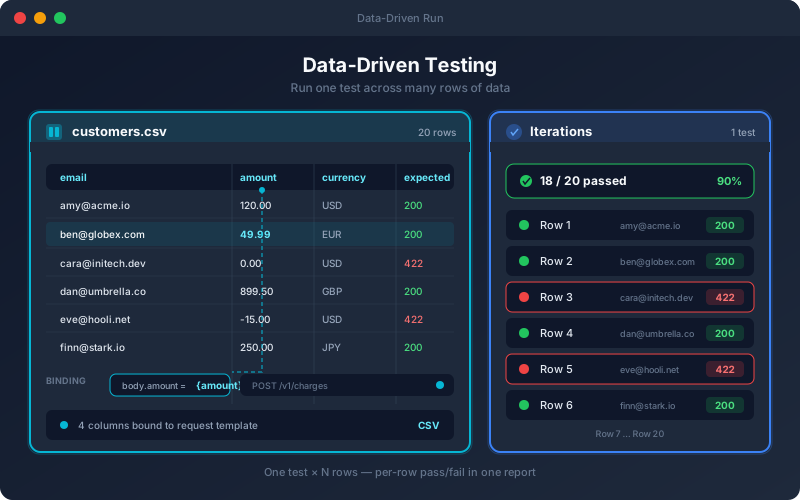
Data-Driven Testing lets one test stand in for many. Instead of copying a test to cover each variation of input, you bind a dataset to it and the platform iterates over every row — substituting values into the request and, where you want, into the expected results. Each row produces its own pass/fail outcome inside a consolidated report, so you can see at a glance which data combinations break your API. Datasets live independently of any one test, so the same data can power checks across multiple endpoints and workflows.
Overview
Attach a dataset to a test and it runs once per row, validating the same logic against dozens or hundreds of input combinations without duplicating a single test. Datasets are reusable within the project, every edit is versioned, and data can be imported from CSV, Excel, JSON, YAML or XML. An EXPECTED_STATUS column checks each row's own status code, INVALID_ columns automatically become negative tests, and rows can be selected all at once, by range, at random, uniquely or by condition. Workflows iterate through their data-bound test steps. Data-driven execution turns "test these ten account types" from ten hand-built tests into one parameterized test and one dataset.
Key Capabilities
How It Works
- 1
Create or upload a dataset (CSV, Excel, JSON, YAML or XML)
- 2
Bind dataset columns to fields in a test
- 3
The test runs once per row, substituting each row's values
- 4
Review per-row results in a single execution report
- 5
Reuse the same dataset across other tests, and in workflows through their test steps
Available on
All Plans
Included in the free trial — no credit card required.
Documentation
Step-by-step guides for setting up and using Data-Driven Testing.
Go deeper
Guides and playbooks that show this capability in practice.
Related Features
Fill Tests From Data
Push a CSV, Excel, JSON, YAML or XML data set into every existing test of a project: preview first, undo afterwards.
Learn moreData Sources
Connect the data your tests need from the sources you already use.
Learn moreWorkflows
Build multi-step API flows with a visual DAG editor.
Learn moreTry Data-Driven Testing Today
Start your 15-day free trial — no credit card required.