
Data Sources
What It Does
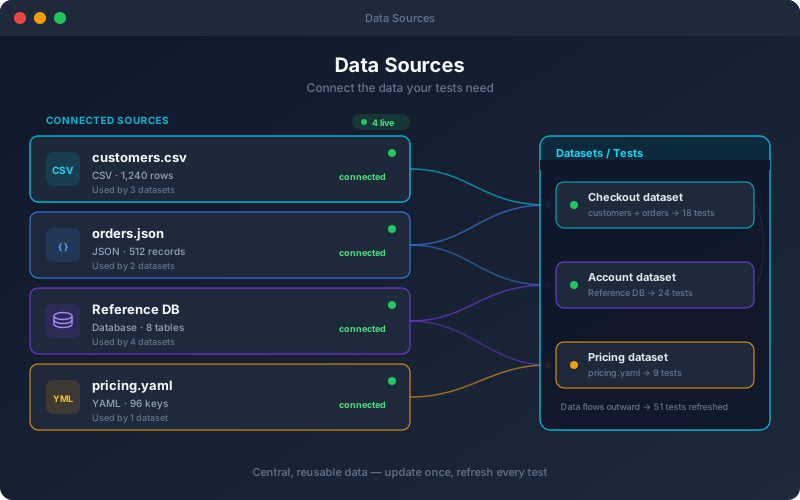
Data Sources give your test data a home outside of individual tests. You register the data your suite depends on once, whether a query against a test database, a file or an API, then reference it wherever it is needed in the project: in datasets, parameterized requests and multi-step workflows. Because tests read the source at run time, refreshing it in one place updates every test that consumes it, eliminating the drift that happens when values are copied into dozens of tests. Database connections are read-only by design, so pointing tests at a shared test database never risks a stray write.
Overview
Define reusable data sources (uploaded files, REST APIs and live databases) and reference them across a project's tests and workflows to parameterize requests. Pull test data straight from PostgreSQL, MySQL, SQL Server, Oracle, SQLite or MongoDB, as well as from CSV, Excel and JSON files. Database data sources are read-only: write statements are refused. Instead of pasting values into individual tests, your team maintains data centrally and points tests at it, and because tests read data sources at run time, a single update reaches every test that uses it.
Key Capabilities
How It Works
- 1
Register a data source: a database query, an uploaded file or a REST API
- 2
Reference the data source from datasets and tests in the project
- 3
Parameterize requests and expected values from the source
- 4
Update the source once to refresh every dependent test
- 5
Combine with data-driven testing to cover input matrices
Available on
All Plans
Included in the free trial — no credit card required.
Documentation
Step-by-step guides for setting up and using Data Sources.
Built for regulated teams
Teams in regulated industries rely on this capability to ship API changes with an audit trail.
Go deeper
Guides and playbooks that show this capability in practice.
Try Data Sources Today
Start your 15-day free trial — no credit card required.