
API Testing in C#: HttpClient, xUnit, RestSharp and .NET 8
Quick answer
API testing in C# means sending real HTTP requests from a .NET test project and asserting on status, headers and body. Use HttpClient with xUnit or NUnit for external APIs, WebApplicationFactory for fast in-process tests of your own ASP.NET Core service, FluentAssertions for readable checks and a JSON schema validator for contracts. Run it all with dotnet test in CI.
Reviewed by Rishi Gaurav
Part of the API Test Automation Tools & Frameworks hub. Start with the pillar guide: Best API testing tools, compared by job.
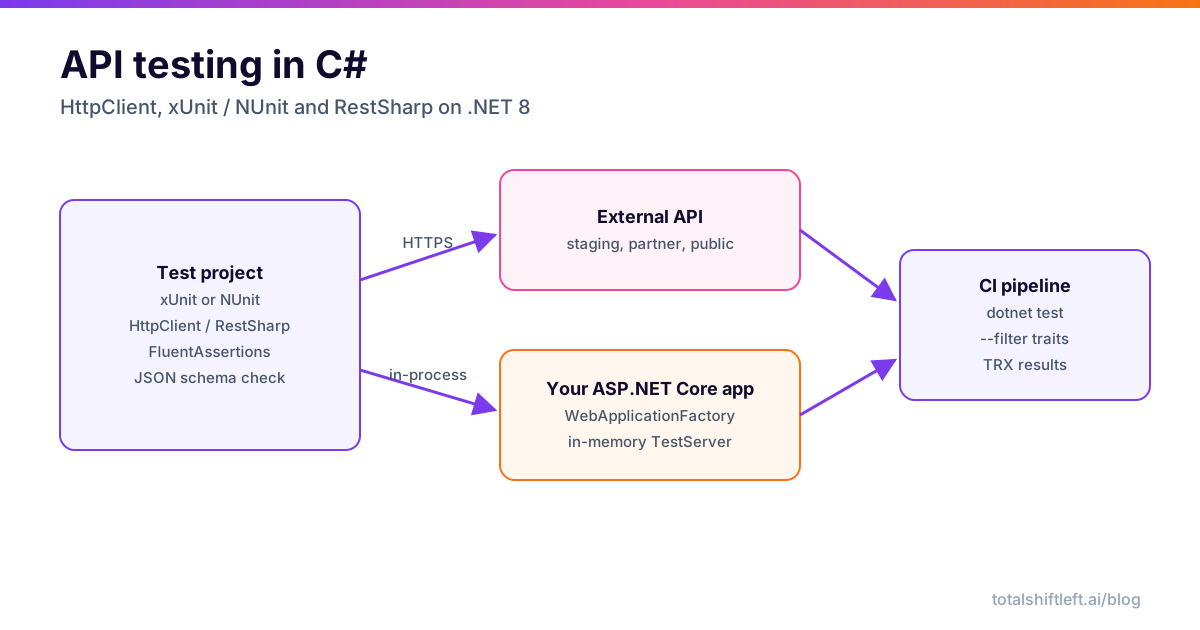
API testing in C# is the practice of calling an HTTP API from a .NET test project and asserting on what comes back: the status code, the headers, the body and the shape of that body. In 2026 the default stack on .NET 8 is a test runner (xUnit or NUnit), HttpClient or RestSharp to send requests, FluentAssertions to keep checks readable, a JSON schema validator for contract checks, and WebApplicationFactory to test your own ASP.NET Core service in memory.
This tutorial builds that stack step by step with code you can paste and run. It is one of the framework guides in our roundup of the best API testing tools; if you are still choosing a framework, start with how to choose an API testing framework. Java and Python teams can follow the same structure in the REST Assured tutorial and the pytest guide.
The external examples call JSONPlaceholder, a free fake REST API, so every test runs without an account. See our list of public APIs for testing for alternatives.
Prerequisites and project setup
You need the .NET 8 SDK (or later) and any editor. Create a solution with an xUnit test project:
dotnet new sln -n ApiTesting
dotnet new xunit -n Api.Tests -f net8.0
dotnet sln add Api.Tests/Api.Tests.csproj

cd Api.Tests
dotnet add package FluentAssertions --version 7.0.0
dotnet add package RestSharp
dotnet add package NJsonSchema
A note on FluentAssertions: from version 8 it moved to a commercial licence for business use. Version 7 stays under Apache 2.0, so pin 7.x (or use the community fork AwesomeAssertions, or Shouldly) unless your company has bought a licence. The assertion syntax in this guide works on 7.x.
The resulting project file looks like this (package versions will be whatever is current when you run the commands):
<Project Sdk="Microsoft.NET.Sdk">
  <PropertyGroup>
    <TargetFramework>net8.0</TargetFramework>
    <Nullable>enable</Nullable>
    <ImplicitUsings>enable</ImplicitUsings>
    <IsPackable>false</IsPackable>
  </PropertyGroup>
  <ItemGroup>
    <PackageReference Include="FluentAssertions" Version="7.0.0" />
    <PackageReference Include="Microsoft.NET.Test.Sdk" Version="17.*" />
    <PackageReference Include="NJsonSchema" Version="11.*" />
    <PackageReference Include="RestSharp" Version="112.*" />
    <PackageReference Include="xunit" Version="2.*" />
    <PackageReference Include="xunit.runner.visualstudio" Version="2.*" />
  </ItemGroup>
</Project>
Write your first API test with HttpClient and xUnit
Create one HttpClient per test class, not per test. A new client per call can exhaust sockets under parallel runs, and a shared fixture also gives you one place to set the base URL and timeout. xUnit's IClassFixture<T> does exactly this.
// ApiClientFixture.cs
namespace Api.Tests;

public sealed class ApiClientFixture : IDisposable
{
    public HttpClient Client { get; } = new()
    {
        BaseAddress = new Uri(
            Environment.GetEnvironmentVariable("API_BASE_URL")
            ?? "https://jsonplaceholder.typicode.com"),
        Timeout = TimeSpan.FromSeconds(10)
    };

    public void Dispose() => Client.Dispose();
}
// PostsApiTests.cs
using System.Net;
using System.Net.Http.Json;
using FluentAssertions;
using Xunit;

namespace Api.Tests;

public sealed record Post(int UserId, int Id, string Title, string Body);

[Trait("Category", "External")]
public class PostsApiTests : IClassFixture<ApiClientFixture>
{
    private readonly HttpClient _client;

    public PostsApiTests(ApiClientFixture fixture) => _client = fixture.Client;

    [Fact]
    public async Task Get_post_returns_200_and_the_post()
    {
        var response = await _client.GetAsync("/posts/1");

        response.StatusCode.Should().Be(HttpStatusCode.OK);
        response.Content.Headers.ContentType!.MediaType.Should().Be("application/json");

        var post = await response.Content.ReadFromJsonAsync<Post>();
        post.Should().NotBeNull();
        post!.Id.Should().Be(1);
        post.Title.Should().NotBeNullOrWhiteSpace();
    }

    [Theory]
    [InlineData(0)]
    [InlineData(99999)]
    public async Task Get_unknown_post_returns_404(int id)
    {
        var response = await _client.GetAsync($"/posts/{id}");

        response.StatusCode.Should().Be(HttpStatusCode.NotFound);
    }

    [Fact]
    public async Task Create_post_returns_201_with_an_id()
    {
        var response = await _client.PostAsJsonAsync("/posts",
            new { title = "release notes", body = "v2.3", userId = 1 });

        response.StatusCode.Should().Be(HttpStatusCode.Created);
        var created = await response.Content.ReadFromJsonAsync<Post>();
        created!.Id.Should().BePositive();
        created.Title.Should().Be("release notes");
    }
}
Run it with dotnet test. Three details matter here. ReadFromJsonAsync uses web defaults, so camelCase JSON maps onto PascalCase record properties with no attributes. [Theory] with [InlineData] is how you write data-driven negative cases. And the [Trait] lets you filter external tests out of fast pipeline stages later.
If you want a baseline to compare your hand-written suite against, you can import the same OpenAPI spec into a generator and see which cases it plans that you skipped. Book a demo to see that comparison on your own spec.
The same test in NUnit
NUnit is just as common in .NET shops, especially teams coming from Selenium. The structure maps one-to-one: [OneTimeSetUp] replaces the fixture and [TestCase] replaces [InlineData].
using System.Net;
using NUnit.Framework;

namespace Api.Tests.NUnit;

[TestFixture]
public class PostsApiNUnitTests
{
    private HttpClient _client = null!;

    [OneTimeSetUp]
    public void SetUp() =>
        _client = new HttpClient { BaseAddress = new Uri("https://jsonplaceholder.typicode.com") };

    [OneTimeTearDown]
    public void TearDown() => _client.Dispose();

    [TestCase(1)]
    [TestCase(2)]
    public async Task Get_post_by_id_returns_200(int id)
    {
        var response = await _client.GetAsync($"/posts/{id}");
        Assert.That(response.StatusCode, Is.EqualTo(HttpStatusCode.OK));
    }
}
Put NUnit tests in their own project (dotnet new nunit); mixing runners in one project is possible but confusing.
RestSharp: a request-builder style
Ready to shift left with your API testing?
Try our no-code API test automation platform free. Generate tests from OpenAPI, run in CI/CD, and scale quality.
RestSharp wraps HttpClient (since version 107) with a fluent request builder, URL segments, serialization and authenticators. Some teams find it reads more like a test script:
using System.Net;
using FluentAssertions;
using RestSharp;
using Xunit;

namespace Api.Tests;

[Trait("Category", "External")]
public class PostsRestSharpTests
{
    private static readonly RestClient Client =
        new(new RestClientOptions("https://jsonplaceholder.typicode.com"));

    [Fact]
    public async Task Get_post_with_restsharp()
    {
        var request = new RestRequest("posts/{id}").AddUrlSegment("id", 1);

        var response = await Client.ExecuteGetAsync<Post>(request);

        response.StatusCode.Should().Be(HttpStatusCode.OK);
        response.Data!.Id.Should().Be(1);
    }

    [Fact]
    public async Task Filter_posts_by_user()
    {
        var request = new RestRequest("posts").AddQueryParameter("userId", "1");

        var response = await Client.ExecuteGetAsync<List<Post>>(request);

        response.Data.Should().NotBeEmpty()
            .And.OnlyContain(p => p.UserId == 1);
    }
}
ExecuteGetAsync does not throw on 4xx or 5xx, which is what you want in tests: you assert on the status instead of catching exceptions. Use client.GetAsync<T>() only when a failure status should throw.
Assertions that catch real bugs
Status-code checks alone miss most regressions. A useful C# API test also checks:
- Headers.
Content-Type,Locationon a 201,Cache-Control, and that no internal header (X-Powered-By, stack traces) leaks. - Collections. FluentAssertions'
OnlyContain,BeInAscendingOrder(p => p.Id)andHaveCountLessThanOrEqualTo(pageSize)express filtering, sorting and paging rules in one line. - Equivalence.
actual.Should().BeEquivalentTo(expected, o => o.Excluding(p => p.Id))compares object graphs while ignoring generated fields. - Error bodies. ASP.NET Core returns RFC 9457 problem details (
application/problem+json) for validation errors; assert the media type and theerrorsmember, not just the 400. - Response time, loosely: a
Stopwatchwith a generous ceiling catches accidental N+1 queries without making tests flaky.
JSON schema validation
Typed deserialization proves the fields you mapped exist; it does not catch extra fields, wrong formats or nulls where the contract forbids them. A schema check does. With NJsonSchema:
using FluentAssertions;
using NJsonSchema;
using Xunit;

namespace Api.Tests;

[Trait("Category", "External")]
public class PostsSchemaTests : IClassFixture<ApiClientFixture>
{
    private const string PostSchema = """
    {
      "type": "object",
      "required": ["userId", "id", "title", "body"],
      "additionalProperties": false,
      "properties": {
        "userId": { "type": "integer", "minimum": 1 },
        "id":     { "type": "integer", "minimum": 1 },
        "title":  { "type": "string", "minLength": 1 },
        "body":   { "type": "string" }
      }
    }
    """;

    private readonly HttpClient _client;

    public PostsSchemaTests(ApiClientFixture fixture) => _client = fixture.Client;

    [Fact]
    public async Task Get_post_matches_schema()
    {
        var schema = await JsonSchema.FromJsonAsync(PostSchema);
        var json = await _client.GetStringAsync("/posts/1");

        var errors = schema.Validate(json);

        errors.Should().BeEmpty(because: string.Join("; ", errors.Select(e => $"{e.Path}: {e.Kind}")));
    }
}
NJsonSchema covers the draft-04 to draft-07 keywords most OpenAPI 3.0 schemas use. If your contracts are written in JSON Schema 2020-12 (OpenAPI 3.1), use JsonSchema.Net instead. In a real project, load the schema from your OpenAPI document rather than an inline string, so the test and the spec cannot drift. Our guide to API schema validation covers that pattern.
In-process tests with WebApplicationFactory
For your own ASP.NET Core service, the fastest and most reliable tests do not go over the network at all. WebApplicationFactory<TEntryPoint> boots the real app, with its real routing, middleware, model binding and serialization, on an in-memory TestServer.
Here is a minimal API under test:
// Orders.Api/Program.cs
using System.Collections.Concurrent;

var builder = WebApplication.CreateBuilder(args);
builder.Services.AddSingleton<IOrderStore, InMemoryOrderStore>();
var app = builder.Build();

app.MapGet("/orders/{id:int}", (int id, IOrderStore store) =>
    store.Find(id) is { } order ? Results.Ok(order) : Results.NotFound());

app.MapPost("/orders", (CreateOrder cmd, IOrderStore store) =>
{
    if (cmd.Quantity <= 0)
        return Results.ValidationProblem(new Dictionary<string, string[]>
        {
            ["quantity"] = ["Must be greater than zero."]
        });

    var order = store.Add(cmd);
    return Results.Created($"/orders/{order.Id}", order);
});

app.Run();

public record CreateOrder(string Sku, int Quantity);
public record Order(int Id, string Sku, int Quantity);

public interface IOrderStore
{
    Order? Find(int id);
    Order Add(CreateOrder cmd);
}

public sealed class InMemoryOrderStore : IOrderStore
{
    private readonly ConcurrentDictionary<int, Order> _orders = new();
    private int _nextId;

    public Order? Find(int id) => _orders.GetValueOrDefault(id);

    public Order Add(CreateOrder cmd)
    {
        var order = new Order(Interlocked.Increment(ref _nextId), cmd.Sku, cmd.Quantity);
        _orders[order.Id] = order;
        return order;
    }
}

public partial class Program { }
The last line makes the compiler-generated Program class visible to the test project. In the test project, add Microsoft.AspNetCore.Mvc.Testing, reference the API project and switch the SDK to Microsoft.NET.Sdk.Web, as the ASP.NET Core integration testing docs recommend:
dotnet add package Microsoft.AspNetCore.Mvc.Testing --version 8.0.*
dotnet add reference ../Orders.Api/Orders.Api.csproj
Free ZIP: scorecard CSV + RFP CSV + guide
API Testing Tool Evaluation Scorecard & RFP Template
A vendor-neutral, weighted scorecard (35 criteria) and 50 RFP questions for comparing API testing tools. No tool is pre-scored: you score from your pilot.
Download Free// OrdersApiTests.cs
using System.Net;
using System.Net.Http.Json;
using FluentAssertions;
using Microsoft.AspNetCore.Mvc.Testing;
using Microsoft.AspNetCore.TestHost;
using Microsoft.Extensions.DependencyInjection;
using Microsoft.Extensions.DependencyInjection.Extensions;
using Xunit;
namespace Api.Tests;
[Trait("Category", "InProcess")]
public class OrdersApiTests : IClassFixture<WebApplicationFactory<Program>>
{
private readonly WebApplicationFactory<Program> _factory;
public OrdersApiTests(WebApplicationFactory<Program> factory) => _factory = factory;
[Fact]
public async Task Create_then_read_order()
{
var client = _factory.CreateClient();
var create = await client.PostAsJsonAsync("/orders", new CreateOrder("SKU-1", 2));
create.StatusCode.Should().Be(HttpStatusCode.Created);
create.Headers.Location.Should().NotBeNull();
var order = await client.GetFromJsonAsync<Order>(create.Headers.Location);
order.Should().BeEquivalentTo(new { Sku = "SKU-1", Quantity = 2 });
}
[Fact]
public async Task Zero_quantity_returns_problem_details()
{
var client = _factory.CreateClient();
var response = await client.PostAsJsonAsync("/orders", new CreateOrder("SKU-1", 0));
response.StatusCode.Should().Be(HttpStatusCode.BadRequest);
response.Content.Headers.ContentType!.MediaType.Should().Be("application/problem+json");
}
[Fact]
public async Task Each_test_can_swap_a_dependency()
{
var client = _factory.WithWebHostBuilder(builder =>
builder.ConfigureTestServices(services =>
{
services.RemoveAll<IOrderStore>();
services.AddSingleton<IOrderStore, InMemoryOrderStore>();
})).CreateClient();
var response = await client.GetAsync("/orders/1");
response.StatusCode.Should().Be(HttpStatusCode.NotFound);
}
}
ConfigureTestServices is where you replace a real database, message bus or third-party client with a fake. Choosing between a fake, a stub and a mock for those dependencies is its own decision; see API mocking vs stubbing.
Run C# API tests in CI with dotnet test
Split the suite with the traits you already added: in-process tests run on every pull request, external tests run against a deployed environment after the deploy step.
# .github/workflows/api-tests.yml
name: api-tests
on: [pull_request]

jobs:
  test:
    runs-on: ubuntu-latest
    steps:
      - uses: actions/checkout@v4
      - uses: actions/setup-dotnet@v4
        with:
          dotnet-version: '8.0.x'
      - run: dotnet restore
      - name: In-process API tests
        run: >
          dotnet test --no-restore
          --filter "Category=InProcess"
          --logger "trx;LogFileName=inprocess.trx"
          --results-directory TestResults
      - name: External API tests
        env:
          API_BASE_URL: ${{ vars.STAGING_API_URL }}
        run: >
          dotnet test --no-restore
          --filter "Category=External"
          --logger "trx;LogFileName=external.trx"
          --results-directory TestResults
      - uses: actions/upload-artifact@v4
        if: always()
        with:
          name: test-results
          path: TestResults
On Azure Pipelines the same steps use the UseDotNet@2 and DotNetCoreCLI@2 tasks, and published TRX files show up in the Tests tab. Our Azure DevOps API testing pipeline guide walks through it.
Many .NET teams end up with two layers: hand-written C# tests for business rules they understand best, and spec-generated tests for breadth. Shift-Left API generates the second layer from an OpenAPI spec with no code, and runs in the same pipelines through first-party GitHub Actions, Jenkins and Azure DevOps integrations, so it can sit next to your dotnet test step rather than replace it.
Troubleshooting common failures
SocketExceptionor port exhaustion under load. You are creating a newHttpClientper test. Share one through a fixture, or useIHttpClientFactoryin a host.InvalidOperationException: Can't find ... ProgramwithWebApplicationFactory. Addpublic partial class Program { }to the API and check the test project usesMicrosoft.NET.Sdk.Web.- Tests pass alone and fail together. xUnit runs test classes in parallel by default. Shared state (a static store, one database) needs a
[Collection]to serialize those classes, or per-test data. - The app under test uses the wrong config.
WebApplicationFactoryruns asDevelopmentby default. Callbuilder.UseEnvironment("Testing")inWithWebHostBuilderand add anappsettings.Testing.json. - Deserialization returns nulls. The JSON uses a naming policy your options do not match (snake_case, for example). Pass a
JsonSerializerOptionswith the rightPropertyNamingPolicytoReadFromJsonAsync. - Flaky external tests. Keep them few, assert on contracts rather than exact data, and quarantine them behind the
Externaltrait so they never block an unrelated merge.
API testing in C# FAQ
What is the best API testing framework in C#?
There is no single framework; a C# API test stack is a test runner plus an HTTP client plus an assertion library. The most common combination is xUnit with HttpClient and FluentAssertions. NUnit is an equally good runner, and RestSharp is a convenient wrapper if you prefer a request-builder style. For your own ASP.NET Core service, add WebApplicationFactory.
Should I use HttpClient or RestSharp for API testing?
HttpClient is built into .NET, has no extra dependency and, with the System.Net.Http.Json extensions, is short enough for most tests. RestSharp adds a fluent builder, URL segments, serialization and authenticators. Since version 107 it is built on HttpClient, so behaviour is similar; pick one per project and stay consistent.
How do I test an ASP.NET Core API without deploying it?
Use WebApplicationFactory<Program> from Microsoft.AspNetCore.Mvc.Testing. It boots your real app in memory and hands you an HttpClient that talks to it without opening a port. Replace the database or external clients with ConfigureTestServices for fast, deterministic tests.
Can I use xUnit for API automation testing?
Yes. Use [Fact] for single cases, [Theory] with [InlineData] or [MemberData] for data-driven cases, IClassFixture to share one client per class, and traits to separate in-process tests from tests against deployed environments.
How do I run C# API tests in a CI pipeline?
Install the .NET SDK on the agent, then run dotnet test with a TRX or JUnit logger so the CI system can display results. Pass the base URL through an environment variable and use --filter on traits to choose which suites run at each stage.
Sources and further reading
- Microsoft Learn: Integration tests in ASP.NET Core
- Microsoft Learn: Unit testing C# with xUnit and dotnet test
- Microsoft Learn: Guidelines for using HttpClient
- xUnit.net documentation
- NUnit documentation
- RestSharp documentation
- FluentAssertions documentation
- NJsonSchema on GitHub
- RFC 9457: Problem Details for HTTP APIs
Ready to shift left with your API testing?
Import your OpenAPI spec and get a runnable test suite, in our cloud or on your own infrastructure.