
API Testing with JavaScript: Jest, Supertest and Playwright
Quick answer
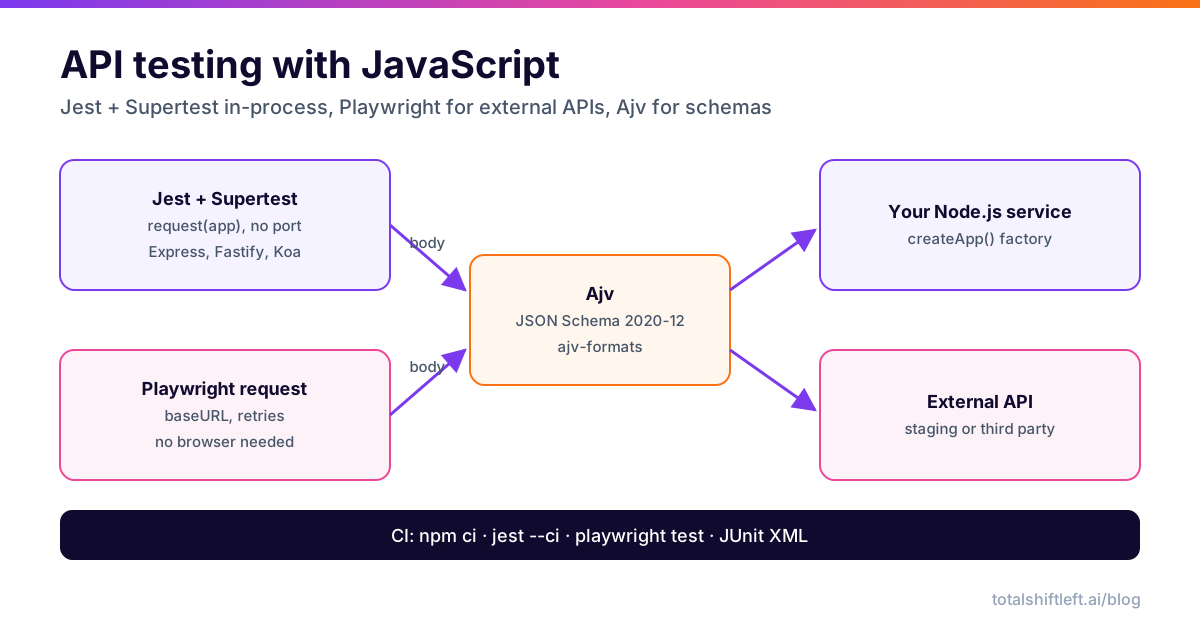
API testing with JavaScript usually means Jest plus Supertest for your own Node.js service, tested in-process without opening a port, and the Playwright request fixture for APIs you call over the network. Add Ajv to validate responses against JSON Schema, then run both suites in CI with npm ci and JUnit reports. Node 20+ and CommonJS keep the setup simple.
Reviewed by Sushant Joshi
Part of the API Test Automation Tools & Frameworks hub. Start with the pillar guide: Best API testing tools, compared by job.
API testing with JavaScript means sending HTTP requests from a Node.js test runner and asserting on status codes, headers and response bodies. The practical 2026 stack has two halves: Jest with Supertest for services you own, tested in-process so no port is opened, and Playwright's request API for APIs you can only reach over the network. Ajv validates bodies against JSON Schema in both.
This tutorial builds both halves with runnable code and wires them into CI. It is one of the framework guides in our roundup of the best API testing tools. If you already use Playwright for UI tests, the Playwright API testing guide goes deeper on that runner, and the Cypress API testing tutorial covers the Cypress route.
Prerequisites and project setup
You need Node.js 20 or later. Create a project with an Express app to test, plus the test tools:
mkdir users-api && cd users-api
npm init -y
npm install express
npm install --save-dev jest supertest @playwright/test ajv ajv-formats jest-junit
The examples use CommonJS (require) on purpose. Jest's ECMAScript module support still needs the --experimental-vm-modules flag, and CommonJS avoids that friction. If your codebase is ESM or TypeScript, the same code works with Vitest, or with Jest plus ts-jest.
Add scripts to package.json:
{
  "scripts": {
    "test": "jest",
    "test:ci": "jest --ci --reporters=default --reporters=jest-junit",
    "test:external": "playwright test"
  },
  "jest": {
    "testEnvironment": "node",
    "testMatch": ["**/test/**/*.test.js"]
  }
}
Test a Node.js API in-process with Jest and Supertest
The single most important design choice: export the app, do not call listen() in the same module. Supertest takes the app object and binds it to an ephemeral port for each request, so tests never collide on ports and need no running server.
// src/app.js
const express = require('express');

function createApp() {
  const app = express();
  app.use(express.json());

  const users = new Map();
  let nextId = 1;

  app.post('/users', (req, res) => {
    const { email, name } = req.body ?? {};
    if (typeof email !== 'string' || !email.includes('@')) {
      return res.status(400).json({ error: 'email is required' });
    }
    const user = { id: nextId++, email, name: name ?? null };
    users.set(user.id, user);
    res.status(201).location(`/users/${user.id}`).json(user);
  });

  app.get('/users/:id', (req, res) => {
    const user = users.get(Number(req.params.id));
    if (!user) return res.status(404).json({ error: 'not found' });
    res.json(user);
  });

  return app;
}

module.exports = { createApp };
// src/server.js (production entry point, never imported by tests)
const { createApp } = require('./app');
createApp().listen(process.env.PORT ?? 3000);
A factory function (createApp) gives every test file a fresh in-memory state, which removes a whole class of order-dependent failures.
// test/users.test.js
const request = require('supertest');
const { createApp } = require('../src/app');

describe('Users API', () => {
  let app;
  beforeEach(() => {
    app = createApp();
  });

  test('POST /users creates a user and returns 201 with Location', async () => {
    const res = await request(app)
      .post('/users')
      .send({ email: 'ada@example.com', name: 'Ada' })
      .expect('Content-Type', /json/)
      .expect(201);

    expect(res.headers.location).toBe(`/users/${res.body.id}`);
    expect(res.body).toMatchObject({ email: 'ada@example.com', name: 'Ada' });
  });

  test.each([
    [{}],
    [{ email: 'not-an-email' }],
    [{ email: 42 }],
  ])('POST /users rejects %j with 400', async (body) => {
    const res = await request(app).post('/users').send(body).expect(400);
    expect(res.body).toEqual({ error: 'email is required' });
  });

  test('GET /users/:id returns the created user', async () => {
    const created = await request(app)
      .post('/users')
      .send({ email: 'grace@example.com' })
      .expect(201);

    const res = await request(app).get(created.headers.location).expect(200);
    expect(res.body).toEqual({ id: created.body.id, email: 'grace@example.com', name: null });
  });

  test('GET /users/:id returns 404 for an unknown id', async () => {
    await request(app).get('/users/999').expect(404);
  });
});
Run npm test. .expect() calls check status and headers inline; Jest's expect handles the body. test.each is the data-driven pattern for negative cases, and each row shows up as its own test in the report.
Hand-picking negative cases is where suites get thin. If you want to see the full positive, negative and boundary case list a spec-driven generator plans for the same endpoints, book a demo and compare it with your test.each tables.
Ready to shift left with your API testing?
Try our no-code API test automation platform free. Generate tests from OpenAPI, run in CI/CD, and scale quality.
Test external APIs with Playwright's request API
For an API you do not run in-process (a staging deployment, a partner API, a third-party service), Playwright Test is a strong runner even without a browser. You get parallel workers, retries, a baseURL, typed fixtures and HTML or JUnit reports for free.
// playwright.config.js
const { defineConfig } = require('@playwright/test');

module.exports = defineConfig({
  testDir: './tests/external',
  retries: process.env.CI ? 1 : 0,
  reporter: [['list'], ['junit', { outputFile: 'results/playwright-junit.xml' }]],
  use: {
    baseURL: process.env.API_BASE_URL ?? 'https://jsonplaceholder.typicode.com',
    extraHTTPHeaders: { Accept: 'application/json' },
  },
});
// tests/external/posts.spec.js
const { test, expect } = require('@playwright/test');

test('GET /posts/1 returns the post', async ({ request }) => {
  const res = await request.get('/posts/1');

  await expect(res).toBeOK();
  expect(res.headers()['content-type']).toContain('application/json');
  expect(await res.json()).toMatchObject({ id: 1, userId: 1 });
});

test('GET /posts filters by userId', async ({ request }) => {
  const res = await request.get('/posts', { params: { userId: 1 } });

  expect(res.status()).toBe(200);
  const posts = await res.json();
  expect(posts.length).toBeGreaterThan(0);
  for (const post of posts) expect(post.userId).toBe(1);
});

test('POST /posts returns 201', async ({ request }) => {
  const res = await request.post('/posts', {
    data: { title: 'release notes', body: 'v2.3', userId: 1 },
  });

  expect(res.status()).toBe(201);
  expect(await res.json()).toHaveProperty('id');
});
The examples hit JSONPlaceholder, a free fake API; swap API_BASE_URL for your staging host. Two Playwright details trip people up. A path with a leading slash replaces any path in baseURL, so use a host-only base URL or drop the slash. And request.post with data sends JSON and sets the content type for you; use form or multipart for other bodies.
Validate response bodies with Ajv
toMatchObject checks the fields you list; it does not notice an extra field, a string where a number belongs, or a bad email format. A JSON Schema check does. Ajv compiles schemas into fast validation functions:
// test/schema.js
const Ajv = require('ajv/dist/2020');
const addFormats = require('ajv-formats');

const ajv = new Ajv({ allErrors: true, strict: true, allowUnionTypes: true });
addFormats(ajv);

const userSchema = {
  type: 'object',
  required: ['id', 'email', 'name'],
  additionalProperties: false,
  properties: {
    id: { type: 'integer', minimum: 1 },
    email: { type: 'string', format: 'email' },
    name: { type: ['string', 'null'] },
  },
};

const validateUser = ajv.compile(userSchema);

function expectToMatchSchema(validate, data) {
  if (!validate(data)) {
    throw new Error(`Schema validation failed:\n${ajv.errorsText(validate.errors, { separator: '\n' })}`);
  }
}

module.exports = { validateUser, expectToMatchSchema };
// test/users.schema.test.js
const request = require('supertest');
const { createApp } = require('../src/app');
const { validateUser, expectToMatchSchema } = require('./schema');

test('created user matches the user schema', async () => {
  const res = await request(createApp())
    .post('/users')
    .send({ email: 'ada@example.com' })
    .expect(201);

  expectToMatchSchema(validateUser, res.body);
});
ajv/dist/2020 speaks JSON Schema 2020-12, which OpenAPI 3.1 uses; the default ajv import is draft-07, a fit for most OpenAPI 3.0 schemas. allowUnionTypes is needed in strict mode for type: ['string', 'null']. The same helper works inside Playwright tests. In a real project, load schemas from your OpenAPI document instead of copying them, so the spec stays the single source of truth; see API schema validation for the pattern.
Run JavaScript API tests in CI
Run the in-process suite on every pull request and the external suite against a deployed environment:
# .github/workflows/api-tests.yml
name: api-tests
on: [pull_request]

jobs:
  test:
    runs-on: ubuntu-latest
    steps:
      - uses: actions/checkout@v4
      - uses: actions/setup-node@v4
        with:
          node-version: 22
          cache: npm
      - run: npm ci
      - name: In-process tests (Jest + Supertest)
        run: npm run test:ci
        env:
          JEST_JUNIT_OUTPUT_DIR: results
      - name: External API tests (Playwright)
        run: npm run test:external
        env:
          API_BASE_URL: ${{ vars.STAGING_API_URL }}
      - uses: actions/upload-artifact@v4
        if: always()
        with:
          name: api-test-results
          path: results
Free ZIP: scorecard CSV + RFP CSV + guide
API Testing Tool Evaluation Scorecard & RFP Template
A vendor-neutral, weighted scorecard (35 criteria) and 50 RFP questions for comparing API testing tools. No tool is pre-scored: you score from your pilot.
Download FreeNo npx playwright install step is needed: tests that only use the request fixture never launch a browser. Both runners write JUnit XML, which GitHub Actions, Jenkins, Azure DevOps and GitLab can all display. For more on gating merges, see API testing in GitHub Actions.
Hand-written JavaScript tests are best for the business rules your team knows. For breadth across every endpoint in a spec, Shift-Left API generates a structured suite from OpenAPI, including boundary, negative and auth cases, without writing code, and it can run beside your Jest job rather than replace it.
Jest, Vitest, Mocha or node:test?
The runner matters less than the HTTP layer, but each has a sweet spot:
| Runner | Best for | Watch out for |
|---|---|---|
| Jest | CommonJS Node services, teams that already use it for unit tests | ESM still needs an experimental flag; slower start-up on large suites |
| Vitest | ESM and TypeScript codebases, Vite projects | Jest-compatible API, but check plugins you rely on |
| Mocha + Chai | Long-lived suites, teams that want to pick each library | More wiring: assertions, mocks and reporters are separate packages |
| node:test | Zero-dependency smoke tests on Node 20+ | Fewer matchers and reporters than the others |
| Playwright Test | Tests against deployed or external APIs, especially if UI tests already use it | Not designed to import and test an app object in-process |
Supertest and Ajv work with all of them, so the code in this guide moves between runners with only the describe/test imports changing. A sensible default for a Node service: Jest or Vitest with Supertest for in-process tests, Playwright for the external suite, and one shared schema helper used by both. Keep the two suites in separate folders with separate commands, because they have different speeds, different failure causes and run at different points in the pipeline.
Troubleshooting
- "Jest did not exit one second after the test run has completed." Something holds an open handle: a database pool, a timer or a server started with
listen(). Runjest --detectOpenHandles, close pools inafterAll, and keeplisten()out of the module you import. SyntaxError: Cannot use import statement outside a module. Jest is loading ESM as CommonJS. Use CommonJS, switch to Vitest, or enable Jest's experimental ESM mode.- Order-dependent failures. Tests share module-level state. Use an app factory or reset state in
beforeEach. req.bodyis undefined. The JSON body parser is missing or registered after the routes, or the client did not sendContent-Type: application/json.- Flaky external tests. Assert on contracts and shapes rather than exact values, keep a single retry in CI, and quarantine slow suites so they never block unrelated merges.
- Ajv throws
strict mode: unknown keyword. The schema uses OpenAPI-only keywords such asnullableorexample. Convert them to JSON Schema, or register them withajv.addKeyword.
You can also skip third-party runners entirely: Node 20+ ships node:test and a global fetch, which is enough for a small smoke suite with zero dependencies.
API testing with JavaScript FAQ
What is the best API testing framework for JavaScript?
For a Node.js service you own, Jest (or Vitest) with Supertest is the most common choice, because Supertest calls your Express, Fastify or Koa app in-process. For APIs you reach over the network, Playwright's request fixture gives you a runner, retries, parallelism and reports without a browser. Many teams use both, plus Ajv for schema checks.
Is Supertest still used for Node.js API testing?
Yes. Supertest remains the standard way to test an HTTP app object without starting a server on a real port. It works with Jest, Vitest, Mocha and node:test.
Can I test APIs with Playwright without a browser?
Yes. The request fixture and request.newContext() send HTTP calls directly from Node.js. A test that only uses them never launches a browser, so CI does not need browser binaries.
How do I validate an API response against a JSON schema in JavaScript?
Use Ajv: compile the schema once, call the validate function on the parsed body, and fail with ajv.errorsText(validate.errors). Add ajv-formats for email and date-time, and import ajv/dist/2020 for JSON Schema 2020-12.
Should I write API tests in TypeScript?
It helps on larger suites because request and response types catch mistakes at compile time, and they can be generated from your OpenAPI spec. Types do not replace runtime schema validation, because the server can still return something the types did not expect.
Sources and further reading
Ready to shift left with your API testing?
Import your OpenAPI spec and get a runnable test suite, in our cloud or on your own infrastructure.