
How DevOps Teams Build Testing Pipelines: Practical Guide (2026)
A DevOps testing pipeline is an automated sequence of testing stages integrated into the CI/CD pipeline that validates software quality at every step from code commit to production deployment. It enforces quality gates at each stage, runs tests in parallel for speed, and provides rapid feedback to developers when quality standards are not met.
Introduction
The 2025 DORA State of DevOps report found that elite-performing teams run their entire testing pipeline in under 10 minutes for commit-stage feedback and under 30 minutes for full validation. Low performers take over 4 hours. The difference is not test volume—it is pipeline architecture.
Building a testing pipeline that is both comprehensive and fast is one of the hardest practical challenges in DevOps. Add too few tests and quality suffers. Add too many tests and the pipeline becomes a bottleneck. Run tests sequentially and developers wait. Run them in parallel and infrastructure costs spike. Enforce strict quality gates and deployment frequency drops. Relax gates and defect escape rates climb.
This guide provides the practical blueprint for building DevOps testing pipelines that achieve both speed and coverage. It covers pipeline stage design, quality gate configuration, parallel execution strategies, tool integration, and optimization techniques. Whether you are building a testing pipeline from scratch or optimizing an existing one, this is the engineering reference for pipeline architecture that supports elite-level DevOps performance.
What Are DevOps Testing Pipelines?
DevOps testing pipelines are automated workflows that execute a defined sequence of quality validations every time code changes are pushed to a repository. They are the technical implementation of the DevOps testing strategy—the infrastructure that turns testing principles into automated enforcement.
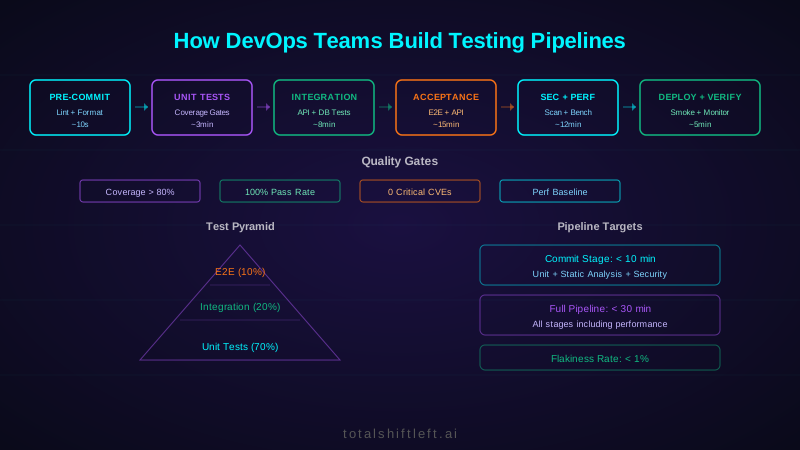
A well-designed testing pipeline follows the test pyramid principle: fast, numerous tests run first (unit tests), followed by progressively slower, more comprehensive tests (integration, API, end-to-end). Quality gates at each stage determine whether code can advance to the next stage. If any gate fails, the pipeline stops and notifies the developer immediately.
The pipeline is not just a sequence of test runs. It includes static analysis, security scanning, performance benchmarking, deployment verification, and production monitoring. Each activity contributes a different quality dimension, and together they provide comprehensive quality validation that no single testing activity can achieve.
Modern pipelines are event-driven: they trigger automatically on code push, pull request creation, branch merge, and scheduled intervals. They provide feedback through multiple channels—IDE integrations, Slack notifications, dashboard updates, and email alerts—ensuring that developers receive quality information where they work.
Why Pipeline Architecture Matters
Speed Is a Quality Attribute
A slow pipeline is a broken pipeline. When developers wait 45 minutes for test results, they context-switch to other work. When the results finally arrive, they have lost the mental context of the change. This delay reduces defect fix quality and increases cycle time. Fast pipelines (under 10 minutes for commit-stage) keep developers in flow state and enable rapid iteration.
Pipeline Reliability Determines Trust
If the pipeline produces false positives (failing when code is correct) or false negatives (passing when code is broken), developers lose trust. They start ignoring failures, bypassing gates, and treating the pipeline as a nuisance rather than a safety net. Pipeline reliability—measured as the rate of accurate pass/fail decisions—is critical for maintaining the DevOps testing culture that depends on pipeline trust.
Architecture Determines Scalability
A pipeline designed for one team and one service will not work for ten teams and fifty services. Pipeline architecture must consider how testing scales across teams, services, and environments. Shared pipeline templates, reusable testing stages, and centralized quality gate configurations enable consistent testing at organizational scale.
Feedback Quality Determines Developer Behavior
The quality of failure messages determines whether developers can fix issues quickly. A failure message that says "integration test failed" is useless. A message that says "API endpoint /users/123 returned 500 instead of 200 when user does not exist" is actionable. Pipeline architecture includes how failure information is presented, not just whether tests pass or fail.
Key Components of DevOps Testing Pipelines
Stage 1: Pre-Commit Validation
Before code leaves the developer's machine, pre-commit hooks run fast validations: linting, formatting, type checking, and unit tests for changed files. This stage catches trivial issues immediately without consuming CI resources.
Pre-commit validation takes 5-30 seconds. It is not comprehensive but catches the most common issues: syntax errors, formatting violations, type mismatches, and broken unit tests. Developers get instant feedback before their code enters the shared pipeline.
Stage 2: Commit-Stage Testing
When code is pushed, the commit-stage pipeline runs within 10 minutes and includes: full unit test suite, static code analysis (SonarQube or equivalent), code coverage calculation and threshold enforcement, dependency vulnerability scanning, and build compilation. This is the primary feedback loop for developers.
Quality gates at this stage: unit test pass rate at 100%, code coverage above threshold (typically 75-85%), no critical or high static analysis violations, no critical dependency vulnerabilities. Failed gates block the pull request from merging.
Stage 3: Integration Testing
After commit-stage passes, integration tests validate that the changed component works correctly with its dependencies—databases, message queues, external APIs, and adjacent services. These tests run in isolated environments with realistic configurations.
Integration tests typically run in 5-15 minutes using containerized dependencies (Docker Compose or Kubernetes). API testing at this stage validates service contracts and data flow between components, and slots into your build through native CI/CD runners for GitHub Actions, GitLab, Jenkins, and Azure DevOps. Quality gates enforce 100% pass rate for integration tests.
Stage 4: Acceptance Testing
Acceptance tests validate end-to-end user scenarios and business requirements. This includes API acceptance tests (validating complete user workflows through API calls) and UI acceptance tests (validating critical user journeys through browser automation).
This stage runs in 10-20 minutes. Test selection is critical—run only tests relevant to the changed area rather than the full acceptance suite on every commit. Full suite runs are reserved for merge-to-main events or scheduled intervals.
Ready to shift left with your API testing?
Try our no-code API test automation platform free. Generate tests from OpenAPI, run in CI/CD, and scale quality.
Stage 5: Security and Performance Testing
Security scanning (SAST, DAST) and performance benchmarking run as dedicated pipeline stages. Security gates block deployment for critical and high-severity vulnerabilities. Performance gates compare response times, throughput, and resource usage against established baselines.
This stage can run in parallel with acceptance testing to reduce total pipeline time. Performance benchmarks are particularly valuable when run against production-like environments with realistic data volumes.
Stage 6: Deployment Verification
After deployment to production (or a pre-production environment), deployment verification tests confirm that the deployment succeeded and critical functionality works correctly. These are typically a subset of acceptance tests that validate the most important user journeys.
Smoke tests run immediately after deployment. If they fail, the deployment is rolled back automatically. Canary deployments combine with monitoring to detect issues during progressive rollout.
Pipeline Architecture Patterns
Fan-Out / Fan-In Pattern: Unit tests, static analysis, and security scanning run in parallel (fan-out). Results are aggregated before proceeding to integration testing (fan-in). This reduces total pipeline time by parallelizing independent validation activities.
Progressive Confidence Pattern: Each stage increases confidence in code quality. Early stages are fast and cheap (unit tests). Later stages are slow and expensive (E2E tests, load tests). This architecture minimizes wasted compute on code that fails early checks.
**Feature Branch vs Main
Branch Pattern:** Feature branch pipelines run commit-stage and integration tests. Main branch pipelines run the full suite including acceptance, security, performance, and deployment. This balances speed (fast feature branch feedback) with thoroughness (comprehensive main branch validation).
Monorepo Pipeline Pattern: For monorepo architectures, the pipeline determines which services are affected by a change and runs only the relevant test suites. This prevents every commit from triggering tests for all services.
The right pattern depends on your architecture, team size, and deployment model. Most organizations combine patterns—using fan-out/fan-in within stages and progressive confidence across stages. The test automation best practices guide covers the testing framework design that these pipeline patterns depend on.
Tools for DevOps Testing Pipelines
| Tool | Type | Best For | Open Source |
|---|---|---|---|
| Total Shift Left | API Testing | Codeless API test automation integrated with CI/CD | No |
| GitHub Actions | CI/CD | Cloud-native pipeline orchestration with marketplace actions | No |
| Jenkins | CI/CD | Self-hosted pipeline orchestration with plugin ecosystem | Yes |
| GitLab CI | CI/CD | Integrated SCM and pipeline with built-in security scanning | No |
| CircleCI | CI/CD | Fast cloud-based pipelines with advanced caching | No |
| Playwright | E2E Testing | Cross-browser acceptance testing in pipelines | Yes |
| Cypress | E2E Testing | Developer-friendly E2E testing with parallel execution | Yes |
| k6 | Performance | Load testing as code integrated into CI/CD | Yes |
| SonarQube | Code Quality | Static analysis quality gates for pipelines | Yes |
| Snyk | Security | Dependency and container vulnerability scanning | No |
| Trivy | Security | Container image security scanning in pipelines | Yes |
| Docker | Containers | Test environment isolation and reproducibility | Yes |
Real-World Example: Building a Testing Pipeline from Scratch
Problem: A growing fintech startup (40 engineers, 4 squads) had no testing pipeline. Developers deployed to production from their laptops using manual scripts. Testing was ad hoc—some developers ran tests locally, most did not. Monthly deployments required 3 days of manual QA. Change failure rate was 40%, and every production incident required manual rollback.
Solution: They built a testing pipeline in three phases over 4 months. Phase 1 (weeks 1-4): implemented GitHub Actions pipeline with unit tests, ESLint, and TypeScript checking. Set code coverage gates at 60% (intentionally low to start). Phase 2 (weeks 5-10): added integration testing using Docker Compose for database and service dependencies, Total Shift Left for automated API testing, and Snyk for dependency scanning. Raised coverage gates to 75%. Phase 3 (weeks 11-16): added Playwright E2E tests for critical user journeys, k6 performance benchmarks comparing against production baselines, and deployment verification tests with automated rollback.
Results: Pipeline execution time: 8 minutes for commit-stage, 22 minutes for full pipeline. Deployment frequency increased from monthly to daily. Change failure rate dropped from 40% to 6%. Manual QA was eliminated entirely. Developers reported higher confidence in deployments and faster feedback on code quality. The pipeline caught an average of 12 issues per week that would have previously reached production.
Common Challenges in Testing Pipeline Design
Pipeline Is Too Slow
Challenge: The pipeline takes 45+ minutes, causing developer frustration, context-switching, and reduced deployment frequency.
Solution: Profile pipeline execution to identify bottlenecks. Implement parallelization for independent stages. Use test impact analysis to run only affected tests on feature branches. Cache dependencies and build artifacts between runs. Move slow tests (E2E, performance) to post-merge pipelines. Set a pipeline time budget (10 minutes commit-stage, 30 minutes full) and optimize relentlessly against it.
Flaky Tests Destroy Pipeline Trust
Challenge: Tests pass and fail intermittently without code changes. Developers re-run the pipeline hoping for green, wasting time and eroding trust.
Solution: Implement a flaky test detection system that tracks test results across runs and flags inconsistent tests. Quarantine flaky tests immediately to a separate non-blocking suite. Fix quarantined tests within one sprint with high priority. Invest in test infrastructure: deterministic test data, isolated environments, proper async waits, and retry-proof assertions. Track flakiness rate as a team metric.
Free YAML templates + guide
CI/CD Testing Pipeline Templates
Production-ready CI/CD pipeline templates for GitHub Actions and GitLab CI. Includes API testing, contract testing, and performance testing stages.
Download FreeEnvironment Inconsistency
Challenge: Tests pass in CI but fail locally, or pass locally but fail in CI. Environment differences (OS, dependencies, configuration) cause inconsistent behavior.
Solution: Containerize test environments using Docker to ensure consistency between local development and CI. Use the same container images in all environments. Pin dependency versions. Provide developers with scripts that reproduce the exact CI environment locally. Document environment requirements explicitly.
Quality Gate Tuning
Challenge: Quality gates are either too strict (blocking valid code) or too lenient (allowing defective code). Finding the right thresholds is difficult.
Solution: Start with lenient gates and tighten gradually based on data. Track the correlation between gate failures and actual defects. If a gate blocks code that is not actually defective (false positive), relax the threshold. If defects escape that a tighter gate would have caught, tighten it. Review gate effectiveness quarterly using DevOps quality metrics.
Scaling Pipeline Infrastructure
Challenge: As teams and services grow, pipeline infrastructure costs increase and queue times lengthen. Teams wait for available CI runners.
Solution: Implement auto-scaling CI runners that scale with demand. Use spot instances or preemptible VMs for cost optimization. Implement pipeline scheduling that distributes load. Cache aggressively to reduce build times. Consider self-hosted runners for high-volume teams. Monitor pipeline queue times and adjust capacity proactively.
Maintaining Pipeline Configuration
Challenge: Pipeline configurations become complex, duplicated across repositories, and difficult to maintain consistently.
Solution: Create shared pipeline templates that teams extend rather than duplicate. Use pipeline-as-code that lives in the repository alongside application code. Version pipeline configurations and review changes through the same code review process. Establish a Pipeline Platform team responsible for maintaining shared templates and infrastructure.
Best Practices for DevOps Testing Pipelines
- Follow the test pyramid: many fast unit tests, fewer slow E2E tests
- Set pipeline time budgets: 10 minutes commit-stage, 30 minutes full pipeline
- Parallelize independent pipeline stages (unit tests, static analysis, security scanning)
- Implement quality gates at every stage with clearly defined pass/fail criteria
- Cache dependencies, build artifacts, and test environments between runs
- Use test impact analysis to run only tests affected by code changes on feature branches
- Quarantine flaky tests immediately and fix within one sprint
- Containerize test environments for consistency between local and CI
- Provide actionable failure messages that include exactly what failed and why
- Create shared pipeline templates for consistency across teams and repositories
- Monitor pipeline health metrics: execution time, success rate, queue time, flakiness rate
- Practice shift-left testing by running the fastest validations first
DevOps Testing Pipeline Implementation Checklist
- ✔ Pre-commit hooks run linting, formatting, and fast unit tests locally
- ✔ Commit-stage pipeline runs full unit tests, static analysis, and coverage checks in under 10 minutes
- ✔ Code coverage quality gate enforces minimum threshold (75-85%)
- ✔ Integration tests validate component interactions with containerized dependencies
- ✔ API tests validate service contracts and business logic through automated requests
- ✔ Security scanning blocks builds with critical/high dependency vulnerabilities
- ✔ Performance benchmarks compare against production baselines on every PR
- ✔ Acceptance tests validate critical user journeys for merge-to-main events
- ✔ Deployment verification tests run post-deployment with automated rollback on failure
- ✔ Pipeline stages run in parallel where possible to minimize total execution time
- ✔ Flaky test detection and quarantine system is operational
- ✔ Pipeline failure messages are actionable with specific error details
- ✔ Shared pipeline templates provide consistency across teams
- ✔ Pipeline health dashboard tracks execution time, success rate, and flakiness rate
Take the next step. See how shift-left API testing platform applies these ideas to your workflow, or explore API testing in CI/CD for the broader picture.
See also: contract testing in our learn hub for the underlying concept.
FAQ
What is a DevOps testing pipeline?
A DevOps testing pipeline is an automated sequence of testing stages integrated into the CI/CD pipeline that validates software quality at every step from code commit to production deployment. It includes unit tests, integration tests, API tests, end-to-end tests, security scans, and performance benchmarks, each with quality gates that block progression on failure.
How many stages should a DevOps testing pipeline have?
A typical DevOps testing pipeline has 5-7 stages: pre-commit validation, commit-stage testing (unit + static analysis), integration testing, acceptance testing (API + E2E), security and performance testing, deployment verification, and production monitoring. The exact number depends on your application complexity and risk tolerance.
How do you keep DevOps testing pipelines fast?
Keep pipelines fast through parallel test execution, intelligent test selection (running only tests affected by changed code), pipeline caching for dependencies and build artifacts, right-sizing test environments, eliminating flaky tests, using the test pyramid (more fast unit tests, fewer slow E2E tests), and splitting long-running tests into separate pipeline stages.
What quality gates should a testing pipeline include?
Essential quality gates include: unit test pass rate (100%), code coverage threshold (75-85%), static analysis (no critical violations), integration test pass rate (100%), security scan (no high/critical CVEs), performance benchmark (response times within baseline), and deployment verification (health checks pass). Each gate blocks pipeline advancement on failure.
How do you handle flaky tests in DevOps pipelines?
Handle flaky tests by quarantining them immediately (move to a separate non-blocking suite), tracking flakiness rates as a team metric, fixing quarantined tests within one sprint, investing in deterministic test infrastructure (isolated data, proper waits, controlled environments), and treating flaky test creation as a code quality issue during reviews.
Conclusion
A well-architected testing pipeline is the backbone of DevOps delivery. It transforms testing from a manual phase into an automated, continuous quality system that provides fast feedback, enforces standards, and builds deployment confidence. The pipeline is where testing strategy becomes testing reality.
Build your pipeline incrementally. Start with the commit-stage fundamentals—unit tests, static analysis, coverage gates—and add stages as your team matures. Optimize relentlessly for speed because a slow pipeline is a pipeline that developers bypass. Invest in reliability because a flaky pipeline is worse than no pipeline at all.
The best testing pipelines are invisible to developers most of the time. Code is pushed, the pipeline runs, quality is validated, and deployment happens automatically. When something fails, the developer gets immediate, actionable feedback. This is the experience that elite DevOps teams build, and it starts with thoughtful pipeline architecture.
Ready to add powerful API testing to your DevOps pipeline? Start your free trial of Total Shift Left and integrate codeless API test automation into your CI/CD workflow in minutes.
Related: DevOps Testing: The Complete Guide | What Is Shift-Left Testing? | How to Build a CI/CD Testing Pipeline | DevOps Testing Best Practices | Continuous Quality in DevOps | Test Automation Best Practices
Ready to shift left with your API testing?
Try our no-code API test automation platform free.