
Using Jaeger for Microservices Debugging: Practical Guide (2026)
Quick answer
Jaeger is a CNCF-graduated, open-source distributed tracing system, originally built by Uber, that debugs microservices by capturing every span in a request's path and rendering it as a waterfall timeline. It pinpoints which service caused a failure or latency spike in seconds instead of hours of log correlation, and CNCF research found tracing adopters cut MTTR by an average of 68%.
Reviewed by Parveen Kumari

Jaeger for microservices debugging provides a visual, trace-driven approach to diagnosing failures, latency issues, and unexpected behavior in distributed systems. By capturing and displaying the complete request flow across services, Jaeger eliminates the guesswork in distributed debugging and lets engineers pinpoint exactly where and why a problem occurred.
Debugging microservices without distributed tracing is like debugging a monolith without a stack trace. You know something went wrong, but you have no idea where in the call chain the failure occurred. A 2025 survey by the CNCF found that distributed tracing reduced mean time to resolution (MTTR) by an average of 68% for organizations that adopted it — and Jaeger is the most widely deployed open-source tracing system in the ecosystem.
Jaeger was originally developed at Uber Technologies to solve the debugging challenges of their microservices architecture (thousands of services processing millions of requests per second). It was donated to the CNCF in 2017, reached graduated status in 2019, and has since become the reference implementation for distributed tracing in cloud-native environments. Its UI, query capabilities, and integration with OpenTelemetry make it the go-to tool for engineers who need to understand what happened to a specific request across multiple services.
This guide covers practical Jaeger usage for microservices debugging — not just setup, but the actual debugging workflows that engineers use daily: finding slow requests, tracing error propagation, comparing normal and abnormal traces, and identifying the root cause of production issues. Whether you are deploying Jaeger for the first time or optimizing an existing deployment, this is the practical reference for 2026.
In this guide
- What Is Jaeger?
- Why Jaeger Is Essential for Microservices Debugging
- Key Components of Jaeger
- Jaeger Architecture for Production Microservices
- Distributed Tracing Tools Comparison
- Real-World Debugging Example with Jaeger
- Jaeger challenges and how to solve them
- Jaeger best practices
- Jaeger Implementation Checklist
- Query Jaeger for the traces that matter
- Jaeger FAQ
What Is Jaeger?
Jaeger is an open-source, end-to-end distributed tracing system designed for monitoring and troubleshooting microservices-based architectures. It collects timing data (spans) from instrumented services, stores them in a backend database, and provides a web UI for searching, visualizing, and analyzing traces.
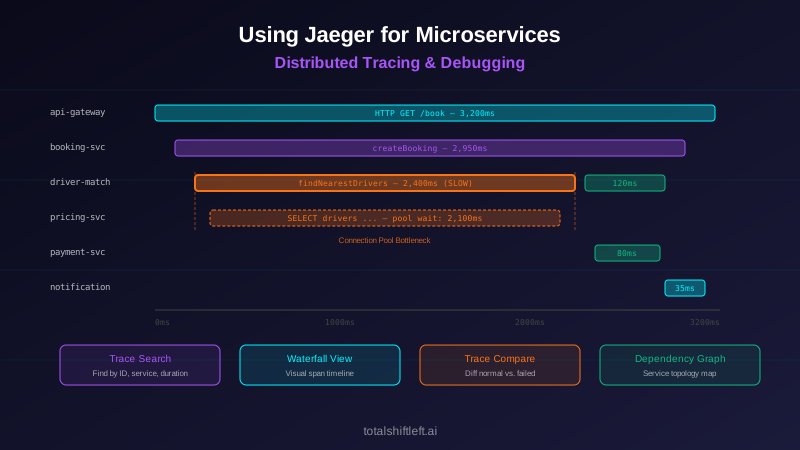
A trace in Jaeger represents a single end-to-end request as it flows through multiple services. Each service creates one or more spans — units of work with a start time, duration, operation name, and metadata (tags, logs). Spans are linked through parent-child relationships, forming a directed acyclic graph that represents the complete request flow. The Jaeger UI renders this graph as a waterfall timeline, making it immediately visible how a request was processed and where time was spent.
Jaeger provides four core capabilities for debugging:
- Trace Search: Find traces by service name, operation name, tags, duration range, and time window. When a user reports a problem, you search for traces matching their request to see exactly what happened.
- Trace Visualization: The waterfall timeline view shows all spans in a trace, their durations, and their parent-child relationships. Bottlenecks, errors, and unusual patterns are visually obvious.
- Trace Comparison: Compare two traces side-by-side to identify what differs between a successful and a failed request, or between a fast and a slow request.
- Dependency Analysis: Jaeger builds a service dependency graph from trace data, showing which services communicate and the volume and error rate of each connection.
If the monitoring-versus-observability line is still fuzzy, observability in DevOps draws it with examples.
Why Jaeger Is Essential for Microservices Debugging
Visual Request Flow Eliminates Guesswork
When a request fails in a microservices architecture, the engineer's first question is: "Which service caused this?" Without tracing, answering that question requires correlating logs from every service in the request chain — a manual, time-consuming process that does not scale. Jaeger's trace visualization answers the question in seconds. Open the trace, find the span with the error tag, and you know exactly which service, which operation, and when the failure occurred.
Latency Attribution Identifies Bottlenecks
Latency debugging in microservices is notoriously difficult because a slow response can be caused by any service in the chain — or by the network between services. Jaeger's waterfall view shows the duration of every span, making it immediately clear where time is being spent. If a request takes 3 seconds and 2.8 seconds of that is in the database span of the inventory service, you know exactly where to focus optimization efforts.
Error Propagation Tracking
In distributed systems, errors propagate and transform as they cross service boundaries. A database timeout in Service C becomes a 500 error in Service B becomes a 504 in the API gateway. Without tracing, the engineer debugging the 504 starts at the wrong end of the chain. Jaeger shows the complete error propagation path, starting from the original failure, so the engineer can go directly to the root cause.
Production Debugging Without Reproduction
Many production issues are difficult to reproduce locally because they depend on specific data, timing, load, or infrastructure conditions. Jaeger captures the actual request flow in production, so engineers can debug the real failure without needing to reproduce it. The trace contains the exact sequence of operations, their timing, the tags (which may include request parameters), and any errors — often enough to identify the root cause without any additional investigation.
Key Components of Jaeger
Jaeger Client Libraries (Deprecated in Favor of OpenTelemetry)
Historically, Jaeger provided its own client libraries for instrumenting applications. These are now deprecated in favor of OpenTelemetry SDKs. Modern Jaeger deployments use OpenTelemetry for instrumentation and export traces to Jaeger via OTLP. This is the recommended approach for all new deployments and the path for migrating existing ones.
Jaeger Collector
The collector receives spans from instrumented applications (via OTLP, Thrift, or gRPC), validates them, indexes them, and writes them to storage. In production, collectors are deployed as a horizontally scalable service. They can also write to Kafka for buffering before storage, which provides resilience against storage backend outages.
Jaeger Query Service
The query service provides the API that the Jaeger UI uses to search and retrieve traces. It reads from the storage backend and supports filtering by service name, operation name, tags, duration, and time range. The query service also builds the service dependency graph from trace data.
Jaeger UI
The web-based UI is where debugging happens. It provides trace search, the waterfall timeline view, trace comparison, and the dependency graph. The UI is designed for debugging workflows: you start with a search (e.g., all traces for the order-service with errors in the last hour), drill into a specific trace, identify the problematic span, and examine its tags and logs for diagnostic data.
Storage Backend
Jaeger supports multiple storage backends: Elasticsearch (most common for production), Cassandra, Kafka (as a buffer), and the newer Jaeger-native storage using ClickHouse or gRPC remote storage plugins. The choice of backend affects query performance, retention capabilities, and operational complexity. Elasticsearch provides the richest query capabilities; Cassandra scales writes more easily.
Jaeger Operator (Kubernetes)
For Kubernetes deployments, the Jaeger Operator automates deployment and management of Jaeger components. It supports different deployment strategies: all-in-one (development), production (separate components), and streaming (with Kafka). The operator manages configuration, scaling, and upgrades.
Jaeger Architecture for Production Microservices
A production Jaeger deployment for microservices follows this architecture:
Ready to shift left with your API testing?
Try our no-code API test automation platform free. Generate tests from OpenAPI, run in CI/CD, and scale quality.
Instrumentation Layer: Each microservice is instrumented with OpenTelemetry SDKs. Auto-instrumentation covers HTTP frameworks, gRPC, database drivers, and message queue clients. Custom instrumentation adds business-specific spans and attributes. The SDK exports spans via OTLP to the OpenTelemetry Collector.
Collection Layer: The OpenTelemetry Collector receives spans from all services. It applies processing — tail-based sampling to capture all error and high-latency traces, attribute enrichment, and data transformation — and exports to the Jaeger Collector via OTLP. Running the OTel Collector between applications and Jaeger provides sampling flexibility that Jaeger alone does not offer.
Ingestion Layer: The Jaeger Collector receives processed spans and writes them to storage. For high-throughput deployments, a Kafka topic sits between the Collector and storage, providing buffering and resilience. A Jaeger Ingester reads from Kafka and writes to the storage backend.
Storage Layer: Elasticsearch is the most common production backend, providing fast search and flexible querying. Traces are indexed by service name, operation name, tags, and duration. Retention policies control storage costs — most teams retain 7-14 days of full traces and longer for aggregated service dependency data.
Query and UI Layer: The Jaeger Query service and UI provide the debugging interface. Engineers search for traces, visualize request flows, and analyze span details. Grafana can also query Jaeger as a data source, enabling trace links from metric dashboards — clicking a data point on a latency graph takes you directly to the relevant traces. This integration is essential for an effective observability testing strategy, and pairs well with automated detection of breaking API changes that surface regressions before they reach the traces you have to debug.
Distributed Tracing Tools Comparison
| Tool | Type | Best For | Open Source |
|---|---|---|---|
| Jaeger | Trace Backend & UI | Production-scale distributed tracing with rich search | Yes (CNCF) |
| Grafana Tempo | Trace Backend | Cost-efficient trace storage with Grafana ecosystem integration | Yes |
| Zipkin | Trace Backend & UI | Lightweight tracing for smaller deployments | Yes |
| Datadog APM | Full-Stack APM | Integrated tracing with metrics, logs, and profiling | No |
| Honeycomb | Trace Analysis | High-cardinality trace exploration and debugging | No |
| AWS X-Ray | Cloud Tracing | AWS-native distributed tracing | No |
| Dynatrace | Full-Stack APM | AI-assisted root cause analysis with tracing | No |
| Splunk APM | Full-Stack APM | Enterprise observability with SignalFx-based tracing | No |
| Lightstep (ServiceNow) | Trace Analysis | Change intelligence and deployment correlation | No |
| SigNoz | Full-Stack Observability | Open-source alternative to Datadog with traces, metrics, logs | Yes |
Real-World Debugging Example with Jaeger
Problem: A ride-sharing platform's booking API experienced intermittent latency spikes where responses took 8-12 seconds instead of the normal 500ms. The spikes occurred 5-10 times per hour, affecting random users. Traditional metrics showed elevated p99 latency but could not identify the cause — average latency and error rates were normal.
Debugging with Jaeger — Step-by-Step:
Step 1 — Search for slow traces: In the Jaeger UI, the engineer searched for traces from the booking-service with duration greater than 5 seconds in the last hour. Jaeger returned 47 traces matching the criteria.
Step 2 — Analyze the trace waterfall: Opening the first slow trace revealed a waterfall with 12 spans. Most spans completed in under 50ms, but one span — driver-matching-service.findNearestDrivers — took 7.8 seconds. This span was the bottleneck.
Step 3 — Examine span details: The slow span's tags showed db.statement: SELECT * FROM drivers WHERE ... and db.type: postgresql. The span logs contained a warning: connection pool wait time: 7200ms. The database query itself took only 600ms — the 7.2 seconds was spent waiting for a database connection.
Step 4 — Compare with normal traces: The engineer used Jaeger's trace comparison to compare a slow trace with a normal trace from the same time period. The normal trace showed the same findNearestDrivers span completing in 450ms with no connection pool wait. The database query was identical.
Step 5 — Correlate with system state: The engineer checked Prometheus metrics for the driver-matching-service's database connection pool. Active connections were at the maximum (20 out of 20) during the spike periods. A concurrent batch job — driver location updates — was holding connections for extended periods, starving the real-time queries.
Step 6 — Fix and verify: The team separated the batch job onto a dedicated connection pool (10 connections) and increased the real-time pool to 30 connections. They also added a connection timeout of 500ms so that requests would fail fast rather than wait 7+ seconds. Jaeger traces confirmed that post-fix latency was consistently under 600ms.
Result: What could have taken hours of log correlation and guesswork took 20 minutes with Jaeger. The visual trace comparison immediately revealed that the problem was connection pool contention, not a slow database query — a distinction that would have been very difficult to make from logs alone.
Jaeger challenges and how to solve them
Trace Volume Overwhelms Storage
Challenge: In production microservices handling thousands of requests per second, storing every trace is prohibitively expensive. A 50-service architecture generating 20 spans per trace at 1,000 RPS produces 1 million spans per second — terabytes of data per day.
Solution: Implement a tiered sampling strategy. Use head-based probability sampling (e.g., 1-5% of traces) for normal traffic. Use tail-based sampling in the OpenTelemetry Collector to capture 100% of traces with errors, high latency (above p95), or specific tags (e.g., user.tier: premium). This captures all interesting traces while reducing volume by 95%+.
Finding the Right Trace
Challenge: When a user reports an issue ("my order was slow 30 minutes ago"), finding the specific trace requires knowing the trace ID, the user's request ID, or enough search criteria to narrow down the results. Without good identifiers, you end up scrolling through hundreds of traces.
Solution: Propagate a user-facing request ID through the system and add it as a span tag. When a user reports an issue, search for their request ID in Jaeger. Also add business-context tags (order.id, user.id, payment.id) to spans so you can search by business entity. Ensure your API tests inject trace IDs so test failures can be linked to traces.
Clock Skew Distorts Timelines
Challenge: Distributed tracing relies on accurate timestamps across services. If clocks are not synchronized (common in cloud environments), spans can appear to start before their parent, durations can be negative, and the waterfall view becomes misleading.
Solution: Use NTP synchronization on all hosts. Jaeger includes clock skew correction that adjusts child span timestamps based on the parent span. In Kubernetes, ensure all nodes synchronize to the same NTP source. Monitor clock drift as an infrastructure metric and alert when drift exceeds 10ms.
Instrumentation Gaps Create Blind Spots
Challenge: If a service in the request chain is not instrumented, its spans are missing from the trace. The trace shows a gap — the parent service's outbound call and the downstream service's response, but nothing in between. This makes it impossible to debug issues in the uninstrumented service.
Solution: Instrument all services, even if only with auto-instrumentation. Prioritize services on critical request paths. For third-party services you cannot instrument, create client-side spans that at least capture the duration and status of outbound calls. Track instrumentation coverage as a team metric — target 100% for production services.
Free Visual blueprint + guide
Microservices Testing Strategy Blueprint
A visual testing strategy for microservices architectures. Covers testing layers, contract testing, service mesh validation, and tool selection.
Download FreeLegacy Services Do Not Support Context Propagation
Challenge: Older services (SOAP, legacy REST, mainframe) may not support W3C Trace Context propagation. Without context propagation, traces break at the legacy service boundary — you get separate traces for the upstream and downstream portions.
Solution: Add a thin proxy or sidecar that extracts trace context from incoming requests and injects it into outbound requests. For services that cannot be modified at all, create a "synthetic span" on the caller side that covers the full roundtrip to the legacy service. This does not show internal detail but preserves the trace continuity.
Trace Data Is Not Actionable
Challenge: Engineers can find traces but cannot extract useful debugging information from them. Spans show operation names and durations but lack the business context and diagnostic detail needed for debugging.
Solution: Add custom attributes (tags) to spans that provide debugging context: database query parameters (sanitized), HTTP request/response sizes, cache hit/miss status, feature flag states, queue depths, and business entity IDs. Add span events (logs) for significant state changes within an operation. The goal is that an engineer looking at a span in Jaeger has enough context to understand what happened without needing to check additional systems.
Jaeger best practices
- Use OpenTelemetry SDKs for instrumentation rather than deprecated Jaeger client libraries — OTel is the future and provides a vendor-neutral instrumentation layer
- Deploy the OpenTelemetry Collector between your applications and Jaeger to gain tail-based sampling, attribute processing, and multi-backend routing capabilities
- Add business-context tags to spans: order IDs, user IDs, payment references — these make it possible to find the specific trace you need when debugging
- Implement tail-based sampling to capture 100% of error and high-latency traces while sampling normal traffic at a lower rate to control storage costs
- Use Jaeger's trace comparison feature to compare slow/failed traces with normal traces — the difference often reveals the root cause immediately
- Configure Elasticsearch index lifecycle policies for Jaeger storage — retain full traces for 7-14 days and consider archiving interesting traces (errors, post-mortem references) for longer
- Integrate Jaeger with Grafana as a data source so engineers can click from a metric anomaly directly to the relevant traces
- Add span events (logs) for significant state changes within operations: cache misses, retries, fallbacks, and circuit breaker activations
- Monitor Jaeger infrastructure health: collector ingestion rate, storage write latency, query response time, and dropped spans
- Use the Jaeger dependency graph to validate that your service topology matches expectations — missing connections often indicate instrumentation gaps
- Create team runbooks that include Jaeger query patterns for common debugging scenarios: "how to find traces for a specific user," "how to debug latency spikes," "how to trace an error across services"
- Align your Jaeger deployment with your broader testing tools for microservices to create a unified debugging experience
Jaeger Implementation Checklist
- ✔ Deploy Jaeger backend (all-in-one for development, production architecture for staging/production)
- ✔ Choose and configure the storage backend (Elasticsearch for rich querying, Cassandra for high write throughput)
- ✔ Deploy the OpenTelemetry Collector with OTLP receiver and Jaeger/OTLP exporter
- ✔ Instrument all production microservices with OpenTelemetry auto-instrumentation
- ✔ Add custom spans for business-critical operations (payment processing, order creation, authentication)
- ✔ Add business-context tags to spans (order.id, user.id, request.id) for searchability
- ✔ Configure tail-based sampling in the OTel Collector to capture all error and high-latency traces
- ✔ Verify end-to-end tracing by sending a test request through the full service chain and confirming the complete trace appears in Jaeger
- ✔ Integrate Jaeger as a Grafana data source for trace-metric correlation
- ✔ Configure storage retention policies (index lifecycle management for Elasticsearch)
- ✔ Set up monitoring for Jaeger infrastructure: collector health, storage capacity, query latency
- ✔ Create team debugging runbooks with Jaeger query examples for common scenarios
- ✔ Train the engineering team on Jaeger UI workflows: trace search, waterfall analysis, trace comparison
- ✔ Validate that context propagation works across all communication protocols (HTTP, gRPC, messaging)
Query Jaeger for the traces that matter
The Jaeger UI is for exploring; the API is for finding. These queries pull the traces you actually want — the slow ones and the failed ones — without clicking:
# every errored trace in the orders service in the last 30 minutes
curl -s "http://jaeger:16686/api/traces?service=orders&tags=%7B%22error%22%3A%22true%22%7D&lookback=30m&limit=50" \
  | jq -r '.data[] | "\(.traceID) \(.spans[0].operationName)"'

# traces slower than 2 seconds
curl -s "http://jaeger:16686/api/traces?service=orders&minDuration=2s&lookback=1h" \
  | jq -r '.data[] | {id: .traceID, ms: (.spans | map(.duration) | max / 1000)}'

# what the slowest span in one trace actually was
curl -s "http://jaeger:16686/api/traces/4bf92f3577b34da6a3ce929d0e0e4736" \
  | jq -r '.data[0].spans | sort_by(-.duration)[0:5][]
           | "\(.process.serviceName) \(.operationName) \(.duration/1000)ms"'
Turn the same query into a regression test so the pattern you just debugged cannot come back unnoticed:
def test_place_order_does_not_fan_out_to_inventory_more_than_once(client, jaeger):
    r = client.post("/v1/orders", json={"sku": "A-1", "qty": 2})
    trace_id = r.headers["traceparent"].split("-")[1]
    spans = jaeger.get(f"/api/traces/{trace_id}").json()["data"][0]["spans"]
    reserve = [s for s in spans if s["operationName"] == "reserve_stock"]
    assert len(reserve) == 1, f"N+1 call pattern: {len(reserve)} reserve_stock spans"
Jaeger FAQ
What is Jaeger and how does it help with microservices debugging?
Jaeger is an open-source, CNCF-graduated distributed tracing system originally built by Uber Technologies. It helps with microservices debugging by collecting, storing, and visualizing distributed traces — the complete request flows across multiple services. When a request fails or is slow, Jaeger shows exactly which service caused the problem, how long each operation took, and what errors occurred, eliminating the guesswork that makes distributed systems debugging so difficult.
How do I set up Jaeger for microservices tracing?
Set up Jaeger by: (1) deploying the Jaeger backend (all-in-one for development, or the production architecture with separate collector, query, and storage components), (2) instrumenting your microservices with OpenTelemetry SDKs configured to export traces via OTLP to the Jaeger collector, (3) configuring sampling strategies (start with 100% in development, probability sampling in production), and (4) accessing the Jaeger UI to search and visualize traces.
What is the difference between Jaeger and Zipkin for microservices tracing?
Jaeger and Zipkin are both open-source distributed tracing systems, but they differ in several ways. Jaeger supports adaptive sampling, has a more modern architecture with separate collector/query/storage components, and is a CNCF graduated project. Zipkin is simpler to deploy, has broader language support historically, and requires less infrastructure. Both now support OpenTelemetry as the instrumentation layer, so you can switch between them without re-instrumenting your code.
How do I use Jaeger to debug latency issues in microservices?
To debug latency with Jaeger: (1) search for traces with high duration using the Jaeger UI's duration filter, (2) open a slow trace to see the timeline view showing all spans, (3) identify the span with the longest duration — this is your bottleneck, (4) examine the span's tags and logs for context (database queries, HTTP status codes, error messages), (5) compare the slow trace with a normal trace to see what differs. The waterfall view makes it immediately visible which service and operation is causing the latency.
Can Jaeger handle production-scale microservices tracing?
Yes, Jaeger is designed for production scale. It supports horizontal scaling of collectors, pluggable storage backends (Elasticsearch, Cassandra, Kafka), and configurable sampling strategies to control data volume. Uber ran Jaeger at a scale of thousands of services processing billions of spans. For production deployments, use the distributed architecture (not all-in-one), configure tail-based sampling via the OpenTelemetry Collector, and choose a storage backend that matches your query patterns and retention requirements.
Sources and further reading
- Jaeger documentation — the open-source distributed tracing backend.
- OpenTelemetry documentation — the vendor-neutral tracing, metrics and logs standard.
- W3C Trace Context — the header format that propagates a trace across services.
Key takeaways
- Jaeger transforms microservices debugging from a manual log-correlation exercise into a visual, systematic process.
- The ability to see the complete request flow across all services — with timing, errors, and diagnostic context — is the single most impactful debugging capability for distributed systems.
- Engineers who have Jaeger spend less time guessing where problems are and more time fixing them.
- The practical value of Jaeger compounds over time. Each trace captured during normal operations becomes a potential debugging reference.
- When an incident occurs, the traces are already there — waiting to be queried.
- Combined with OpenTelemetry for instrumentation and Grafana for visualization, Jaeger forms the tracing pillar of a complete observability stack that makes distributed systems manageable.
Ready to complement your observability stack with automated API testing? Start your free trial of Total Shift Left and catch API issues in your pipeline before they become production incidents that need Jaeger to debug.
Related reading: Microservices Testing Complete Guide | OpenTelemetry for Microservices Observability | Root Cause Analysis for Distributed Systems | Debug Failed API Tests in CI/CD | Best Testing Tools for Microservices | DevOps Testing Best Practices
Ready to shift left with your API testing?
Try our no-code API test automation platform free.