
Cypress API Testing Tutorial: cy.request() Guide (2026)
Quick answer
Cypress tests APIs with cy.request(), which sends an HTTP call without visiting a page, asserted on with Chai's expect() inside Mocha's describe/it structure. Unlike Playwright's request fixture, cy.request() still launches a browser context even for pure API tests, and it fails the test automatically on any non-2xx/3xx status unless you pass failOnStatusCode: false. It's the natural choice for teams already using Cypress for end-to-end tests who want API coverage in the same runner.
Reviewed by Sushant Joshi
Cypress API testing means using Cypress's cy.request() command to send an HTTP call directly and assert on the response with Chai, inside the same describe/it structure Cypress uses for end-to-end tests — without visiting a page or interacting with the DOM. Teams already running Cypress for UI automation get API coverage in the same framework and CI job, the same value proposition Playwright offers for its own ecosystem.
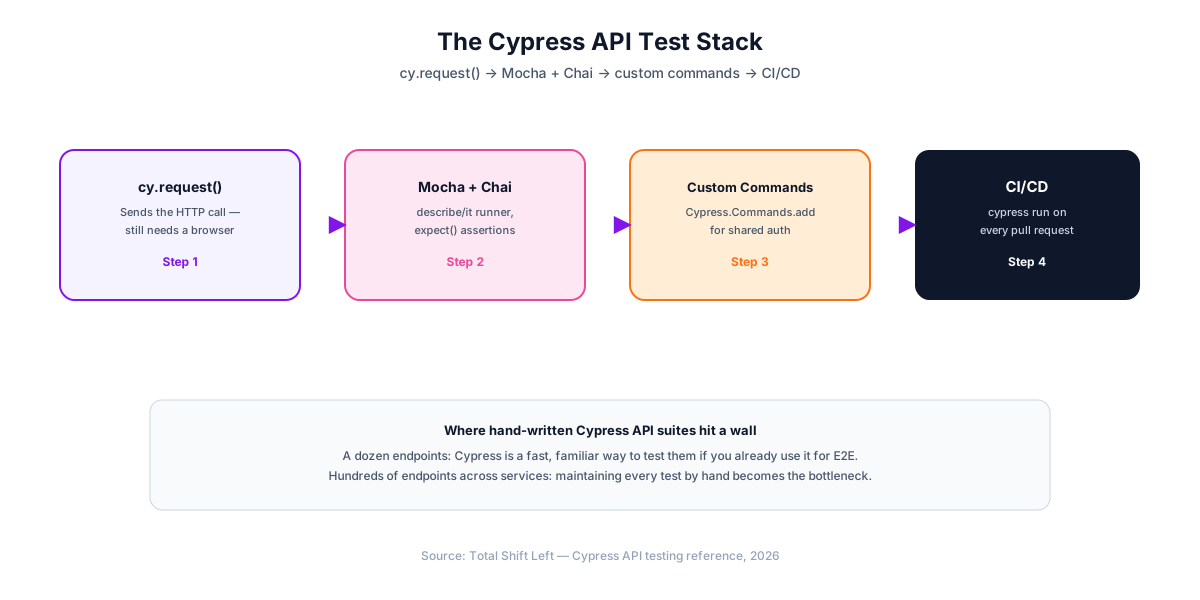
This guide covers cy.request() from scratch: basic requests, Cypress's default fail-on-error-status behavior (a common source of confusing beginner failures), chaining data between requests, custom commands for authentication, parametrized tests, and running the suite in CI/CD. Every example runs as written against JSONPlaceholder, a free public fake REST API.
In this guide
- Why Cypress for API Testing
- What you need before you start
- Your First cy.request() Test
- The failOnStatusCode Gotcha
- Testing POST, PUT, and DELETE
- Chaining Requests with Aliases
- Custom Commands for Authentication
- Parametrizing Tests with a Loop
- Running in CI/CD with GitHub Actions
- Common Pitfalls in Cypress API Testing
- Cypress vs Playwright vs pytest for API Testing
- When to Move Beyond Hand-Written Tests
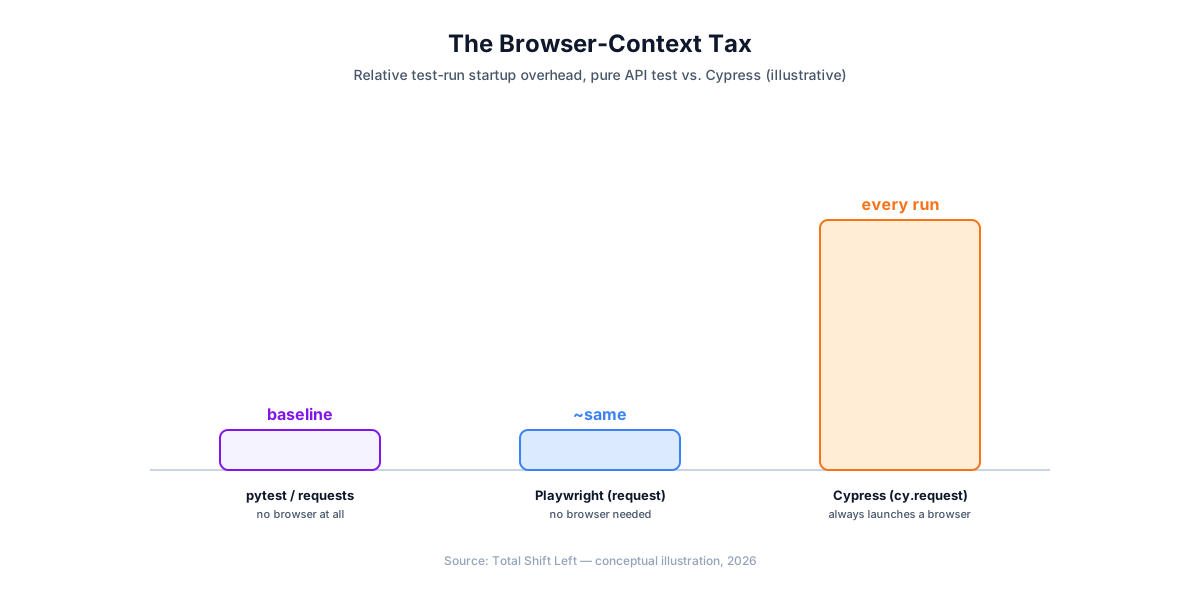
- Cypress is a browser tool doing API work
- Keeping an API spec fast in Cypress
Why Cypress for API Testing
cy.request() predates Cypress's newer component-testing features and has always served two purposes: setting up state for an E2E test without driving the UI (logging in via an API call instead of clicking through a login form), and standalone API assertions. For teams already invested in Cypress for end-to-end coverage, using it for API tests too means one test runner, one CI configuration, and one set of custom commands shared across both layers.
The tradeoff against a lighter tool: Cypress's architecture launches a browser context for every test run, even one that never calls cy.visit(). That is real overhead a pure API framework like pytest or Playwright's request fixture does not carry — the right call if you already run Cypress for E2E, a real cost if you are choosing a tool from scratch for API tests alone.
If your tooling behaves differently across spec versions, OpenAPI 3.0 vs 3.1 explains why.
What you need before you start
npm install -D cypress
- Node.js 18+
- cypress — bundles Mocha (test runner), Chai (assertions), and
cy.request()
Your First cy.request() Test
// cypress/e2e/users.cy.js
describe('Users API', () => {
  it('gets a user and returns 200', () => {
    cy.request('GET', 'https://jsonplaceholder.typicode.com/users/1').then((response) => {
      expect(response.status).to.eq(200);
      expect(response.body).to.have.property('email');
      expect(response.body.email).to.include('@');
    });
  });
});
Run it:
npx cypress run --spec "cypress/e2e/users.cy.js"
Setting baseUrl in cypress.config.js lets every request use a relative path instead of the full URL — cy.request() prefixes relative URLs with baseUrl the same way cy.visit() does:
// cypress.config.js
const { defineConfig } = require('cypress');

module.exports = defineConfig({
  e2e: {
    baseUrl: 'https://jsonplaceholder.typicode.com',
  },
});
cy.request('GET', '/users/1').then((response) => {
  expect(response.status).to.eq(200);
});
The failOnStatusCode Gotcha
This is the single most common source of confusion for Cypress API testing beginners: cy.request() automatically fails the test on any response outside the 2xx/3xx range — unlike fetch or axios, which just resolve with whatever status came back. Testing an expected error requires opting out explicitly:
it('returns 404 for a nonexistent user', () => {
  cy.request({
    url: '/users/999',
    failOnStatusCode: false,
  }).then((response) => {
    expect(response.status).to.eq(404);
  });
});
Without failOnStatusCode: false, this test would fail with a Cypress-generated error before your own expect() assertion ever runs — the test "fails," but not for the reason you'd assume from reading the assertion alone.
Testing POST, PUT, and DELETE
describe('Posts API', () => {
  it('creates a post', () => {
    cy.request('POST', '/posts', {
      title: 'foo',
      body: 'bar',
      userId: 1,
    }).then((response) => {
      expect(response.status).to.eq(201);
      expect(response.body.title).to.eq('foo');
    });
  });

  it('updates a post', () => {
    cy.request('PUT', '/posts/1', {
      id: 1,
      title: 'updated',
      body: 'bar',
      userId: 1,
    }).then((response) => {
      expect(response.status).to.eq(200);
      expect(response.body.title).to.eq('updated');
    });
  });

  it('deletes a post', () => {
    cy.request('DELETE', '/posts/1').then((response) => {
      expect(response.status).to.eq(200);
    });
  });
});
Passing a plain object as the third argument to cy.request(method, url, body) serializes it to JSON automatically, the same convenience requests and Playwright's request fixture give you.
Chaining Requests with Aliases
Cypress commands are queued and asynchronous — you cannot assign a request's result to a plain JavaScript variable and use it later. Use .then() for a direct callback, or .its() and .as() to create a named alias:
Ready to shift left with your API testing?
Try our no-code API test automation platform free. Generate tests from OpenAPI, run in CI/CD, and scale quality.
it('creates a post, then fetches it', () => {
  cy.request('POST', '/posts', { title: 'foo', body: 'bar', userId: 1 })
    .its('body.id')
    .as('newPostId');

  cy.get('@newPostId').then((newPostId) => {
    cy.request('GET', `/posts/${newPostId}`).then((response) => {
      expect(response.status).to.eq(200);
    });
  });
});
.its('body.id') extracts a single field from the response and yields it directly, so .as('newPostId') stores just the ID — not the whole response object — under that alias.
Custom Commands for Authentication
Cypress.Commands.add() centralizes a repeated action, like authenticating, into a single reusable command instead of repeating the login request in every test:
// cypress/support/commands.js
Cypress.Commands.add('apiLogin', () => {
  return cy
    .request('POST', '/auth/login', {
      username: Cypress.env('TEST_USERNAME'),
      password: Cypress.env('TEST_PASSWORD'),
    })
    .its('body.token');
});
it('gets a protected resource', () => {
  cy.apiLogin().then((token) => {
    cy.request({
      url: '/account',
      headers: { Authorization: `Bearer ${token}` },
    }).then((response) => {
      expect(response.status).to.eq(200);
    });
  });
});
Cypress.env() reads from cypress.env.json, the --env CLI flag, or environment variables prefixed with CYPRESS_ — set credentials as CI secrets exposed via CYPRESS_TEST_USERNAME/CYPRESS_TEST_PASSWORD, never as literal strings in a spec file.
Parametrizing Tests with a Loop
Like Playwright, Cypress has no built-in @parametrize decorator — loop over your cases and call it() inside the loop:
const cases = [
  { userId: 1, expectedStatus: 200 },
  { userId: 10, expectedStatus: 200 },
  { userId: 999, expectedStatus: 404 },
];

cases.forEach(({ userId, expectedStatus }) => {
  it(`GET /users/${userId} returns ${expectedStatus}`, () => {
    cy.request({
      url: `/users/${userId}`,
      failOnStatusCode: false,
    }).then((response) => {
      expect(response.status).to.eq(expectedStatus);
    });
  });
});
failOnStatusCode: false is required here for the same reason covered earlier — without it, the 999 case fails before the assertion runs.
Running in CI/CD with GitHub Actions
# .github/workflows/api-tests.yml
name: API Tests

on: [push, pull_request]

jobs:
  cypress-run:
    runs-on: ubuntu-latest
    steps:
      - uses: actions/checkout@v4
      - uses: cypress-io/github-action@v6
        with:
          spec: cypress/e2e/**/*.cy.js
        env:
          CYPRESS_TEST_USERNAME: ${{ secrets.TEST_USERNAME }}
          CYPRESS_TEST_PASSWORD: ${{ secrets.TEST_PASSWORD }}
The official cypress-io/github-action handles dependency installation and caching automatically — check the action's Marketplace listing for the current version tag before pinning. See our step-by-step CI/CD guide for GitLab CI and Jenkins equivalents.
Common Pitfalls in Cypress API Testing
- Forgetting
failOnStatusCode: falsewhen testing an expected error status. The test fails before your own assertion runs. - Assigning a
cy.request()result to a plain variable. Cypress commands are queued, not synchronous — use.then()or an alias instead. - Using Cypress for a pure API suite with no E2E tests at all. It works, but carries browser-launch overhead a framework like
pytestor Playwright'srequestfixture doesn't — a reasonable choice only if the team already knows Cypress. - Asserting only the status code. Cypress has no built-in JSON Schema validator; check specific fields with
expect(response.body).to.have.property(...), or bring inajvfor full structural validation the same way a Playwright suite would. - Committing credentials into
cypress.env.json. Gitignore that file and read secrets fromCYPRESS_-prefixed CI environment variables instead. - No negative-path coverage. Loop invalid IDs and malformed payloads into the same parametrized array as valid cases, remembering
failOnStatusCode: falsefor the ones expecting a non-2xx response.
Cypress vs Playwright vs pytest for API Testing
| Approach | Language | Needs a browser? | CI/CD fit | Best for |
|---|---|---|---|---|
| Cypress (cy.request) | JavaScript | Yes — always launches a browser context | Native — same runner as E2E tests | Teams already using Cypress for E2E |
| Playwright (request fixture) | TypeScript/JavaScript | No — pure API tests skip the browser | Native — same runner as E2E tests | Teams already using Playwright for E2E, or wanting a lighter API-only tool |
| pytest + requests | Python | No | Native — same runner as unit tests | Python teams |
| AI-generated (Total Shift Left) | None required | No | Native CI plugins | Teams testing many endpoints across services |
The practical distinction from Playwright is architectural, not capability: Cypress's browser-context requirement is real overhead if API testing is all you need, and irrelevant if you already run Cypress for E2E and want to add API coverage to the same suite. See API testing vs UI testing for how the two layers complement each other either way.
When to Move Beyond Hand-Written Tests
The economics track every other framework in this series: twice the endpoints means roughly twice the it() blocks, custom commands, and fixtures to maintain. For a service with a dozen endpoints — especially one a Cypress-standardized team is already testing at the UI layer — hand-written cy.request() tests are a fast, reasonable choice. Somewhere past a few dozen endpoints across multiple services, the suite's maintenance cost starts competing with the API's own development for engineering time.
Free Guided worksheet
Build Your Testing Strategy in 30 Minutes
A structured worksheet that walks you through defining your testing strategy in 30 minutes. Cover architecture, tools, layers, and team responsibilities.
Download FreeThe alternative is generating the suite directly from the OpenAPI specification instead of hand-translating it into Cypress spec files. Total Shift Left imports your spec, generates positive, negative, and boundary test cases for every endpoint, and re-generates automatically when the spec changes — so schema drift updates the suite instead of silently breaking it.
Cypress is a browser tool doing API work
cy.request() is genuinely useful, and it is worth being clear about what you are getting, because two properties surprise people.
Requests bypass the browser entirely. cy.request() is issued by the Node process behind Cypress, not by the page. That is why it ignores CORS and the same-origin policy — helpful for setup, and misleading if you assume it proves the browser could make the same call. If you need to verify CORS behaviour, that is a test against the browser's own fetch, not cy.request().
Cookies are shared with the browser context. A cy.request() that logs in sets cookies the subsequent page visit will use. This is the reason the pattern is popular for seeding state before a UI test, and it is also a source of surprise when an API-only spec leaks session state between tests.
The honest positioning: Cypress is the right place for API calls that support browser tests — creating a user before exercising a flow, cleaning up afterwards, checking a backend side effect the UI does not show. For a pure API suite with no browser involved, a dedicated framework starts faster, parallelises more cheaply, and does not carry a browser runtime you are not using.
The exception is a team that already runs Cypress and needs a handful of API checks. Adding them there is less friction than introducing a second framework, and that trade is usually right until the API tests outnumber the UI ones.
Keeping an API spec fast in Cypress
Cypress starts a browser even for a spec that never visits a page, which is the main reason a pure API suite feels slower here than elsewhere. Two settings recover most of that cost.
Disable video recording and screenshots for API specs — both exist to debug visual failures and neither helps when nothing was rendered. And keep API specs in their own directory with their own config, so they do not inherit browser-oriented defaults meant for UI tests.
// cypress.config.js
module.exports = defineConfig({
  e2e: {
    specPattern: 'cypress/e2e/api/**/*.cy.js',
    video: false,
    screenshotOnRunFailure: false,
    testIsolation: false,   // no page to reset between API tests
  },
});
testIsolation: false is the one worth understanding. By default Cypress clears state between tests, which is correct for UI specs and pure overhead for a spec that never loads a page. Turning it off for API specs removes a per-test reset — but it also means cookies set by one cy.request() persist into the next test, so isolate deliberately where that matters.
Frequently asked questions about Cypress API testing
Can Cypress test APIs without opening a browser? Not entirely — cy.request() sends the HTTP call directly without visiting a page, but Cypress's architecture still launches a browser context to run the test runner itself, even if no test ever calls cy.visit(). This is a real difference from Playwright, whose request fixture runs with no browser involved at all.
Why does my Cypress API test fail on a 404 I expected? cy.request() automatically fails the test on any response outside the 2xx or 3xx range by default. To test an expected error status, pass { failOnStatusCode: false } in the request options object, then assert on response.status yourself inside the .then() callback.
How do I chain data between Cypress API requests? Cypress commands are queued and asynchronous, so you cannot assign a request's result to a plain variable. Use .then() to access the response in a callback, or capture it with .its() and .as() to create an alias, then retrieve it later with cy.get('@alias').
Cypress vs Playwright for API testing — which is better? If your team already uses one of them for end-to-end tests, adding API coverage to that same framework avoids a second tool. Playwright's request fixture is lighter for pure API suites since it needs no browser; Cypress is the natural choice specifically for teams already standardized on it for E2E.
How do I run Cypress API tests in CI/CD?
Run npx cypress run, which exits non-zero on any failure — the official cypress-io/github-action wraps this for GitHub Actions with caching and artifact upload built in.
Can a Cypress API suite fully replace an AI-generated API test suite? For a handful of endpoints, hand-written Cypress is often faster, especially if the team already knows the framework. Past a few dozen endpoints across services, generating the suite from an OpenAPI spec keeps coverage complete without the manual upkeep.
Sources and further reading
- Cypress cy.request() — Cypress's HTTP request command for API assertions.
- RFC 9110 — HTTP Semantics — the normative definition of methods, status codes and headers.
- GitHub Actions documentation — workflow syntax, caching and matrix builds.
Key takeaways
cy.request()still launches a browser context — real overhead if API testing is all you need, irrelevant if you already run Cypress for E2E.failOnStatusCode: falseis required to test an expected error status — this trips up nearly every Cypress API testing beginner at least once.- Cypress commands are queued, not synchronous. Use
.then()or.its()/.as()aliases to chain data between requests. Cypress.Commands.add()centralizes repeated setup like authentication into one reusable command.- No built-in JSON Schema validator — check specific fields manually or bring in
ajvfor full structural validation. - Hand-written suites scale linearly with endpoint count. Past a few dozen endpoints across services, generating tests from an OpenAPI spec becomes the more maintainable path.
Generate the Equivalent Suite from Your OpenAPI Spec
Every test in this guide can also be generated automatically. Import your OpenAPI specification into Total Shift Left and get positive, negative, and boundary test cases for every endpoint — regenerated the moment your spec changes, with no Cypress spec files to maintain by hand.
Start your free trial and compare the generated suite against your own, or see plans and pricing if you're already evaluating.
Ready to shift left with your API testing?
Try our no-code API test automation platform free.