
Manual Testing vs Automation Testing: When to Use Each
Quick answer
Manual testing means a human executes test cases and applies judgment; automation testing means scripts or platforms run tests programmatically. Use manual testing for exploratory investigation, usability evaluation and features still in design. Automate anything that runs more than ~10 times: regression suites, API contract validation and CI/CD gates. The industry target is 70-80% automated, 20-30% manual.
Reviewed by Rishi Gaurav
Part of the Shift-Left, DevOps & QA Strategy hub. Start with the pillar guide: What is shift-left testing?.
Manual testing vs automation testing compares two approaches to software quality assurance. Manual testing relies on human testers executing cases by hand for judgment-driven validation, while automation testing uses scripts and tools for speed, repeatability, and scale. The right balance depends on test type, frequency, and team maturity.
The manual testing vs. automation testing debate persists because both sides have legitimate points—and both sides are partly right. Manual testing brings irreplaceable human judgment, creativity, and subjective evaluation. Automation testing brings speed, repeatability, and scale that no human team can match. The question is not which is better. The question is which is appropriate for each type of test in your specific context. This guide provides a rigorous, data-driven framework for making that decision, including a 10-point comparison table, clear criteria for each approach, a hybrid strategy model, and guidance on where Shift-Left API automates the repetitive API testing that manual testers should never have to perform at scale.
The debate over manual testing vs. automation testing is often framed as a zero-sum competition, but this framing creates poor decisions. Teams that automate everything waste resources on brittle, expensive automated tests for scenarios that genuinely require human judgment. Teams that rely too heavily on manual testing cannot scale their quality coverage to match the pace of modern software development.
The right model is a deliberate hybrid: understanding precisely which scenarios each approach serves best, and designing a testing strategy that applies each in its appropriate domain. This guide gives you the analytical framework to make those decisions confidently—based on frequency, stability, complexity, ROI, and the specific characteristics of your testing scenarios.
We also address the specific case of API testing, where manual testing fails catastrophically at scale and where automation via platforms like Shift-Left API provides the most dramatic ROI improvement.
In this guide
- What Is Manual Testing?
- What Is Automation Testing?
- Why the Choice Matters
- The key components of manual and automation testing
- Manual vs. Automation Testing: Architecture Comparison
- Comprehensive Comparison Table
- When Manual Testing Wins
- When Automation Testing Wins
- The Hybrid Approach: Best of Both
- Manual vs Automated API Testing: Economics and Migration Path
- Manual and automation testing in practice: a worked example
- Manual and automation testing challenges and how to solve them
- Best Practices for the Manual/Automation Decision
- Decision Framework Checklist
- Where the 10x difference actually comes from
- Frequently asked questions about manual and automation testing
The same trade shows up in the tools themselves — curl vs Postman covers when a reproducible one-line command beats a saved request, and when it does not.
What Is Manual Testing?
Manual testing is the process of a human tester executing test cases, following test plans, and verifying software behavior without the use of automation scripts. The tester interacts directly with the application—clicking buttons, entering data, observing results—and applies judgment to determine whether behavior is correct, acceptable, or problematic.
Manual testing is characterized by:
- Human judgment: Testers notice unexpected behavior even when it is not explicitly in a test case
- Exploratory capability: Testers can deviate from scripts based on what they discover
- Subjective evaluation: Testers can assess usability, aesthetics, and user experience
- Contextual understanding: Testers understand the business context that scripts cannot encode
- Flexibility: Testers can adapt to unexpected application states without script failures
Manual testing types include:
- Exploratory testing: Unscripted investigation to discover unknown defects
- Usability testing: Human evaluation of user experience quality
- Ad hoc testing: Informal testing without defined test cases
- Beta testing: Real users validating the product in real conditions
- Acceptance testing: Stakeholders verifying that requirements are met
If the constraint is budget rather than tooling, the business case for API test automation works the numbers you need for that conversation.
If the layer boundaries are the open question, unit vs integration vs system testing covers them with examples.
What Is Automation Testing?
Automation testing is the use of software tools, scripts, or platforms to execute test cases programmatically without human intervention. Automation testing excels at repeatability—the same test executes identically across thousands of runs—and scale—a single suite can validate hundreds of scenarios simultaneously.
Automation testing is characterized by:
- Repeatability: Identical execution on every run eliminates human variation
- Speed: Hundreds of tests complete in seconds or minutes
- Scale: Test suites can grow to thousands of cases without proportional staffing increases
- Continuous operation: Tests run on every commit, every build, around the clock
- Consistent coverage: No test steps are skipped due to fatigue or oversight
- Data variability: The same test logic can execute against hundreds of data combinations
Automation testing types include:
- Unit testing: Automated tests for individual code functions
- API testing: Automated validation of REST, GraphQL, or gRPC endpoints
- Integration testing: Automated validation of component interactions
- Regression testing: Automated re-validation of existing functionality after changes
- Performance testing: Automated load and stress testing
- E2E testing: Automated simulation of user journeys through the full application
Why the Choice Matters
The Cost Differential
The cost of manual testing scales linearly with coverage requirements. If you need 200 test cases run on every release, you need proportional QA hours. If you add 50 new features per quarter, you need 50 more test cases—and 50 more QA hours per release cycle. Manual testing cost grows with the product.
Automation testing cost scales sub-linearly. Building an automated test suite requires upfront investment, but the marginal cost of running 200 tests vs. 2,000 tests is negligible. The automation pays for itself over time as the manual equivalent grows prohibitively expensive.
The World Quality Report 2025 found that organizations spending over 30% of QA budget on manual regression testing report 2.3x higher total quality cost than organizations that have automated regression and reserved manual effort for exploratory and acceptance testing.
The Speed Differential
Manual testing cannot match automation for feedback speed. A QA engineer verifying 50 API endpoints manually takes 2–4 hours. The same 50 endpoints verified by Shift-Left API's automated suite takes under 2 minutes. At CI/CD speeds—where code changes happen dozens of times per day—manual testing cannot provide timely feedback.
The Human Advantage
Automation cannot match manual testing for discovery of unknown unknowns. Automated tests validate what was expected to be tested. Human testers discover what was not expected to go wrong. Exploratory testing by experienced QA engineers consistently finds a class of defects that automated suites miss: usability problems, unexpected interaction effects, and context-dependent failures that no test script anticipated.
The key components of manual and automation testing
Manual Testing Components
Test planning: Documenting what scenarios will be tested, what data will be used, and what the expected outcomes are.
Test execution: Human interaction with the application following the test plan.
Defect logging: Documenting observed defects with reproduction steps, screenshots, and severity assessments.
Exploratory sessions: Time-boxed unscripted investigation, typically 90-minute sessions with a defined charter.
Ready to shift left with your API testing?
Try our no-code API test automation platform free. Generate tests from OpenAPI, run in CI/CD, and scale quality.
Regression verification: Manual re-execution of previously passing tests after a change—highly suitable for automation replacement.
Automation Testing Components
Test script development: Writing the code or configuring the platform (like Shift-Left API) to execute test scenarios.
Test data management: Creating and managing the data sets that automated tests operate against.
CI/CD integration: Configuring automated tests to trigger and gate deployments in the delivery pipeline.
Reporting and alerting: Generating structured output for pipeline systems and human review.
Maintenance: Updating tests as the application evolves.
Manual vs. Automation Testing: Architecture Comparison
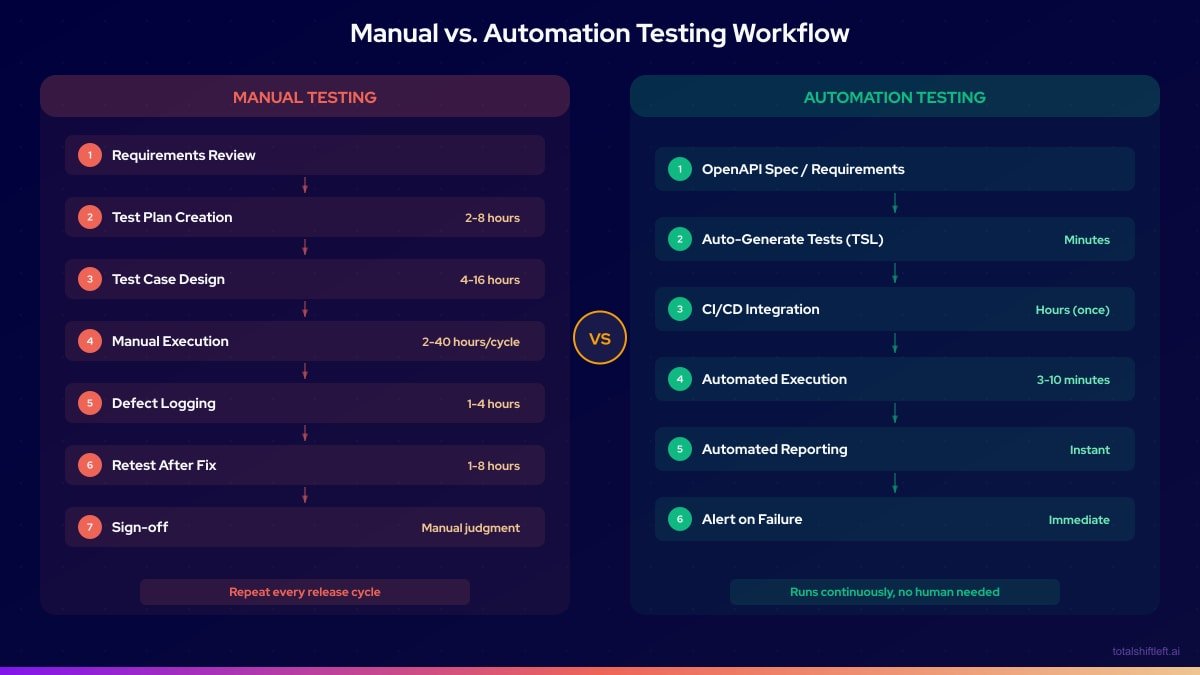
Comprehensive Comparison Table
| Dimension | Manual Testing | Automation Testing |
|---|---|---|
| Speed | Slow — hours to days per test cycle | Fast — minutes per full suite run |
| Cost per run | High — scales with QA headcount | Low — near-zero marginal cost after setup |
| Upfront investment | Low — test plans and cases | High — script development, tooling setup |
| Repeatability | Variable — human error and fatigue | Perfect — identical execution every run |
| Scalability | Poor — linear cost growth | Excellent — sub-linear cost growth |
| Discovery of unknown bugs | Excellent — human intuition and exploration | Poor — only validates what was scripted |
| Usability assessment | Excellent — subjective evaluation possible | Poor — cannot assess user experience |
| CI/CD integration | Not practical — too slow for continuous feedback | Native — triggers on every commit or build |
| Maintenance overhead | Low per test (update test plans) | Medium — scripts break when UI/API changes |
| Appropriate for | Exploratory, usability, acceptance, new features | Regression, API, integration, load, security |
When Manual Testing Wins
Manual testing is the right choice when:
1. Exploratory investigation is required. When you need to discover what is wrong, not just verify that known scenarios pass, manual exploratory testing is irreplaceable. Skilled exploratory testers consistently find defects that comprehensive automated suites miss.
2. Usability and UX are being evaluated. No automation tool can tell you whether a user interface is intuitive, aesthetically coherent, or emotionally satisfying. Human judgment is mandatory for UX quality assessment.
3. The feature is in active design. Features that are changing frequently are poor automation targets. Automated tests for unstable features require constant rewrites, creating negative ROI. Manual testing is appropriate until the feature stabilizes.
4. The test will be run once or rarely. Building an automation suite for a one-time test is pure waste. One-time validation scenarios belong in manual testing.
5. Acceptance testing with stakeholders. When product owners or business stakeholders need to verify that requirements are met, manual acceptance testing provides the human confirmation that automation cannot replace.
6. Context-dependent evaluation is needed. Tests that require understanding business context, compliance interpretation, or edge case judgment belong to human testers.
When Automation Testing Wins
Automation testing is the right choice when:
1. Tests run frequently. Any test that will be run more than 10 times in its lifetime is a strong automation candidate. Regression suites run on every build—100% automation target.
2. The feature is stable. Stable, well-defined functionality maintains automated tests without constant rewrites. Core business functions (authentication, payment processing, data validation) deserve automation investment.
3. Large data variation is required. Testing the same logic against 50 different input combinations is impractical manually. Automation makes data-driven testing trivial. In Shift-Left API, data-driven testing runs any test or workflow across a dataset — CSV, Excel, JSON, XML, YAML, a database query or an API — with a result per iteration, and columns prefixed INVALID_ produce negative variants automatically. If the tests already exist, Fill tests from a data set pushes a data set's values into them with a preview first and Undo after, leaving deliberate boundary values and credentials alone.
4. API contracts must be continuously validated. Every API endpoint that serves business-critical functions should be continuously validated in CI. This is exactly where Shift-Left API excels—importing your OpenAPI spec and using schema-aware test generation to auto-produce tests that run on every build.
5. Regression coverage is needed at scale. When your application has hundreds or thousands of features, manually regressing all of them before every release is impossible. Automation is the only viable path to comprehensive regression coverage.
6. Performance and load testing is required. No amount of manual testing can simulate 10,000 concurrent users. Performance and load testing are automation-only domains. They do not have to mean a second set of scripts, though: Shift-Left API's API load testing builds smoke, load, stress, spike and soak runs from the functional API tests you already automated, and reports a verdict in words. It is a paid add-on, included in the Trial.
7. Security scanning is needed. SAST, DAST, and dependency scanning are programmatic by nature. Manual security review is complementary but cannot replace automated scanning.
The Hybrid Approach: Best of Both
The most effective quality strategy in 2026 combines manual and automation testing deliberately:
Automate: Regression tests, API contract tests, unit tests, integration tests, performance tests, security scans. Everything that runs repeatedly against stable functionality.
Manually test: Exploratory sessions (time-boxed, 90 minutes, defined charter), usability reviews, acceptance testing with stakeholders, new feature smoke testing before automation is built.
Decision rule for new features: When a new feature is released, QA engineers perform manual exploratory testing for the first 1-2 sprints. As the feature stabilizes, automation is built. This approach aligns with a mature shift left testing strategy where automation coverage grows as features solidify. By the time the feature reaches its third sprint, it has automated regression coverage and no longer requires manual regression.
This model keeps manual QA effort focused on high-value discovery work while automation handles the repetitive validation that would otherwise consume QA capacity. For teams starting automation, no-code test automation tools dramatically reduce the skill barrier. To define which tests to automate and in what order, build a test automation strategy before investing in tooling.
Manual vs Automated API Testing: Economics and Migration Path
The manual/automation tradeoff is sharpest — and most measurable — at the API layer specifically, where every request-response pair is a discrete, scriptable unit of work.
The economics. For an API surface with 200 endpoints and a 20-test suite per endpoint, a full manual regression pass takes roughly 100 engineering hours (4,000 tests at ~1.5 minutes each). An automated suite completes the same coverage in under 10 minutes on sharded CI. Over a year of weekly releases that's roughly 5,000 saved engineering hours — and manual passes statistically miss regressions on more than 35% of runs due to tester fatigue and time-boxing, a failure mode automation doesn't have.
What automation catches that manual testing structurally can't. Schema drift against the OpenAPI specification, regressions across every endpoint on every build, contract violations between microservices, and response-time SLO breaches all require running the full suite on every change — something no human team does consistently. Manual testing remains the right call for exploratory testing of undocumented endpoints, ad-hoc production-incident debugging, and one-off security probing.
Free PDF (10 pages)
Shift Left Testing Playbook
Move testing earlier in your SDLC with a proven adoption roadmap. Includes CI/CD architecture, tool stack recommendations, and metrics to track success.
Download FreeAPI-specific tooling landscape:
| Tool / Platform | Mode | Best For |
|---|---|---|
| Postman, Insomnia, Bruno, cURL | Manual | Exploratory testing, API learning, one-off probes |
| RestAssured, Karate, Pytest + Requests | Scripted automation | Teams willing to write and maintain test code |
| Total Shift Left / AI-first platforms | Spec-driven automation | Coverage generated from an OpenAPI spec, no authoring |
A 5-phase migration path for teams currently running regression through Postman: (1) audit existing collections and endpoint coverage, (2) lint and validate OpenAPI spec quality, (3) generate a baseline automated suite from the spec for a pilot set of services, (4) wire the suite into CI/CD in warning mode before promoting to a blocking gate, (5) redirect the manual effort freed up toward exploratory and security testing. Teams with 50-300 endpoints typically complete this in 8-16 weeks; teams hand-writing Karate or RestAssured scripts instead of using spec-driven generation typically take 2-4x longer.
Step (1) does not have to throw the existing collections away. Shift-Left API's Postman import turns each request into one test, carries the assertions over (compiling checks from the collection's own scripts where they cannot be mapped directly), imports variable captures and Postman auth settings into authentication profiles, and lists anything it left out — so the audit in step (1) starts from a concrete gap list rather than a manual read-through.
Manual and automation testing in practice: a worked example
Problem
A healthcare technology company had a QA team of 4 engineers supporting 22 developers. The team was spending 80% of their time running manual regression tests before each bi-weekly release. With only 20% of capacity remaining for exploratory testing, they were missing entire categories of defects that only exploratory testing would reveal. Two serious bugs had reached production in the previous quarter.
Solution
The team implemented a deliberate manual/automation hybrid strategy:
Month 1: API automation
- Imported OpenAPI specifications for their 3 core microservices into Shift-Left API
- Auto-generated API tests covering 187 endpoints
- Integrated into CI/CD—API tests now run on every PR (3 minutes)
Month 2: Unit test ownership shift
- Moved unit test writing responsibility to developers
- QA engineers review unit test quality, not write unit tests
- Unit test coverage increased from 44% to 71% in 8 weeks
Month 3: Exploratory testing program
- Freed from regression work, QA engineers ran weekly exploratory sessions
- Each session: 90 minutes, defined charter, new feature or high-risk area
- 11 defects discovered in the first month of dedicated exploratory testing that automation would not have caught
Results After 6 Months
- Manual regression time: 80% of QA capacity → 15% of QA capacity
- Exploratory testing: 20% → 60% of QA capacity
- Production defects: 2 per quarter → 0 in 6 months
- API coverage: 0% → 100% (187 endpoints in CI)
- QA team satisfaction: Engineers reported significantly more meaningful work
Manual and automation testing challenges and how to solve them
Challenge: Team tries to automate everything, including exploratory scenarios Solution: Establish explicit criteria for what gets automated and what stays manual. Document these criteria in the QA strategy guide. Review automation additions in retrospective to catch poor automation investments.
Challenge: Manual testing bottleneck blocks releases Solution: Identify which manual tests are actually regression tests in disguise. These should be automated. Genuine exploratory and acceptance tests should be time-boxed, not open-ended.
Challenge: Automated tests require programming expertise QA team does not have Solution: Separate the automation investment by layer. Unit tests owned by developers. API tests managed through no-code platforms like Shift-Left API. E2E tests co-owned by QA and developers using frameworks like Playwright that have lower coding barriers than alternatives.
Challenge: Automated API tests break every sprint Solution: If API tests break frequently, the tests are likely checking implementation details rather than behavior. Use contract-based testing. Or use Shift-Left API, which holds a re-imported spec change for approval, lets you regenerate from the approved spec, and proposes fixes for tests that broke, each one applied only when a person accepts it.
Challenge: Stakeholders do not trust automation results Solution: Make automated test reports visible and readable to non-engineers. TSL's analytics dashboard provides executive-level views of API test health. Pair automation results with manual acceptance testing for high-stakes releases to build stakeholder confidence over time.
Best Practices for the Manual/Automation Decision
- Define automation criteria explicitly. Write down what qualifies a test for automation before any automation is built.
- Reserve manual testing for discovery. Manual testing should be exploratory, not repetitive. If a manual test has been run more than five times, it is an automation candidate.
- Do not automate unstable features. Automation on features under active design creates negative ROI. Wait for stability before investing in automation.
- Use no-code tools to lower the automation barrier. Shift left testing tools like Shift-Left API make API test automation accessible to QA engineers who do not write code.
- Track the manual/automation ratio quarterly. Target: 20–30% manual (exploratory/acceptance), 70–80% automated (regression/API/unit).
- Include automation cost in feature estimates. If a feature will require ongoing manual regression, include the automation buildout in the development estimate.
- Celebrate exploratory testing findings. When manual exploratory testing catches a defect that automation missed, celebrate it publicly. This reinforces the value of human testing.
- Review ROI on automation investments annually. Automation that has never caught a defect in a year is waste. Delete it.
Decision Framework Checklist
Use this checklist to decide whether a specific test should be manual or automated:
- ✔ Will this test run more than 10 times? → Automate
- ✔ Is this testing stable, well-defined functionality? → Automate
- ✔ Does this test validate an API endpoint? → Automate (use Shift-Left API)
- ✔ Does this test require human judgment about subjective quality? → Manual
- ✔ Is this an exploratory investigation of unknown behavior? → Manual
- ✔ Is the feature under active design and changing frequently? → Manual for now
- ✔ Is this a one-time validation for a specific release? → Manual
- ✔ Does this test require evaluating user experience or usability? → Manual
Where the 10x difference actually comes from
The comparison is not "human versus script" in the abstract — it is what each costs per release. A regression pass over 200 endpoints is roughly ten hours by hand; the same coverage as a generated suite is one command:
# the automated regression pass: about 4 minutes for 200 endpoints
time schemathesis run openapi.yaml --url "$STAGING_URL" --checks all
# ...
# real    3m52s
What automation cannot do is decide whether the behaviour is right. That judgement is the manual half, and it is best spent as a timeboxed exploratory charter rather than as a scripted re-run of what CI already checked:
Exploratory charter — 90 minutes
Explore: the checkout flow's error paths
With:    an expired card, a card that 3DS-challenges, and a network drop mid-payment
To find: states where the order exists but the payment does not, or vice versa

Notes / bugs found:
- Dropping the connection after /pay but before the callback leaves the order
  "pending" forever; there is no reconciliation job.  -> BUG-4192
- The 3DS challenge returns 200 with an HTML body from a JSON endpoint. -> BUG-4193
Frequently asked questions about manual and automation testing
What is the difference between manual testing and automation testing?
Manual testing involves human testers executing test cases directly, bringing judgment and creativity. Automation testing uses scripts or tools to execute tests programmatically, providing speed, repeatability, and scale. The best teams use both for different purposes.
When should you use manual testing instead of automation?
Manual testing is appropriate for exploratory testing, usability and UX evaluation, one-time or rarely-run tests, tests for features still under active design, and any scenario where human judgment about subjective quality is required.
When should you automate tests?
Automate tests that run frequently (every build or every commit), validate stable functionality, cover critical business paths, require many data variations, or would consume excessive QA time if run manually. Regression suites are the highest-priority automation target.
What percentage of testing should be automated?
Industry best practice recommends automating 70–80% of the test suite, focusing on unit, API, and integration layers. The remaining 20–30% is manual testing for exploratory, usability, and complex scenario coverage.
Sources and further reading
- ISTQB Glossary — the standard vocabulary for test terms.
- Martin Fowler — The Practical Test Pyramid — the reference argument for test-layer proportions.
- Google Testing Blog — Google's engineering write-ups on test sizing and flakiness.
Key takeaways
Manual testing and automation testing are partners, not competitors. Manual testing provides the human intelligence that discovers unknown defects, evaluates user experience, and provides stakeholder confidence. Automation provides the speed, scale, and repeatability that enables continuous delivery at modern cadences. Teams implementing a DevOps testing strategy benefit most when they assign each to its appropriate domain—and uses no-code platforms like Shift-Left API to make automation accessible for the API layer without requiring programming expertise. Start your free trial and automate the API tests your team is currently running manually.
Related: Test Automation Strategy | What Is Shift Left Testing | Shift Left Testing Strategy | Best Shift Left Testing Tools | DevOps Testing Strategy | Best Postman Alternatives | No-code API testing platform | Start Free Trial
Ready to shift left with your API testing?
Import your OpenAPI spec and get a runnable test suite, in our cloud or on your own infrastructure.