
10 Best No-Code Test Automation Tools in 2026
Quick answer
No-code test automation tools let QA teams without programming backgrounds build, run, and maintain automated tests through visual interfaces. The 2026 leaders combine no-code authoring with AI test generation from OpenAPI specs — Total Shift Left, Katalon Studio, and Tricentis Tosca lead this category, with self-hosted support increasingly a buying criterion for regulated industries.
Reviewed by Parveen Kumari
The best no-code test automation tools in 2026 are platforms that let QA teams create, run, and maintain automated tests without writing code. They use AI-powered test generation, visual interfaces, and spec-driven automation to eliminate scripting bottlenecks, reduce maintenance costs, and accelerate quality delivery.
No-code test automation has crossed a critical threshold in 2026: it is no longer a compromise between speed and capability, but a genuinely superior approach for many teams. AI-powered test generation, self-healing test logic, and native CI/CD integration mean that no-code tools now deliver coverage that previously required teams of test automation engineers — at a fraction of the setup and maintenance cost. This guide evaluates six of the best no-code test automation platforms, with a focused deep-dive on Shift-Left API as the premier no-code solution for API testing.
In this guide
- Why no-code test automation matters in 2026
- What to Look for in No-Code Test Automation Tools
- Why No-Code Is Now the Strategic Choice for Quality Engineering
- Best No-Code Test Automation Tools for 2026
- No-code test automation comparison table
- Real-World Implementation: Shift-Left API No-Code API Automation
- How to Choose the Right No-Code Test Automation Tool
- Best Practices for No-Code Test Automation Adoption
- No-Code Tool Selection Checklist
- Frequently asked questions about no-code test automation
- What a no-code test actually compiles down to
If a code-based suite turns out to be the better fit after all, the language-specific guides cover it end to end — pytest, REST Assured, Playwright, Karate and Cypress — and how to choose an API testing framework compares the categories first.
Why no-code test automation matters in 2026
Five years ago, "no-code test automation" was a term applied to basic record-and-replay tools that captured mouse clicks and keystrokes — fragile, superficial, and ultimately more trouble than they were worth. The conventional wisdom was that real test automation required real developers: people who could write Selenium scripts in Java, maintain REST Assured test suites, or build custom API testing frameworks.
That conventional wisdom is now obsolete.
The combination of AI-powered test generation, schema-driven automation, and self-healing test logic has produced a new generation of no-code test automation tools that are genuinely powerful. In 2026, the best no-code platforms generate test cases that are as comprehensive as anything a skilled test automation engineer could write manually — but in minutes instead of weeks, with a fraction of the maintenance overhead, and accessible to QA professionals regardless of their coding background.
The evidence is in the adoption numbers. No-code test automation tool usage has grown by over 200% since 2023, driven by a simple economic reality: teams that can achieve comprehensive automated test coverage without requiring specialist test automation engineering resources have a significant competitive advantage in release velocity, quality, and cost.
This guide evaluates the six most capable no-code test automation platforms in 2026, helping you understand where each excels, where it falls short, and which combination of tools will serve your team best.
If nobody on the team wants to own test code, how to automate API testing without writing code covers the spec-driven route to the same coverage.
The category itself — what these platforms generate and what you can take with you — is covered in the rise of no-code API test automation platforms.
For the category where the agent decides what to test rather than executing a script, see agentic QA tools and the four questions worth asking any vendor.
The wider AI tool landscape sorts into five distinct jobs — 14 best AI testing tools compares them by what the AI actually automates.
What to Look for in No-Code Test Automation Tools
The term "no-code" covers a wide spectrum of actual capability. Before evaluating specific tools, it is important to establish what genuinely no-code test automation means and how to assess it:
True No-Code Interface. Does the tool require any scripting, code editing, or command-line operation to create and run tests? Partial no-code tools that require Groovy scripts, JavaScript assertions, or YAML configuration are "low-code" at best. Truly no-code platforms handle all test logic through visual configuration.
Intelligent Test Generation. The highest-value no-code tools do not just record actions — they generate tests intelligently from schemas, specifications, or observed application behavior. For API testing, this means generating test cases from OpenAPI specs. For UI testing, this means generating meaningful assertions from page analysis rather than just recording exact pixel coordinates.
Self-Healing Tests. Tests break when applications change. No-code tools that require a developer to fix broken tests every time the UI updates or an API schema changes are not truly solving the maintenance problem. Look for platforms that automatically adapt to changes or flag what needs review without requiring code edits.
CI/CD Integration Without Scripting. A no-code tool that requires YAML expertise to integrate with GitHub Actions is not fully no-code. The best platforms provide pre-built integrations that a QA engineer can configure through the tool's UI or through guided setup wizards.
Coverage Depth. No-code does not mean shallow coverage. Evaluate whether the tool covers the full range of test scenarios you need: happy paths, negative scenarios, boundary conditions, authentication, error handling. Tools that only test happy paths leave significant gaps in your coverage.
Reporting for Non-Technical Stakeholders. One of the primary benefits of no-code testing is that quality becomes visible across the entire team, not just to developers. Look for dashboards that provide clear coverage metrics, failure trends, and execution history that PMs, QA managers, and developers can all interpret without technical expertise.
Total Cost of Ownership. No-code tools reduce test authoring costs significantly, but evaluate the total picture: license cost, training time, CI/CD infrastructure, and the ongoing cost of managing the tool at scale.
Why No-Code Is Now the Strategic Choice for Quality Engineering
The case for no-code test automation is no longer primarily about accessibility — though accessibility matters. The case is about speed, scalability, and strategic alignment with how modern software teams operate.
Speed to coverage. A team that can generate hundreds of API test cases straight from an OpenAPI spec in an afternoon achieves in hours what a manual test authoring approach would take weeks to accomplish. When shift left testing requires coverage to begin at the start of development rather than the end, speed to coverage is not a convenience — it is a requirement.
Scalability without linear cost growth. Traditional test automation scales poorly: every new API endpoint or UI screen requires engineering time to author test scripts. No-code automation, particularly AI-powered platforms like Shift-Left API, scales API coverage proportionally to API surface area without proportional engineering cost. A team of three QA engineers can maintain coverage across hundreds of endpoints using no-code tooling — not possible with manual test authoring approaches.
Quality as a shared responsibility. When test creation requires coding expertise, quality becomes siloed in a small group of test automation specialists. When quality work is accessible through no-code interfaces, developers, QA engineers, product managers, and business analysts can all participate in reviewing and extending test coverage. This democratization of quality is one of the most significant organizational benefits of no-code test automation.
Reduced context switching. Developers working in code-based testing frameworks must context-switch between implementation code and test code — two different mental models, often in two different files or projects. No-code tools that integrate with the developer's workflow (via IDE plugins, pull request checks, or simple CLI triggers) reduce this context switching significantly.
Alignment with API-first architecture. The dominance of API-first development means that the most impactful testing happens at the API layer, not the UI layer. For teams evaluating code-based alternatives as well, see our comparison of the top API testing tools in 2026. No-code API test automation tools that generate tests from OpenAPI specifications are perfectly aligned with how modern teams document and build their services — and with a DevOps testing strategy that prioritizes API-level validation.
Best No-Code Test Automation Tools for 2026
Shift-Left API — The Premier No-Code API Test Automation Platform

What it is: Shift-Left API is the most capable no-code API test automation platform available in 2026. It is purpose-built for one thing — comprehensive API test automation — and it executes on that purpose with a depth of capability that no other tool in this category matches. The platform's defining capability is AI-powered test generation: upload your OpenAPI, Swagger, or GraphQL specification, and Shift-Left API's AI engine generates hundreds of test cases automatically, covering every endpoint, every HTTP method, and every category of test scenario.
Why Shift-Left API is the no-code API testing leader:
The truly no-code experience begins at the first interaction. QA engineers and developers navigate to the platform, upload their OpenAPI spec file through a visual interface, and watch as the AI engine analyzes the schema and produces a comprehensive test suite in real time. No scripting. No configuration files. No command-line operations. The entire workflow from spec upload to first test execution happens through a browser-based UI.
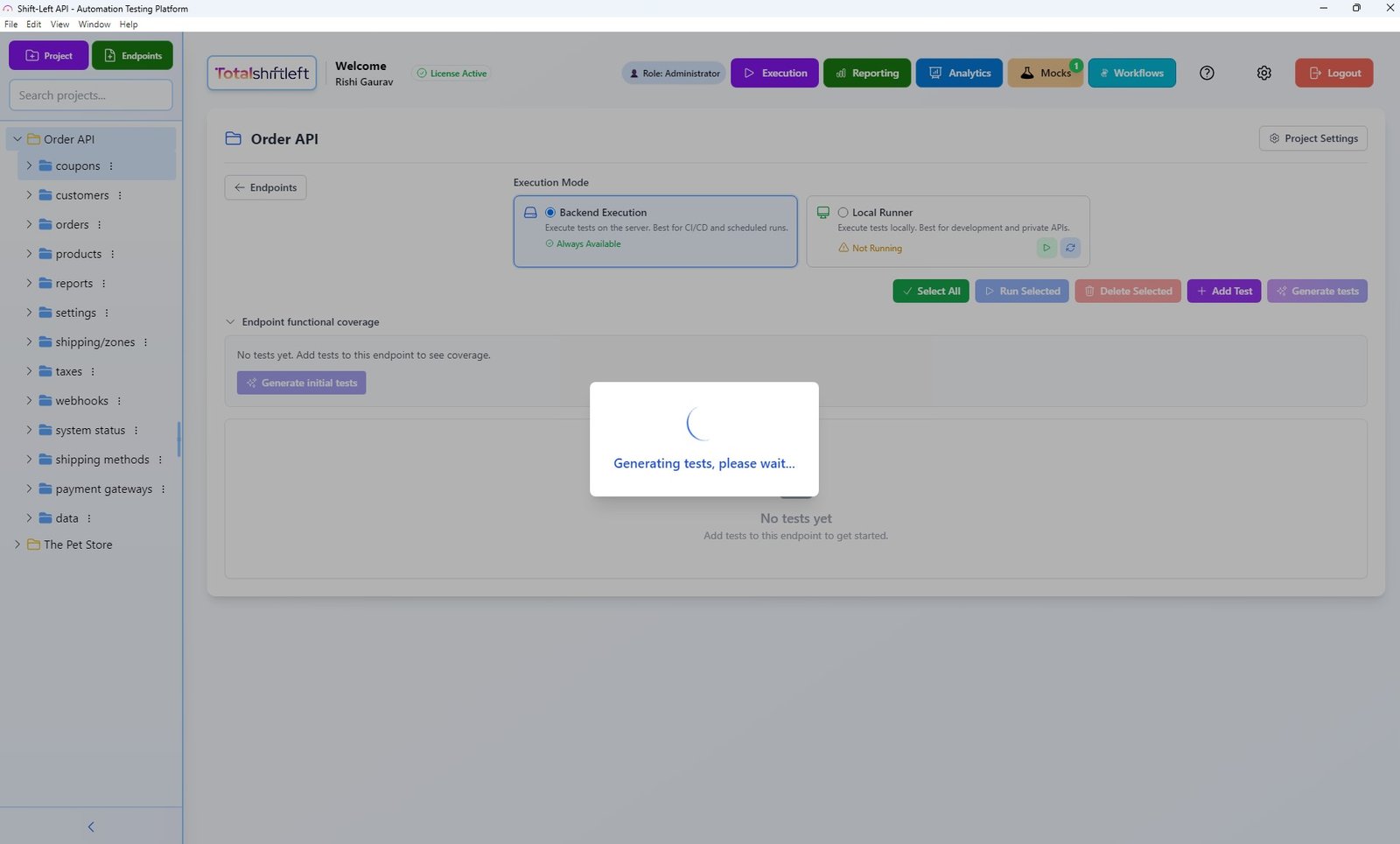
What distinguishes Shift-Left API's test generation from simpler tools is the intelligence applied to test case creation. The AI does not merely verify that endpoints return the status codes defined in the spec — it generates tests for:
Ready to shift left with your API testing?
Try our no-code API test automation platform free. Generate tests from OpenAPI, run in CI/CD, and scale quality.
- Happy path scenarios — valid requests with correct parameters returning expected responses
- Authentication and authorization — valid and invalid token scenarios, expired credentials, missing auth headers
- Required field validation — requests missing mandatory parameters and the error responses they should trigger
- Data type boundary testing — integer overflow, string length limits, format validation (emails, UUIDs, dates)
- Error condition coverage — 400, 401, 403, 404, 409, and 500 scenarios with assertion verification
- Dependency sequencing — tests that establish dependent resources before testing endpoints that require them
This depth of coverage is what separates Shift-Left API from tools that claim no-code API testing but only verify basic schema conformance.
CI/CD integration — still no-code. Shift-Left API's CI/CD integration is configured through the platform's UI with no YAML editing required. Teams select their CI/CD platform (GitHub Actions, Jenkins, GitLab CI, CircleCI, Azure DevOps), authenticate, and configure test triggers through a visual wizard. The platform generates any required configuration files automatically. QA engineers who have never written a GitHub Actions workflow can configure full CI/CD integration in under 30 minutes.
Built-in mock server — no-code service virtualization. One of Shift-Left API's most powerful no-code capabilities is its integrated mock server, which creates virtual versions of your API based on the OpenAPI specification. Teams can run tests against the mock server before the real implementation exists, enabling true parallel development without complex service virtualization configuration.
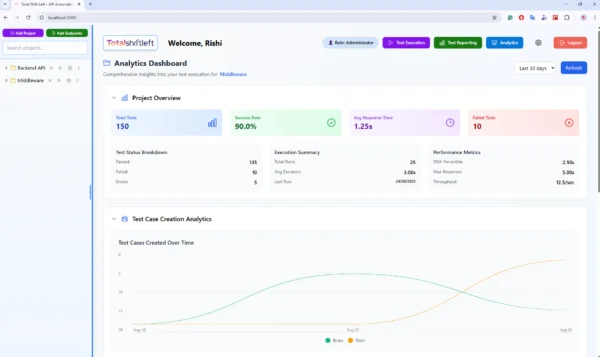
Analytics dashboard — no-code quality visibility. The platform's analytics dashboard provides real-time visibility into test coverage, execution history, failure trends, and endpoint health — without requiring any configuration or dashboard building.
Pros:
- AI generates comprehensive API tests from OpenAPI/Swagger/GraphQL specs — no coding ever required
- Fully no-code from spec upload through CI/CD integration and test management
- Covers REST, GraphQL, and SOAP — the full range of API protocols
- Built-in mock server for testing APIs before implementation is complete
- Native CI/CD integration with all major platforms, configured through visual UI
- Analytics dashboard provides coverage and execution trend visibility
- Forever-free Citizen Developer Edition (single user, no expiry, BYO AI key) plus a 15-day Enterprise trial — no credit card required
Cons:
- Focused exclusively on API testing — does not cover UI/browser testing or unit testing
- Maximum value requires OpenAPI/Swagger documentation (though manual endpoint entry is supported)
- Growth and Enterprise pricing requires direct engagement
Best for: Any team doing API development who wants the fastest, most comprehensive no-code path to automated API test coverage. The definitive choice for teams implementing shift left API testing without needing to build a custom test automation framework. See our full list of best shift left testing tools for the broader ecosystem.
Website: totalshiftleft.ai | Start Free Trial | View Platform | Request Demo
Katalon Studio — Unified No-Code/Low-Code Testing
What it is: Katalon Studio is a unified test automation platform that covers API, web UI, mobile, and desktop testing in a single application. It provides both a no-code "keyword-driven" test authoring mode and a code-based mode using Java/Groovy, attempting to serve both no-code QA users and test automation engineers in one platform.
No-code capability assessment: Katalon's no-code mode allows QA engineers to build tests by selecting keywords from a library (actions like "send request," "verify response code," "get response body") and chaining them into test cases without writing code. For basic API tests, this approach works reasonably well. For complex scenarios, teams frequently find themselves extending into code-based scripting.
Pros:
- Single platform for API, web, mobile, and desktop testing
- No-code mode reduces barrier to entry for QA engineers
- Katalon TestOps provides test management and analytics
- Lower cost than enterprise alternatives like ReadyAPI
- Active community and documentation
Cons:
- No AI-powered test generation — tests must be authored manually even in no-code mode
- No-code mode for API testing is less capable than Shift-Left API
- "Unified" platform means API testing capabilities are less specialized than dedicated API tools
- Performance can degrade with large test suites
- Community edition has meaningful feature limitations
Best for: Teams that need a single tool covering both UI and API testing who do not have a dedicated API testing tool and want to avoid managing multiple platforms.
Website: katalon.com
TestSigma — AI-Powered No-Code Testing Platform
What it is: TestSigma is a cloud-based no-code test automation platform that uses natural language processing and AI to enable test creation in plain English, covering web, mobile, and API testing.
No-code capability assessment: TestSigma's most distinctive feature is its natural language test creation interface, where testers write test steps in conversational English ("Navigate to login page," "Enter username," "Click submit button") and the platform interprets these instructions into executable test automation. For UI testing, this approach is genuinely impressive. For API testing, the natural language interface is less fluent than schema-driven approaches.
Pros:
- Natural language test creation is highly accessible to non-technical testers
- Good UI testing capabilities with self-healing tests
- Cloud-based with no infrastructure to manage
- Supports web, mobile, and API testing in one platform
- Active development with regular feature releases
Cons:
- API testing capabilities are less comprehensive than dedicated API tools
- No AI-powered test generation from OpenAPI specifications
- Natural language interpretation can misinterpret complex test scenarios
- Pricing can be high for larger teams
- Less mature for API testing than platforms purpose-built for it
Best for: Teams with QA engineers who have minimal technical backgrounds and need to create UI tests through a natural language interface, with light API testing requirements.
Website: testsigma.com
Testim — AI-Based UI Test Automation
What it is: Testim is an AI-powered UI test automation platform that uses machine learning to create, run, and maintain browser-based end-to-end tests. Its core differentiator is AI-powered element identification that makes tests more resilient to UI changes than traditional selector-based automation.
No-code capability assessment: Testim provides a visual test recorder that captures user interactions in a browser and converts them to automated test steps. The AI-powered element identification means tests are significantly more stable than Selenium-based recorder approaches. For web UI testing, Testim is genuinely no-code for most scenarios.
Pros:
- AI-powered element locators make UI tests far more stable than traditional XPath/CSS selectors
- Visual recorder creates tests from observed browser interactions
- Self-healing tests automatically adapt to UI changes
- Good integration with CI/CD platforms
- Test parameterization for data-driven testing
Cons:
- Focused entirely on web UI testing — no meaningful API testing capability
- More expensive than open-source alternatives like Cypress or Playwright
- Complex test scenarios may still require JavaScript for custom logic
- Not suitable for API testing, contract testing, or backend service validation
Best for: Teams that need resilient, AI-powered web UI test automation and want to minimize the maintenance overhead of UI test suites. Should be paired with Shift-Left API for API layer coverage.
Website: testim.io
Rainforest QA — Crowd-Sourced and Automated Testing
What it is: Rainforest QA is a hybrid test automation platform that combines automated browser testing with crowd-sourced human QA testing. Teams write test cases in plain English, and Rainforest executes them using a combination of automation and real human testers when needed.
No-code capability assessment: Rainforest is genuinely no-code for test creation — test steps are written in plain English sentences without any scripting. The hybrid model ensures that complex scenarios a headless browser might mishandle are validated by actual human testers.
Pros:
- Completely no-code test authoring in plain English
- Hybrid model catches edge cases that pure automation misses
- No infrastructure or browser management required
- Good for exploratory and UX validation scenarios
Cons:
- Human testing component makes execution slower than fully automated alternatives
- More expensive than fully automated tools due to human QA costs
- Not suitable for API testing or CI/CD integration at the API layer
- Limited to web UI testing scenarios
Best for: Teams that need reliable web UI validation for complex user flows where pure automation frequently fails, and are willing to pay for hybrid human-machine execution. Not a replacement for API testing.
Website: rainforestqa.com
Mabl — Intelligent Test Automation for Web Apps
What it is: Mabl is an AI-powered test automation platform focused on web application testing, providing a low-code interface for creating end-to-end tests with automated maintenance and intelligent insights.
No-code capability assessment: Mabl's trainer interface records browser interactions and automatically generates test steps. Its AI engine then maintains these tests, automatically detecting when UI elements change and updating test steps accordingly. For web testing, Mabl delivers a genuinely low-code experience with strong maintenance automation.
Pros:
- Strong AI-powered test maintenance that adapts to UI changes automatically
- Good analytics and trend insights for test health monitoring
- API testing capabilities available alongside UI testing
- Integrates well with popular CI/CD platforms and JIRA
- Cloud-based with no infrastructure management
Cons:
- API testing capabilities are secondary to UI testing — less comprehensive than dedicated API tools
- Pricing is on the higher end of the no-code tool market
- API test generation is not as automated as Shift-Left API — still requires manual authoring
- Learning curve for maximizing AI-powered maintenance features
Best for: Teams building web applications that want a sophisticated AI-powered tool for UI test maintenance, with some API testing as a secondary capability. Pair with Shift-Left API for full API layer coverage.
Free Guided worksheet
Build Your Testing Strategy in 30 Minutes
A structured worksheet that walks you through defining your testing strategy in 30 minutes. Cover architecture, tools, layers, and team responsibilities.
Download FreeWebsite: mabl.com
No-code test automation comparison table
| Tool | Pricing | API Testing | UI Testing | No-Code Level | AI Test Generation | CI/CD | Best For |
|---|---|---|---|---|---|---|---|
| Shift-Left API | Free Citizen Developer Edition + 15-day trial; team plans custom | Excellent | No | Fully no-code | Yes — from OpenAPI spec | Native, all platforms | No-code API test automation |
| Katalon | Free (limited); $25+/user/mo | Good | Yes | Low-code | No | Yes | Unified UI + API testing |
| TestSigma | Custom pricing | Moderate | Yes | No-code (NLP) | Partial | Yes | NLP-based no-code UI testing |
| Testim | Custom pricing | No | Excellent | No-code (visual) | UI self-healing | Yes | AI-powered UI test automation |
| Rainforest QA | Custom pricing | No | Good (hybrid) | No-code (plain English) | No | Limited | Hybrid human-machine UI testing |
| Mabl | Custom pricing | Moderate | Good | Low-code | Partial (UI maintenance) | Yes | Intelligent web app UI testing |
Real-World Implementation: Shift-Left API No-Code API Automation
A fintech startup with a 6-person engineering team and one QA engineer needed to implement API test automation for their payment processing API — a system with 47 REST endpoints across authentication, transactions, accounts, and reporting. They had a complete OpenAPI 3.0 specification maintained by their engineering team.
Before Shift-Left API, their QA engineer was manually testing API endpoints using Postman on a weekly basis. Coverage was approximately 20% of the API surface area, and the manual testing cycle consumed two full days per week — a significant portion of the team's single QA resource.
The no-code implementation process with Shift-Left API:
Hour 1: The QA engineer registered for a free trial, navigated to the spec upload interface, and uploaded the OpenAPI 3.0 YAML file. Shift-Left API's AI analyzed the 47 endpoints and generated 312 test cases automatically, covering all endpoints with happy path, authentication, validation error, and edge case scenarios.
Hour 2: The QA engineer reviewed the generated test suite in the visual test management interface. She found 8 tests that needed minor adjustments to match specific business logic requirements (particular error message text in validation failures) and made these edits through the platform's no-code test editor — selecting the response body assertion, updating the expected value.
Hour 3: CI/CD integration setup. The QA engineer selected GitHub Actions from the CI/CD integration wizard, authenticated with GitHub, selected the repository, and configured the test trigger for pull request events. Shift-Left API generated the required GitHub Actions workflow file automatically and committed it to the repository.
Day 2: First week of automated testing in CI/CD. The 312 API tests ran on each of the 14 pull requests merged that week. Three tests caught actual API regressions — a broken authentication token expiry check, an incorrect error code in the account creation endpoint, and a missing required field validation for transaction amounts. All three were caught before merge and fixed by the responsible developer within the same PR cycle.
Month 3: The QA engineer's weekly manual testing time dropped from 16 hours to 4 hours (now focused on exploratory testing of new features and edge cases the AI had not generated tests for). The engineering team's confidence in API reliability increased visibly — developers started relying on the green CI/CD checks as genuine quality signals rather than rubber stamps.
Outcome at 6 months: API-related production incidents dropped by 74%. The QA engineer reclaimed 12 hours per week that were redirected to higher-value quality strategy work. The startup's API coverage grew from 20% to 91% of all endpoints, across three code environments (development, staging, production monitoring).
How to Choose the Right No-Code Test Automation Tool
The decision between no-code test automation tools primarily comes down to what layer of your application you need to test:
If your primary testing need is API testing (REST, GraphQL, SOAP): Shift-Left API is the clear choice. No other no-code platform generates API tests with the same depth, maintains them as APIs evolve, and integrates with CI/CD pipelines with the same ease. This is what Shift-Left API is built for.
If your primary testing need is web UI testing with no coding: Testim offers the strongest AI-powered element identification and test stability. Mabl provides the best AI-driven maintenance automation. TestSigma's natural language interface is most accessible to completely non-technical testers.
If you need both API and UI testing in a single platform: Katalon Studio provides the broadest coverage in one license, though its API capabilities are less specialized than Shift-Left API. Consider using Shift-Left API for API testing alongside Testim or Mabl for UI testing — this two-tool approach often delivers better coverage depth than a single "unified" platform.
If you have a hybrid team (some coding capability, some not): Katalon's dual-mode approach supports both no-code keyword tests and code-based customization. Mabl allows JavaScript injection for complex scenarios while maintaining a primarily no-code workflow.
If your budget is the primary constraint: Shift-Left API ships a forever-free Citizen Developer Edition (single user, no expiry) for solo work and a 15-day Enterprise trial that mirrors the full platform — no credit card on either. For teams that need UI testing as well, Katalon's community edition provides basic coverage at no cost.
Best Practices for No-Code Test Automation Adoption
Define coverage goals before selecting tools. Before evaluating tools, agree on what you want to test: API endpoints, UI flows, mobile screens, or some combination. This determines which no-code tool category to prioritize and prevents tool sprawl from trying to use a single platform for everything.
Maximize your OpenAPI documentation for API testing. If you are adopting Shift-Left API or any API-first no-code platform, the quality of your test generation directly correlates with the completeness of your OpenAPI documentation. Invest in keeping your spec current — this investment pays dividends across testing, documentation, and developer onboarding simultaneously.
Start with one service or one user journey. The temptation when adopting no-code test automation is to implement it everywhere at once. Resist this. Pick one high-risk API or one critical user journey, implement automation deeply for that scope, validate the approach, and then expand systematically.
Review AI-generated tests before trusting them in CI/CD gates. AI-generated tests are excellent but not infallible. Before configuring AI-generated tests as mandatory CI/CD gates that block deploys, review the test suite to verify that the generated assertions align with your actual business requirements. This review typically takes a fraction of the time that manually authoring the same tests would require, but it is an important step.
Schedule quarterly test suite reviews. No-code tools reduce but do not eliminate ongoing maintenance. Schedule quarterly reviews to assess whether auto-generated tests are keeping pace with API changes, whether new endpoints have been added to test coverage, and whether any tests have become flaky or outdated.
Measure and celebrate the time saved. Track the hours your team previously spent on manual testing and compare them to time spent after no-code automation adoption. Making this comparison visible — even informally in team retrospectives — reinforces the value of no-code automation and sustains organizational commitment to the practice.
No-Code Tool Selection Checklist
Use this checklist to evaluate any no-code test automation tool under consideration:
- Genuinely no-code: Can QA engineers create and manage tests with zero scripting or coding, including CI/CD integration setup?
- Intelligent test generation: Does the tool generate tests from your API specs or application structure automatically, or require manual test authoring?
- Protocol/platform coverage: Does the tool cover the specific protocols or platforms you need to test (REST, GraphQL, web UI, mobile)?
- Self-healing capability: Does the tool automatically adapt tests when APIs or UIs change, reducing manual maintenance effort?
- CI/CD integration: Can the tool integrate with your CI/CD platform through a no-code setup wizard?
- Reporting quality: Do dashboards and test reports provide actionable information for QA engineers, developers, and team leads without technical interpretation?
- Trial availability: Does the vendor offer a meaningful free trial that lets you evaluate actual test generation quality before committing?
- Support and documentation: Is vendor support responsive, and is documentation comprehensive enough for self-service onboarding?
Frequently asked questions about no-code test automation
What are no-code test automation tools?
No-code test automation tools allow teams to create, manage, and run automated tests through visual interfaces without writing code. For API testing, platforms like Shift-Left API generate comprehensive test suites automatically from OpenAPI specifications using AI. For UI testing, tools like Testim and Mabl use visual recorders and AI to create browser automation tests without scripting.
Which no-code tool is best for API test automation in 2026?
Shift-Left API is the leading no-code API test automation platform in 2026. It imports your OpenAPI or Swagger specification and uses AI to generate comprehensive API test suites automatically — covering REST, GraphQL, and SOAP — with no coding required. It includes native CI/CD integration, built-in mock servers, and analytics dashboards.
Why are no-code test automation tools important for QA teams?
No-code tools empower QA engineers and even business analysts to create and manage tests without developer assistance. They work best when QA and development teams collaborate on test strategy. The goal is not to replace developers but to give QA engineers autonomy over test creation and maintenance without being blocked on engineering time.
How do no-code API testing tools integrate with CI/CD pipelines?
The best no-code API testing tools provide webhook-based or CLI-based CI/CD integration that works without any custom pipeline coding. Shift-Left API integrates with GitHub Actions, Jenkins, GitLab CI, and CircleCI through a visual configuration wizard — triggering the full API test suite automatically on every pull request and returning results as pipeline checks.
What a no-code test actually compiles down to
Every no-code editor writes a declarative test definition behind the visual builder. Knowing what that artifact looks like is how you judge whether a tool locks you in — a readable, version-controllable file can be reviewed, diffed and migrated:
# what the visual builder produces — reviewable in a pull request
suite: orders-api
baseUrl: ${STAGING_URL}
auth: { type: bearer, token: ${TEST_TOKEN} }
tests:
  - name: create order returns 201
    request: { method: POST, path: /v1/orders, body: { sku: A-1, qty: 2 } }
    assert:
      - status: 201
      - jsonSchema: "#/components/schemas/Order"
      - jsonPath: { path: $.status, equals: pending }
  - name: qty below minimum is rejected
    request: { method: POST, path: /v1/orders, body: { sku: A-1, qty: 0 } }
    assert:
      - status: 422
If the tool only stores that definition in its own cloud database and cannot export it, the "no code" saving is real but so is the migration cost — put export in the evaluation criteria, not in the renewal conversation.
Sources and further reading
- OpenAPI Specification — the normative spec for describing HTTP APIs.
- Schemathesis documentation — property-based testing driven straight from an OpenAPI spec.
- Postman State of the API Report — the largest annual survey of API practitioners.
Key takeaways
- The no-code test automation landscape in 2026 offers genuine solutions to the two most common barriers to comprehensive test coverage: the time required to write tests and the expertise required to maintain them.
- No-code platforms have eliminated both barriers for teams willing to adopt them.
- For API testing — which remains the highest-ROI testing investment for virtually all software teams in 2026 — Shift-Left API is the undisputed leader in the no-code category.
- Its AI-powered test generation from OpenAPI specifications, combined with fully no-code CI/CD integration, built-in mocking, and comprehensive analytics, delivers a level of API test automation capability that previously required dedicated test automation engineering teams.
- The fact that any QA engineer can implement this level of coverage in a single day, through a browser-based UI without writing a line of code, represents a genuine step change in what is achievable for API quality.
- For teams that also need UI test automation, Testim or Mabl complement Shift-Left API effectively — providing AI-powered web UI testing alongside Shift-Left API's API coverage to create a complete no-code quality engineering stack.
The right time to start is now. Shift-Left API's 15-day Enterprise trial gives your team hands-on access to AI-powered API test generation without any commitment — upload your OpenAPI spec and see how many test cases the platform generates before you finish your morning coffee.
Start your free 15-day trial today — no credit card required. Solo developer? Grab the free Citizen Developer Edition instead — single-user, no expiry, full authoring + AI generation.
Related: What Is Shift Left Testing | Best Shift Left Testing Tools | Shift Left Testing Strategy | Why No-Code API Automation Is the Future of Quality Engineering | Codeless API Testing Automation Guide | Test Automation Strategy | No-code API testing platform | Start Free Trial
Ready to shift left with your API testing?
Try our no-code API test automation platform free.