
OWASP API Security Top 10: How to Test Each Risk (2026)
Quick answer
The OWASP API Security Top 10 (2023 edition) ranks ten API risk categories: API1 Broken Object Level Authorization (BOLA), API2 Broken Authentication, API3 Broken Object Property Level Authorization, API4 Unrestricted Resource Consumption, API5 Broken Function Level Authorization, API6 Unrestricted Access to Sensitive Business Flows, API7 Server Side Request Forgery, API8 Security Misconfiguration, API9 Improper Inventory Management, and API10 Unsafe Consumption of APIs. Test each with a different technique — authorization risks need cross-user token swaps, SSRF needs payload-based DAST, and misconfiguration/inventory risks need spec-driven scanning rather than request-level tests.
Reviewed by Sushant Joshi
API security vulnerabilities are weaknesses in API design, implementation, or configuration that attackers can exploit to gain unauthorized access, steal data, or disrupt services. The OWASP API Security Top 10 categorizes the most critical API vulnerabilities, with Broken Object Level Authorization (BOLA), Broken Authentication, and Injection attacks being the most frequently exploited in real-world breaches.
APIs are the primary attack vector for modern applications. In 2025, API-related breaches accounted for 43% of all data breaches, a 12% increase from the previous year. The breaches that made headlines — millions of customer records exposed, financial systems compromised, healthcare data leaked — overwhelmingly traced back to a handful of well-known API vulnerability categories that could have been detected with proper testing.
The frustrating reality is that these vulnerabilities are not novel or mysterious. Broken Object Level Authorization, the number one API vulnerability, is conceptually simple: an API lets User A access User B's data because it fails to check who owns the requested resource. SQL injection has been documented for over two decades. Yet these vulnerabilities persist because API security testing remains an afterthought for most development teams — something addressed by a quarterly scan rather than continuous validation.
This guide covers the most common API security vulnerabilities, explains how each one works, and provides practical testing strategies for each. Whether you are a developer, QA engineer, or security professional, you will learn how to identify these vulnerabilities in your own APIs and implement testing that catches them before attackers do — following the shift-left approach of building security testing into your development workflow.
In this guide
- What Are API Security Vulnerabilities?
- Why API Vulnerability Testing Matters
- Key Vulnerability Categories
- How API Vulnerability Testing Works
- OWASP API Security Top 10 testing tools compared
- OWASP API Security Top 10 testing in practice: a worked example
- OWASP API Security Top 10 testing challenges and how to solve them
- OWASP API Security Top 10 testing best practices
- OWASP API Security Top 10 testing checklist
- A test for each of the top OWASP API risks
- OWASP API Security Top 10 testing FAQ
What Are API Security Vulnerabilities?
API security vulnerabilities are flaws in how APIs are designed, coded, configured, or deployed that allow attackers to perform unauthorized actions. Unlike traditional web application vulnerabilities that often involve the browser and DOM manipulation, API vulnerabilities are server-side issues exploitable through crafted HTTP requests alone — no browser required.
The OWASP API Security Top 10 provides the industry-standard categorization of API vulnerabilities. Updated in 2023, it reflects the real-world attack patterns observed across thousands of API breaches. The categories are not theoretical — each represents a class of vulnerability that is actively exploited in production APIs today.
API vulnerabilities differ from traditional web vulnerabilities in several important ways. APIs expose data and business logic directly without a UI layer to mask internal behavior. API responses often return more data than necessary, creating data exposure risks. API authentication and authorization must be enforced at every endpoint independently, unlike web applications where a session layer provides centralized access control. And APIs are increasingly consumed by automated clients, making them targets for automated attacks at scale.
Understanding these vulnerabilities requires thinking like an attacker: What happens if I change this user ID? What if I add an unexpected field to this request? What if I send this request without authentication? What if I send 10,000 requests per second? Each question maps to a specific vulnerability category.
For the token-level cases, see JWT testing.
AI tool endpoints add a threat model of their own — securing MCP endpoints covers tool poisoning, confused deputy and token passthrough.
Why API Vulnerability Testing Matters
Breaches Are Expensive and Increasing
The average cost of a data breach involving APIs reached $4.7 million in 2025. API-specific breaches tend to be more expensive than other breach types because APIs often provide direct access to sensitive data stores. A single BOLA vulnerability can expose an entire customer database. Testing for known vulnerability categories before deployment is orders of magnitude cheaper than incident response.
Compliance Mandates Security Testing
PCI DSS 4.0 requires automated security testing of web applications and APIs, including testing for known vulnerability categories. SOC 2 Type II audits evaluate the effectiveness of security testing practices. HIPAA security rules require risk assessments that include technical vulnerability testing. Demonstrating API vulnerability testing satisfies these requirements and prevents audit failures.
Attack Surface Is Growing Rapidly
The average enterprise exposes over 15,000 API endpoints — a number that grows by 30% annually as microservices proliferate. Each new endpoint is a potential attack surface. Without systematic vulnerability testing integrated into the development pipeline, new vulnerabilities are introduced faster than security teams can review code manually.
Attackers Use Automated Tools
Modern API attackers use automated tools that systematically scan for known vulnerability patterns across thousands of endpoints. Tools like nuclei, Burp Suite extensions, and custom scripts can identify BOLA, injection, and authentication vulnerabilities in minutes. Your testing must be at least as comprehensive as the attacker's tooling to provide adequate protection.
Key Vulnerability Categories
Broken Object Level Authorization (BOLA) — API1
BOLA is the most exploited API vulnerability. It occurs when an API uses a user-supplied identifier (like /api/users/123/orders) to access a resource but fails to verify that the authenticated user is authorized to access that specific resource. An attacker simply changes the ID to another user's ID and accesses their data.
How to test: Authenticate as User A, make a request to access User A's resource (e.g., GET /api/orders/456), then replay the exact same request with User B's authentication token. If User B receives User A's order data, the API has a BOLA vulnerability. Test every endpoint that accepts object identifiers — user IDs, order IDs, document IDs, transaction IDs — with cross-user credential swaps.
Broken Authentication — API2
Broken authentication vulnerabilities allow attackers to compromise authentication mechanisms. This includes weak credential requirements, missing brute-force protection, exposed credentials in URLs, lack of token validation, and improper session management. APIs are particularly vulnerable because they often use stateless token-based authentication that, if misconfigured, can be bypassed or forged.
How to test: Attempt access with no credentials (expect 401), with expired tokens (expect 401), with malformed tokens (expect 401), and with tokens signed using different algorithms (e.g., changing RS256 to HS256 in JWT). Driving these cases is far easier when the platform manages reusable auth profiles for OAuth, API keys, JWT, and AWS SigV4, so valid and deliberately invalid credentials can be swapped per test. Test for credential stuffing protection by sending rapid authentication requests. Verify that tokens expire at the documented interval and cannot be reused after logout.
Broken Object Property Level Authorization — API3
This vulnerability occurs when an API exposes object properties that the user should not be able to read or modify. A user profile endpoint might return internal properties like isAdmin, accountBalance, or internalNotes that should be filtered. Or a profile update endpoint might accept a role field in the request body, allowing privilege escalation.
How to test: Compare the API response against the documented schema — any extra fields indicate data exposure. For write operations, include unexpected properties in the request body (like role: admin, isVerified: true, discount: 100) and check if the API processes them. This is the "mass assignment" attack pattern.
Unrestricted Resource Consumption — API4
APIs that do not enforce rate limits, request size limits, or pagination boundaries allow attackers to consume excessive resources. This includes brute force attacks, large payload attacks, resource-intensive queries (like requesting 1 million records), and denial-of-service through repeated expensive operations.
How to test: Send requests that exceed reasonable size limits. Request extremely large page sizes (?limit=1000000). Send rapid bursts of requests to test rate limiting. Upload oversized files. Submit GraphQL queries with excessive depth or complexity. Monitor API response times for operations that should be bounded.
Broken Function Level Authorization — API5
This vulnerability occurs when an API fails to restrict access to administrative or privileged functions. A regular user discovers that changing GET /api/users to DELETE /api/users/123 or PUT /api/admin/settings works because the API only checks authorization on read operations, not write operations — or only checks authorization on certain URL patterns.
How to test: Enumerate all API endpoints across all HTTP methods (GET, POST, PUT, DELETE, PATCH). Attempt every endpoint with a low-privilege user token. Pay special attention to administrative endpoints, bulk operations, and state-changing operations. Test URL pattern variations: /api/v1/admin/users, /api/internal/users, /admin/api/users.
Ready to shift left with your API testing?
Try our no-code API test automation platform free. Generate tests from OpenAPI, run in CI/CD, and scale quality.
Unrestricted Access to Sensitive Business Flows — API6
Some endpoints expose business-critical flows — purchasing, booking, posting a review — that attackers abuse through automation even without a traditional bug. Ticket-scalping bots, automated account creation, and review manipulation all exploit this category by calling the API directly and skipping the frontend protections (CAPTCHA, human-pacing) a browser would normally enforce.
How to test: Identify business-critical flows and verify that anti-automation controls are enforced server-side, not just in the UI. Call the flow's API endpoints directly, bypassing the frontend, and confirm CAPTCHA, rate limiting, and device fingerprinting still trigger. Attempt the flow at machine speed (dozens of requests per second) and verify the system detects and throttles it.
Server Side Request Forgery (SSRF) — API7
SSRF occurs when an API accepts a URL as input and fetches it server-side without validation. An attacker can use this to scan internal networks, access internal services (like cloud metadata endpoints), or exfiltrate data through the API server. APIs that accept webhook URLs, import URLs, or image URLs for processing are common targets.
How to test: For any parameter that accepts a URL, test with internal addresses (http://localhost, http://127.0.0.1, http://169.254.169.254 for cloud metadata), internal hostnames, and DNS rebinding payloads. Test URL scheme variations
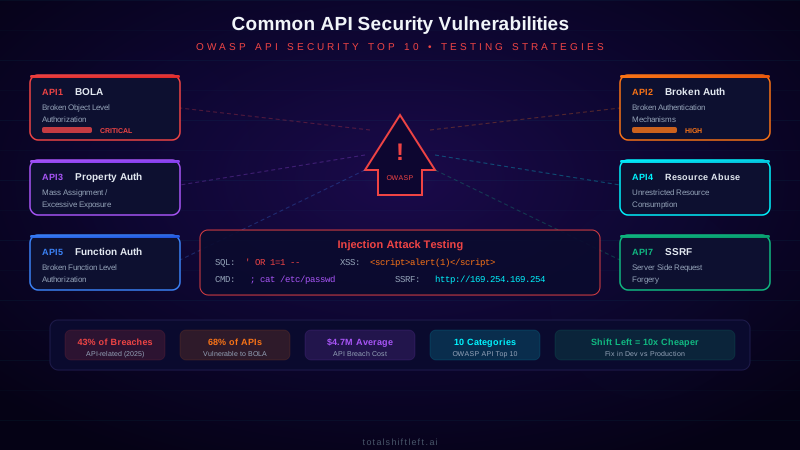
: file:///etc/passwd, gopher://, dict://. Monitor whether the API server makes outbound requests to the supplied URLs.
Security Misconfiguration — API8
This category covers missing security headers, verbose error messages that leak stack traces, unnecessary HTTP methods left enabled, permissive CORS policies, default credentials, and missing TLS enforcement — the class of bugs that come from what wasn't locked down rather than a specific logic flaw.
How to test: Scan every endpoint for security headers (Strict-Transport-Security, X-Content-Type-Options, Content-Security-Policy). Verify CORS configuration does not allow wildcard origins on authenticated endpoints. Send malformed requests and confirm error responses stay generic — no stack traces, database schema names, or internal IPs. Enumerate allowed HTTP methods per endpoint (OPTIONS request) and flag any unexpected verbs left enabled.
Improper Inventory Management — API9
Organizations lose track of API versions, deprecated endpoints, and shadow APIs that remain live and accessible. Old versions may be missing security fixes applied to the current version; undocumented endpoints bypass whatever review process governs the documented surface.
How to test: Scan for common versioning patterns (/v1/, /v2/, /beta/, /internal/) and confirm deprecated versions are actually disabled, not just undocumented. Diff your API gateway's live routing configuration against the OpenAPI specification to surface endpoints that exist in production but not in the spec — these shadow endpoints are consistently the least-tested and most-vulnerable part of the surface.
Unsafe Consumption of APIs — API10
When your service consumes a third-party API, it inherits that API's risk. If the third-party API is compromised, misconfigured, or simply returns malformed data, and your service processes that response without validation, the third party's problem becomes an injection point or data-corruption bug in your own system.
How to test: Inventory every third-party API integration. For each, mock a malicious or malformed response (unexpected types, oversized payloads, unescaped strings) and verify your service validates and rejects it rather than processing it blindly. Confirm outbound calls to third parties are wrapped in the same input-validation discipline you apply to your own inbound API.
How API Vulnerability Testing Works
API vulnerability testing follows a systematic methodology that combines automated scanning with targeted manual testing. The process begins with discovery — mapping every API endpoint, parameter, authentication mechanism, and data flow in the application. This discovery phase uses API specifications (OpenAPI, Swagger), traffic analysis, and endpoint enumeration to build a complete picture of the attack surface.
The next phase is automated scanning, where security testing tools send crafted requests designed to detect known vulnerability patterns. A comprehensive automated scan covers injection payloads across all input parameters, authentication bypass attempts, authorization matrix testing (every endpoint with every user role), schema validation to detect data exposure, and rate limit verification.
Automated scanning is complemented by manual testing for vulnerabilities that require human judgment. Business logic flaws — like the ability to transfer negative amounts, apply discounts out of context, or manipulate workflow sequences — cannot be detected by automated tools because they require understanding the intended business behavior. Penetration testers bring this contextual understanding.
The testing results are triaged, deduplicated, and prioritized by severity and exploitability. Critical findings (like BOLA on a payment endpoint) are escalated immediately. High findings (like injection on a search endpoint) are assigned to the current sprint. Medium and low findings are added to the security backlog. This risk-based approach ensures that the most dangerous vulnerabilities are fixed first.
Continuous testing means repeating this process automatically in your CI/CD pipeline on every code change. Each new endpoint, modified parameter, or changed authorization rule is tested against the complete vulnerability catalog before reaching production.
OWASP API Security Top 10 testing tools compared
| Tool | Type | Best For | Open Source |
|---|---|---|---|
| OWASP ZAP | DAST Scanner | Automated OWASP Top 10 scanning | Yes |
| Burp Suite Pro | Pen Testing | Manual vulnerability exploitation and verification | No |
| sqlmap | Injection Testing | SQL injection detection and exploitation | Yes |
| Nuclei | Template Scanner | Custom vulnerability pattern detection | Yes |
| Total Shift Left | AI Test Gen | Automated security test generation from OpenAPI specs | No |
| 42Crunch | Spec Audit | API specification security auditing | No |
| Postman | API Testing | Manual security test case execution | Partial |
| ffuf | Fuzzer | Endpoint discovery and parameter fuzzing | Yes |
| jwt_tool | JWT Testing | JWT-specific vulnerability testing | Yes |
| Arjun | Discovery | Hidden parameter discovery | Yes |
For a deeper comparison of these tools with pricing and CI/CD integration details, see our API Security Testing Tools Comparison.
OWASP API Security Top 10 testing in practice: a worked example
Problem: An e-commerce platform with 300+ API endpoints had never conducted focused API vulnerability testing. Their security program relied on annual network penetration tests that touched the API surface only superficially. After a competitor was breached through a BOLA vulnerability, the company decided to assess their own API security posture.
Solution: The team implemented a structured vulnerability assessment program. They started by generating an automated security test suite using Total Shift Left, which analyzed their OpenAPI specifications and created test cases for each OWASP API Top 10 category. The initial scan discovered 47 vulnerabilities: 3 critical (BOLA on payment and user profile endpoints), 8 high (SQL injection in search parameters, broken function-level authorization on admin endpoints), 19 medium (missing rate limits, excessive data in responses), and 17 low (missing security headers, verbose error messages). They integrated the security tests into their CI/CD pipeline and established quality gates that blocked deployments with critical or high findings.
Results: All critical and high vulnerabilities were remediated within two weeks. The CI/CD integration caught 12 additional vulnerabilities in the next month as developers introduced new endpoints. Vulnerability density dropped from 0.16 per endpoint to 0.02 per endpoint within three months. The security team reduced manual review time by 70% because automated testing handled the known vulnerability categories, allowing them to focus manual effort on business logic review. The program cost less than a single incident response engagement.
OWASP API Security Top 10 testing challenges and how to solve them
Challenge: Authorization Testing at Scale
Testing BOLA and function-level authorization requires testing every endpoint with every user role — a combinatorial explosion that is impractical to do manually for large APIs. An API with 200 endpoints and 5 user roles requires 1,000 authorization test cases minimum. Solution: Use tools that generate authorization matrix tests automatically from your API specification and role definitions. Total Shift Left and 42Crunch both support automated authorization testing. Prioritize testing by data sensitivity — payment and PII endpoints first.
Challenge: Injection Testing Without Breaking Things
Injection payloads can cause unintended side effects — SQL injection tests might modify or delete data, command injection might execute system commands. Testing against production or shared environments creates real risk. Solution: Always test against isolated environments with restorable data. Use read-only injection payloads (boolean-based, time-based) that detect vulnerabilities without modifying data. Configure test databases with rollback capabilities so any modifications are automatically reversed.
Free PDF guide (12 pages)
Top 50 API Testing Mistakes
50 real-world API testing mistakes organized by category — from authentication to performance — each with a concrete fix strategy.
Download FreeChallenge: Keeping Up with Evolving Vulnerabilities
New API vulnerability types emerge regularly — GraphQL-specific attacks, gRPC vulnerabilities, and supply chain attacks through API dependencies are relatively new categories not yet covered by all testing tools. Solution: Supplement tool-based testing with manual security review using current threat intelligence. Subscribe to OWASP, HackerOne, and API security-focused newsletters. Update your security testing tools regularly and evaluate new tools as vulnerability categories evolve.
Challenge: False Positives in Automated Scanning
Automated vulnerability scanners commonly report false positives — flagging a parameter as SQL-injectable when the backend correctly handles the input, or reporting BOLA when the API intentionally returns shared resources. Solution: Tune scanner sensitivity for your specific API architecture. Use tools that support false positive suppression rules. Validate automated findings manually before creating remediation tickets. Track false positive rates per vulnerability category to guide tuning.
Challenge: Testing APIs with Complex State
Some API vulnerabilities only manifest after a sequence of operations — for example, a race condition in payment processing that allows double-spending, or an authorization bypass that only works after a specific state transition. Single-request scanners miss these. Solution: Design multi-step security test scenarios that mirror real user workflows. Use tools that support request chaining and variable extraction to build stateful test sequences. Focus manual penetration testing efforts on complex stateful operations.
Challenge: Incomplete API Documentation
Security testing tools perform best when they have complete API specifications. Undocumented endpoints, shadow APIs, and deprecated-but-still-active endpoints are often the most vulnerable because they receive the least attention. Solution: Use API discovery tools (Akto, APIClarity) to find undocumented endpoints. Compare discovered endpoints against your OpenAPI specification to identify shadow APIs. Test undocumented endpoints with the same rigor as documented ones.
OWASP API Security Top 10 testing best practices
- Test for BOLA on every endpoint — BOLA is the #1 API vulnerability. Every endpoint that accepts an object identifier should be tested with cross-user credential swaps. Automate this as your highest priority security test.
- Cover all OWASP API Top 10 categories — Map your test cases to each OWASP category and ensure complete coverage. Track which categories have automated tests vs. requiring manual testing.
- Test with multiple user roles — Do not just test with authenticated vs. unauthenticated. Test with every role: admin, regular user, read-only user, API partner, and service accounts. Authorization boundaries between roles often have gaps.
- Inject in every input channel — Test injection not just in request bodies, but in path parameters, query strings, headers (including custom headers), and cookies. Attackers target every input surface.
- Validate error responses — Ensure error responses do not leak sensitive information like stack traces, database schemas, internal IP addresses, or software versions. Test with invalid inputs and verify error messages are generic.
- Automate security testing in CI/CD — Run automated security tests on every pull request. Block merges on critical and high findings. Make security testing as routine as unit testing.
- Maintain an API inventory — You cannot test APIs you do not know about. Maintain a complete inventory of all API endpoints, including internal, partner, and deprecated APIs. Test every endpoint, not just public ones.
- Apply defense in depth — Do not rely on a single security control. Implement authentication, authorization, input validation, rate limiting, and output filtering. Test that each layer works independently.
- Prioritize by data sensitivity — Focus testing efforts on APIs that handle payments, PII, authentication, and administrative functions. A BOLA vulnerability on a user preferences endpoint is less critical than one on a payment endpoint.
- Regression test every finding — When a vulnerability is found and fixed, add a permanent regression test to prevent reintroduction. Your automated test suite should grow with every finding.
OWASP API Security Top 10 testing checklist
- ✔ BOLA tested on every endpoint with object identifiers
- ✔ Authentication tested: no credentials, expired tokens, invalid tokens
- ✔ Authorization matrix: every endpoint tested with every user role
- ✔ SQL injection tested on all input parameters
- ✔ Command injection tested on parameters processed server-side
- ✔ Mass assignment tested with unexpected fields in request bodies
- ✔ Rate limiting verified on all endpoints, especially authentication
- ✔ Response schema validated — no extra fields exposed
- ✔ Error responses checked for information leakage
- ✔ SSRF tested on all URL-accepting parameters
- ✔ JWT/token security validated (algorithm confusion, expiration, signing)
- ✔ Sensitive data encrypted in transit and not exposed in URLs
- ✔ API inventory complete and all endpoints included in testing
- ✔ Business-critical flows (purchase, booking, review) tested for anti-automation controls called directly, bypassing the frontend
- ✔ Security headers, CORS policy, and enabled HTTP methods verified per endpoint
- ✔ Deprecated API versions confirmed disabled; live routing diffed against the OpenAPI spec for shadow endpoints
- ✔ Third-party API responses validated before processing (malformed/malicious response handling)
- ✔ Security tests automated in CI/CD pipeline with quality gates
See also: jwt authentication in our learn hub for the underlying concept.
A test for each of the top OWASP API risks
Each risk in the list has a shape you can assert on. These four cover the categories that account for most real API incidents — object-level authorization, function-level authorization, unrestricted resource consumption and mass assignment:
# tests/test_owasp_api_top10.py
import requests, pytest

def test_api1_bola(api, token_other, someone_elses_order_id):
    """API1:2023 Broken Object Level Authorization."""
    r = requests.get(f"{api}/v1/orders/{someone_elses_order_id}",
                     headers={"Authorization": f"Bearer {token_other}"})
    assert r.status_code in (403, 404)

def test_api3_mass_assignment(api, token_user):
    """API3:2023 — a client-supplied field must not escalate privilege."""
    r = requests.post(f"{api}/v1/users", json={"email": "x@example.test", "role": "admin"},
                      headers={"Authorization": f"Bearer {token_user}"})
    if r.status_code == 201:
        assert r.json().get("role") != "admin", "mass assignment: role was accepted"

def test_api4_unrestricted_consumption(api, token_user):
    """API4:2023 — the server enforces a page-size ceiling."""
    r = requests.get(f"{api}/v1/orders?limit=1000000",
                     headers={"Authorization": f"Bearer {token_user}"})
    assert r.status_code == 400 or len(r.json()["items"]) <= 100

def test_api5_bfla(api, token_viewer):
    """API5:2023 Broken Function Level Authorization."""
    r = requests.delete(f"{api}/v1/admin/users/7",
                        headers={"Authorization": f"Bearer {token_viewer}"})
    assert r.status_code in (401, 403)
Run the automated scan alongside them — the scanner covers breadth (every path in the spec), these tests cover the authorization logic a scanner has no way to reason about:
docker run --rm -t ghcr.io/zaproxy/zaproxy:stable zap-api-scan.py \
  -t "$API/openapi.yaml" -f openapi -r zap-report.html
OWASP API Security Top 10 testing FAQ
What is the most common API security vulnerability?
Broken Object Level Authorization (BOLA) is the most common and most exploited API security vulnerability according to the OWASP API Security Top 10. BOLA occurs when an API endpoint allows a user to access another user's data by manipulating object identifiers (like user IDs or order numbers) in API requests. It affects an estimated 68% of APIs that handle user-specific resources.
What are the OWASP API Security Top 10 vulnerabilities?
The OWASP API Security Top 10 (2023) includes: API1 Broken Object Level Authorization, API2 Broken Authentication, API3 Broken Object Property Level Authorization, API4 Unrestricted Resource Consumption, API5 Broken Function Level Authorization, API6 Unrestricted Access to Sensitive Business Flows, API7 Server Side Request Forgery, API8 Security Misconfiguration, API9 Improper Inventory Management, and API10 Unsafe Consumption of APIs.
How do you test for SQL injection in APIs?
Test for SQL injection in APIs by injecting SQL payloads into every input parameter — path parameters, query strings, request body fields, and headers. Send payloads like single quotes, UNION SELECT statements, boolean-based payloads (OR 1=1), and time-based payloads (WAITFOR DELAY). Analyze responses for SQL error messages, unexpected data, or timing differences that indicate the payload was executed.
How do you test for Broken Object Level Authorization (BOLA)?
Test for BOLA by authenticating as User A, capturing a request that accesses User A's resource (e.g., GET /api/orders/123), then replacing User A's token with User B's token and replaying the same request. If User B can access User A's resource, the API has a BOLA vulnerability. Test every endpoint that accepts object identifiers with cross-user token swaps.
What is mass assignment vulnerability in APIs?
Mass assignment occurs when an API accepts and processes properties in a request body that the client should not be able to set. For example, a user profile update endpoint that accepts a role field, allowing a regular user to send role: admin and elevate their privileges. Test by including unexpected fields in request bodies and checking if the API processes them.
How can you prevent API security vulnerabilities?
Prevent API security vulnerabilities by implementing proper authorization checks on every endpoint, using parameterized queries to prevent injection, validating and sanitizing all inputs, applying the principle of least privilege, rate limiting all endpoints, using strong authentication mechanisms, keeping API specifications accurate, and running automated security tests in your CI/CD pipeline on every deployment.
Sources and further reading
- OWASP API Security Top 10 (2023) — the reference list of API risk categories.
- OWASP Web Security Testing Guide — test procedures for each class of web and API vulnerability.
- OWASP ZAP documentation — the open-source DAST scanner.
Key takeaways
- API security vulnerabilities are predictable, well-documented, and testable — yet they continue to cause the majority of API breaches because teams treat security testing as an afterthought rather than an integral part of development.
- The OWASP API Security Top 10 provides a clear framework for what to test, and the tools and techniques described in this guide provide the practical how.
- The organizations that avoid API breaches are the ones that test for these vulnerability categories continuously, on every code change, integrated directly into their development pipeline.
Ready to automate testing for OWASP API Security Top 10 vulnerabilities across your API portfolio? Start your free trial of Total Shift Left and generate comprehensive security tests from your API specifications today.
Related: API Testing: The Complete Guide | API Penetration Testing vs Security Testing | API Security Testing Tools Comparison | API Security Testing in CI/CD | Testing API Rate Limiting | REST API Testing Best Practices | OWASP API Top 10 Enterprise Controls
For regulated teams: see the enterprise API security testing buyer's guide, the platform security & trust center, and how OWASP coverage maps across regulated industries.
Ready to shift left with your API testing?
Try our no-code API test automation platform free.