
Playwright API Testing: Complete Guide (2026)
Quick answer
Playwright can test REST APIs directly through its built-in request fixture, with no browser instance required — a meaningful advantage over browser-based tools, since API-only suites run faster and need no browser binaries installed in CI. Pair it with the ajv library for JSON schema validation and Playwright's own test runner for parametrization and reporting. Teams already using Playwright for end-to-end tests get API testing in the same framework and CI job, with no second tool to maintain.
Reviewed by Sushant Joshi
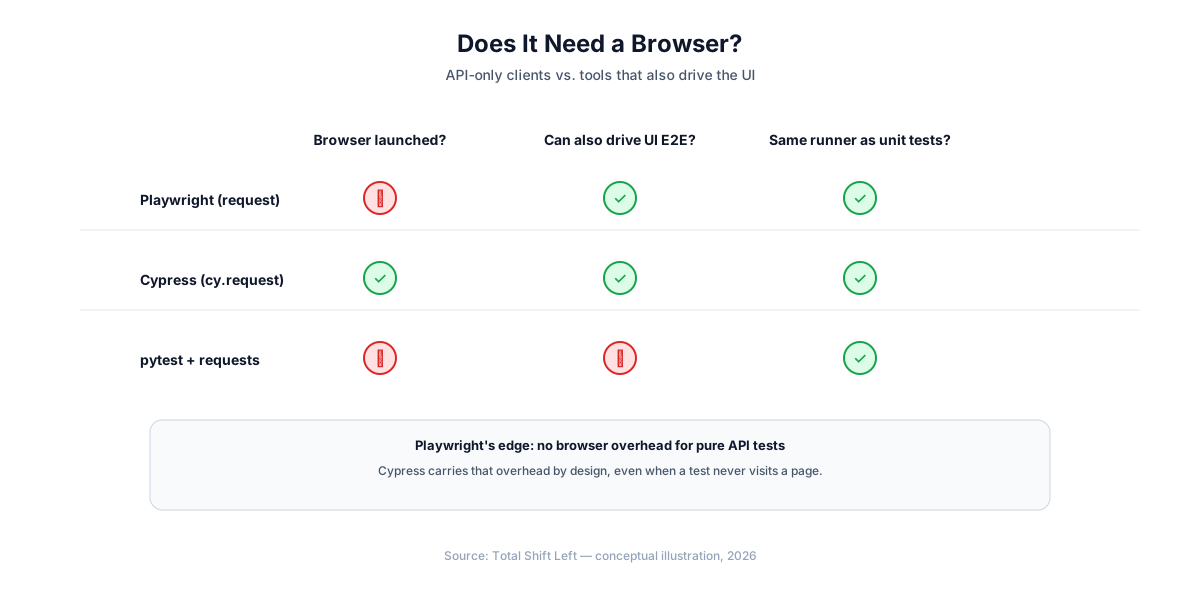
Playwright API testing means using Playwright's built-in request fixture to send and assert on HTTP calls directly, without launching a browser — the same test runner, assertion library (expect()), and reporting that Playwright uses for end-to-end tests, applied to the API layer alone. Teams already using Playwright for UI automation get API coverage in the same framework with no second tool to learn.
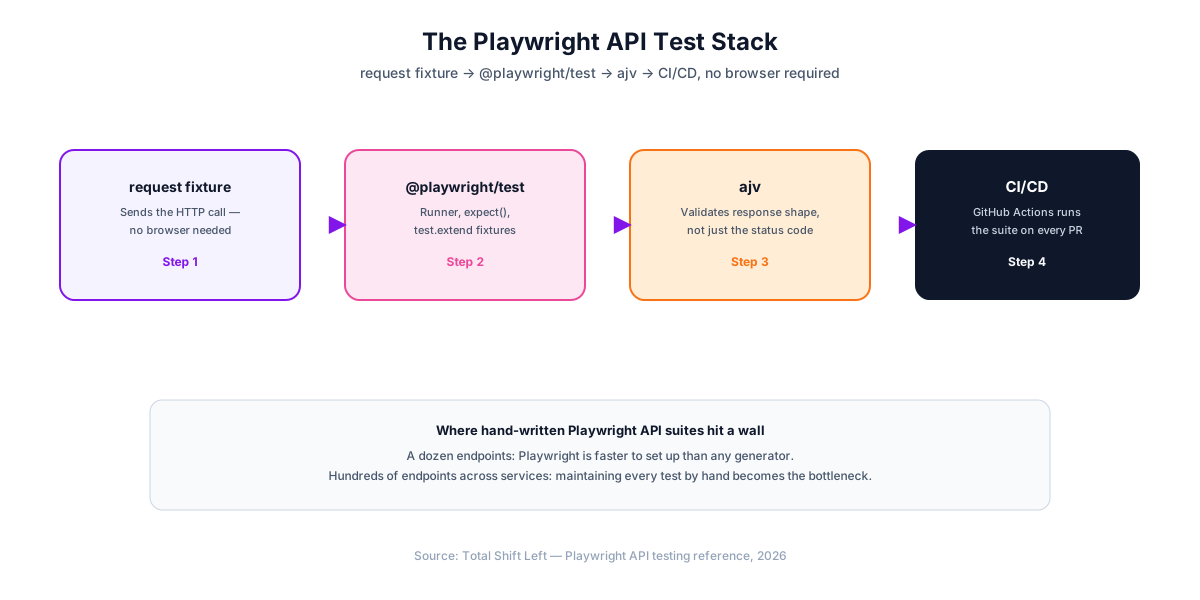
This guide builds a real Playwright API test suite from scratch: project setup, the request fixture, JSON schema validation with ajv, parametrized tests, a custom fixture for authentication, and a GitHub Actions workflow. Every code sample runs as written against JSONPlaceholder, a free public fake REST API.
In this guide
- Why Playwright for API Testing
- What you need before you start
- Project Structure
- Writing Your First API Test
- Validating Response Schemas with ajv
- Testing POST, PUT, and DELETE Requests
- Parametrizing Tests Without a Decorator
- Custom Fixtures for Authentication
- Running Your Suite in CI/CD with GitHub Actions
- Common Pitfalls in Playwright API Testing
- Playwright vs Postman vs pytest vs AI-Generated Tests
- When to Move Beyond Hand-Written Tests
- Running the suite in parallel
- Frequently asked questions about Playwright API testing
Why Playwright for API Testing
Playwright is best known as a browser automation framework, but its request fixture — an instance of APIRequestContext — sends HTTP calls with no browser attached at all. That matters for two reasons: an API-only suite starts and runs faster with no browser binary to launch, and teams that already use Playwright for end-to-end tests get API coverage in the exact same test runner, fixture model, and CI configuration, rather than adopting a second framework for the API layer.
The tradeoff against a Python- or Java-specific tool is ecosystem, not capability: Playwright's API testing surface (request.get(), request.post(), response.json()) is comparable to requests or REST Assured, but it lives in a JavaScript/TypeScript codebase — the natural fit for teams whose UI and API tests should share one language.
For the spec-version differences behind this, see OpenAPI 3.0 vs 3.1.
What you need before you start
npm install -D @playwright/test ajv
- Node.js 18+
- @playwright/test — the test runner and
requestfixture - ajv — JSON schema validation (Playwright has no built-in equivalent)
You do not need npx playwright install for a pure API suite — that command downloads browser binaries, which an API-only test never launches.
Project Structure
api-tests/
├── playwright.config.ts
├── package.json
└── tests/
    ├── users.spec.ts
    ├── posts.spec.ts
    └── schemas/
        └── user-schema.ts
// playwright.config.ts
import { defineConfig } from '@playwright/test';

export default defineConfig({
  testDir: './tests',
  use: {
    baseURL: 'https://jsonplaceholder.typicode.com',
  },
  reporter: [['list'], ['junit', { outputFile: 'results.xml' }]],
});
baseURL in the shared use block means every test can call request.get('/users/1') with a relative path instead of repeating the full URL.
Writing Your First API Test
// tests/users.spec.ts
import { test, expect } from '@playwright/test';

test('get user returns 200', async ({ request }) => {
  const response = await request.get('/users/1');
  expect(response.status()).toBe(200);
});

test('get user returns expected fields', async ({ request }) => {
  const response = await request.get('/users/1');
  const body = await response.json();
  expect(body.id).toBe(1);
  expect(body.email).toContain('@');
  expect(body.name).toBeTruthy();
});
Run it:
npx playwright test
response.ok() is a convenience shortcut for status() >= 200 && status() < 300 when you only care whether the call succeeded, not the exact code — useful for setup steps inside a fixture where the specific status isn't the thing under test.
Validating Response Schemas with ajv
Field-by-field assertions do not catch a field silently changing type or an unexpected field appearing.
// tests/schemas/user-schema.ts
export const userSchema = {
  type: 'object',
  required: ['id', 'name', 'username', 'email'],
  properties: {
    id: { type: 'integer' },
    name: { type: 'string' },
    username: { type: 'string' },
    email: { type: 'string', format: 'email' },
    address: { type: 'object' },
    phone: { type: 'string' },
    website: { type: 'string' },
    company: { type: 'object' },
  },
};
import { test, expect } from '@playwright/test';
import Ajv from 'ajv';
import addFormats from 'ajv-formats';
import { userSchema } from './schemas/user-schema';

const ajv = new Ajv();
addFormats(ajv);

test('user matches schema', async ({ request }) => {
  const response = await request.get('/users/1');
  const body = await response.json();
  const validate = ajv.compile(userSchema);
  const valid = validate(body);
  expect(valid, JSON.stringify(validate.errors)).toBeTruthy();
});
ajv-formats is a separate package (npm install -D ajv-formats) required for format keywords like "format": "email" — plain ajv validates types and required fields but ignores format without it. Passing JSON.stringify(validate.errors) as the assertion message means a failure shows exactly which field violated the schema, not just that validation failed.
Ready to shift left with your API testing?
Try our no-code API test automation platform free. Generate tests from OpenAPI, run in CI/CD, and scale quality.
Testing POST, PUT, and DELETE Requests
// tests/posts.spec.ts
import { test, expect } from '@playwright/test';

test('create post', async ({ request }) => {
  const response = await request.post('/posts', {
    data: { title: 'foo', body: 'bar', userId: 1 },
  });
  expect(response.status()).toBe(201);
  const body = await response.json();
  expect(body.title).toBe('foo');
  expect(body.id).toBeDefined();
});

test('update post', async ({ request }) => {
  const response = await request.put('/posts/1', {
    data: { id: 1, title: 'updated', body: 'bar', userId: 1 },
  });
  expect(response.status()).toBe(200);
  const body = await response.json();
  expect(body.title).toBe('updated');
});

test('delete post', async ({ request }) => {
  const response = await request.delete('/posts/1');
  expect(response.status()).toBe(200);
});
Passing data as a plain object serializes it to JSON automatically and sets Content-Type: application/json — the same convenience requests gives you in Python with json=payload.
Parametrizing Tests Without a Decorator
Playwright has no @parametrize decorator. Instead, loop over your cases at the module level and call test() inside the loop — each call registers as its own named test:
import { test, expect } from '@playwright/test';

const cases = [
  { userId: 1, expectedStatus: 200 },
  { userId: 10, expectedStatus: 200 },
  { userId: 999, expectedStatus: 404 },
];

for (const { userId, expectedStatus } of cases) {
  test(`get user ${userId} returns ${expectedStatus}`, async ({ request }) => {
    const response = await request.get(`/users/${userId}`);
    expect(response.status()).toBe(expectedStatus);
  });
}
Because the loop runs at module load time, not at test-run time, Playwright's reporter lists all three as distinct, individually re-runnable tests — get user 999 returns 404 appears as its own line, not folded into a shared parametrized-test entry.
Custom Fixtures for Authentication
Extend Playwright's base test with a project-specific fixture instead of re-authenticating inside every test:
// tests/fixtures.ts
import { test as base, expect } from '@playwright/test';

type AuthFixtures = {
  authToken: string;
};

export const test = base.extend<AuthFixtures>({
  authToken: async ({}, use) => {
    const token = process.env.TEST_API_TOKEN ?? '';
    await use(token);
  },
});

export { expect };
import { test, expect } from './fixtures';

test('get protected resource', async ({ request, authToken }) => {
  const response = await request.get('/account', {
    headers: { Authorization: `Bearer ${authToken}` },
  });
  expect(response.status()).toBe(200);
});
Reading the token from process.env.TEST_API_TOKEN keeps it out of the repository — set it as an encrypted secret in your CI provider, never as a literal string in a spec file.
Running Your Suite in CI/CD with GitHub Actions
# .github/workflows/api-tests.yml
name: API Tests

on: [push, pull_request]

jobs:
  api-tests:
    runs-on: ubuntu-latest
    steps:
      - uses: actions/checkout@v4
      - uses: actions/setup-node@v4
        with:
          node-version: '20'
      - run: npm ci
      - run: npx playwright test
        env:
          TEST_API_TOKEN: ${{ secrets.TEST_API_TOKEN }}
      - uses: actions/upload-artifact@v4
        if: always()
        with:
          name: playwright-report
          path: playwright-report/
Notice there is no npx playwright install step — for a pure API suite there are no browsers to install, which is one of the reasons this pipeline runs faster than an equivalent end-to-end Playwright job. See our step-by-step CI/CD guide for GitLab CI and Jenkins equivalents.
Common Pitfalls in Playwright API Testing
- Forgetting
awaitonresponse.json(). It returns a Promise; a missingawaitsilently produces a Promise object instead of the parsed body, and every field assertion after it fails confusingly. - Asserting only the status code. Validate structure with
ajv, not just individual fields. - Installing browser binaries for an API-only suite. Skip
npx playwright installentirely if no test usespage— it only slows CI down. - No negative-path coverage. Loop invalid IDs and malformed payloads into the same parametrized array as valid cases.
- Sharing mutable state between parametrized test cases. Each
test()call in the loop should be independent — do not rely on one iteration's side effects being visible to the next. - Committing tokens into fixture files. Read them from
process.env, set as CI secrets.
Playwright vs Postman vs pytest vs AI-Generated Tests
| Approach | Language | Learning curve | CI/CD fit | Schema validation | Best for |
|---|---|---|---|---|---|
| Playwright (request fixture) | TypeScript/JavaScript | Low–Medium | Native — same runner as E2E tests | Manual (ajv) | Teams already using Playwright for E2E |
| pytest + requests | Python | Low | Native — same runner as unit tests | Manual (jsonschema) | Python teams |
| REST Assured | Java | Medium | Native — same runner as JUnit/TestNG | Automatic (json-schema-validator) | Java/JVM teams |
| Postman + Newman | JSON collections, JS scripts | Low for exploration, higher for CI | Requires exporting/running via Newman CLI | Manual (pm.test scripts) | Manual exploration, small automated suites |
| AI-generated (Total Shift Left) | None required | Low — import a spec | Native CI plugins | Automatic — generated from the OpenAPI schema | Teams testing many endpoints across services |
Free Guided worksheet
Build Your Testing Strategy in 30 Minutes
A structured worksheet that walks you through defining your testing strategy in 30 minutes. Cover architecture, tools, layers, and team responsibilities.
Download FreePlaywright's specific advantage over pytest and REST Assured isn't capability — it's consolidation: a team already running Playwright for UI tests adds API coverage with zero new tooling. See API testing vs UI testing for how the two layers complement each other, or our full tools comparison for the wider field.
When to Move Beyond Hand-Written Tests
The economics are the same regardless of language: twice the endpoints means roughly twice the spec files, fixtures, and schema definitions to maintain. For a service with a dozen endpoints, hand-written Playwright tests are a reasonable, fast-to-set-up choice. Somewhere in the range of a few dozen endpoints across multiple services, the suite's maintenance cost starts competing with the API's own development for engineering time.
The alternative is generating the suite directly from the OpenAPI specification instead of hand-translating it into TypeScript. Total Shift Left imports your spec, generates positive, negative, and boundary test cases for every endpoint, and re-generates automatically when the spec changes — so schema drift updates the suite instead of silently breaking it.
Running the suite in parallel
Playwright runs tests in parallel by default, which is why an API suite written under it is usually fast without extra work — and why shared state fails loudly and early.
// playwright.config.ts
export default defineConfig({
  fullyParallel: true,
  workers: process.env.CI ? 4 : undefined,
  retries: process.env.CI ? 1 : 0,   // retry once in CI, never mask locally
});
The rule that keeps this working: every test creates the data it needs and does not depend on data another test created. Where a shared resource is unavoidable — a single account with a rate limit, a fixture that is expensive to build — reach for a worker-scoped fixture rather than serialising the whole suite.
Be deliberate about retries. One retry in CI absorbs genuine network flakiness; it also hides a real intermittent bug if nobody looks at which tests are retrying. Report retried tests rather than treating a pass-on-retry as a clean pass.
One caveat specific to API testing under Playwright: the request fixture carries its own storage state, so a test that authenticates through the browser context does not automatically share that session with API calls. Create an explicit APIRequestContext with the headers you want, rather than assuming the two share credentials.
Frequently asked questions about Playwright API testing
Can Playwright test APIs without a browser? Yes. Playwright's request fixture sends HTTP requests directly, independent of the browser automation Playwright is best known for. No browser binary needs to be installed for a pure API suite, which makes API-only Playwright tests start faster in CI than a full end-to-end test run.
Playwright vs Postman for API testing — which is better? Postman is faster for ad-hoc, manual exploration of an API. Playwright is the better choice for automated, version-controlled regression testing that runs in CI/CD — it lives in your codebase as TypeScript or JavaScript, uses the same test runner as your end-to-end suite, and needs no separate collection export.
How do I validate a JSON schema in a Playwright API test? Playwright has no built-in JSON schema validator, so pair it with the ajv library. Compile a JSON Schema with ajv.compile(schema), run it against the parsed response body, and assert the result is valid with Playwright's expect(). This catches structural drift that a field-by-field assertion would miss.
How do I run parametrized API tests in Playwright? Playwright has no parametrize decorator like pytest. Instead, loop over an array of test cases at the module level and call test() once per case inside the loop — each iteration registers as its own named test, and Playwright's reporter shows each as a separate pass/fail line.
Should teams already using Playwright for E2E tests also use it for API tests? Usually yes. Testing the API layer directly, in the same framework as the UI suite, catches backend regressions faster than routing every check through the browser, and it reuses the existing test runner, CI configuration, and reporting — no second tool to maintain.
Can a Playwright API suite fully replace an AI-generated API test suite? For a handful of endpoints, hand-written Playwright is often faster to set up. Past a few dozen endpoints across services, generating the suite from an OpenAPI spec keeps coverage complete without the manual upkeep.
Sources and further reading
- Playwright API testing — Playwright's request-context API for testing endpoints.
- RFC 9110 — HTTP Semantics — the normative definition of methods, status codes and headers.
- GitHub Actions documentation — workflow syntax, caching and matrix builds.
Key takeaways
- Playwright's
requestfixture tests APIs with no browser required — skipnpx playwright installentirely for a pure API suite. ajvfills the schema-validation gap Playwright's core library doesn't cover; addajv-formatsforformatkeywords likeemail.- Parametrize with a loop, not a decorator — call
test()inside afor...ofat module level so each case is its own reportable test. base.extend()centralizes auth instead of re-reading a token in every test.- Teams already on Playwright for E2E gain API coverage with zero new tooling — same runner, same CI job, same reports.
- Hand-written suites scale linearly with endpoint count. Past a few dozen endpoints across services, generating tests from an OpenAPI spec becomes the more maintainable path.
Generate the Equivalent Suite from Your OpenAPI Spec
Every test in this guide can also be generated automatically. Import your OpenAPI specification into Total Shift Left and get positive, negative, and boundary test cases for every endpoint — regenerated the moment your spec changes, with no Playwright fixtures to maintain by hand.
Start your free trial and compare the generated suite against your own, or see plans and pricing if you're already evaluating.
Ready to shift left with your API testing?
Try our no-code API test automation platform free.