
API Testing vs UI Testing: Key Differences (2026)
Quick answer
Test the API layer first. API tests run in milliseconds, stay stable when the UI changes and reach business logic, authorization and data contracts directly. UI tests take seconds, break on markup and timing changes, and suit 10-30 critical journeys plus browser-only checks: rendering, accessibility, cross-browser behaviour. AI self-healing lowers UI test maintenance but not that order.
Reviewed by Parveen Kumari
Part of the API Testing hub. Start with the pillar guide: What is API testing? Types, tools and how it works.
API testing vs UI testing compares two layers of software validation. API testing validates business logic and service interfaces at the programmatic level, while UI testing verifies visual elements and user interactions. API tests run faster, cost less to maintain, and catch defects earlier in the development lifecycle.
API testing vs UI testing is the question of which application layer to validate first and most thoroughly. API testing validates the backend logic, data contracts, and business rules directly through HTTP requests; UI testing validates what end users see and interact with through a browser or app interface. The shift-left principle answers clearly: test the API layer first.
Every software engineering team faces the same fundamental resource constraint: limited time to invest in testing. The decision about where to invest — in API tests, UI tests, or both — has enormous consequences for test effectiveness, maintenance burden, and release velocity.
For much of the 2010s, the dominant paradigm was UI-first testing: record browser interactions with Selenium or Cypress, replay them as regression tests, and call it coverage. This approach felt intuitive — test what the user sees — but it produced test suites that were slow, brittle, and expensive to maintain. A CSS class rename could break dozens of tests. A loading spinner could cause random failures. Teams spent more time maintaining their UI tests than writing new ones.
The industry has largely shifted to an API-first testing strategy — validating business logic, data contracts, and integration behavior at the API layer before layering on minimal UI tests for critical user journeys. This shift-left approach produces faster, more stable, and more meaningful coverage. For a related comparison of testing scope, see end-to-end testing vs API testing.
This guide explains the difference between API and UI testing across 10 dimensions, presents the test pyramid model, and makes the case — with concrete data — for why testing the API layer first is the most efficient quality strategy available to modern engineering teams.
In this guide
- What Is API Testing?
- What Is UI Testing?
- API Testing vs UI Testing: Core Differences
- The Testing Pyramid Explained
- Comprehensive Comparison Table
- Where Unit Tests Fit
- API Testing vs Web Service Testing
- When API Testing Is the Right Choice
- When UI Testing Is Necessary
- Does AI Change the Answer?
- Why Test APIs First: The Shift-Left Argument
- Architecture: The Optimal Test Strategy
- API testing and UI testing tools compared
- Real-World Implementation with Total Shift Left
- Common Mistakes in API vs UI Test Strategy
- API testing and UI testing best practices
- Testing Strategy Checklist
- Frequently asked questions about API testing and UI testing
What the API layer has to assert is not constant across protocols — REST vs GraphQL vs gRPC covers how failure signalling, authorization and streaming change the job. For the layer breakdown underneath, see the nine types of API testing.
What Is API Testing?
API testing is the practice of directly calling an application's API endpoints and validating the responses — without using a user interface. In REST API testing, you send HTTP requests and assert on:
- HTTP status codes (200, 201, 400, 401, 403, 404, 422, 500)
- Response body structure and data types
- Business logic (calculated values, state transitions, validation rules)
- Authentication and authorization behavior
- Performance (response time SLAs)
- Error handling (appropriate error responses for invalid inputs)
API tests do not require a browser, a real user, or a running frontend. They communicate directly with the application server, making them fast (typically 10-200ms per test) and resilient to frontend changes.
Examples of what API tests validate:
POST /orderscreates an order correctly and returns the order IDGET /orders/{id}returns 403 when accessed by a different userPUT /products/{id}with an invalid price returns 422 with a descriptive errorDELETE /users/{id}requires admin role and returns 403 for regular users
What Is UI Testing?
UI testing (also called end-to-end testing, browser testing, or E2E testing) validates application behavior through the graphical user interface — simulating real user interactions in a browser.
UI test tools like Selenium, Playwright, and Cypress control a real browser instance, navigate to pages, click buttons, fill forms, and assert on what appears on screen:
- Text visible on the page
- Form submission success/failure
- Navigation between pages
- Visual rendering and layout
- User workflow completion (login → browse → add to cart → checkout)
UI tests require a fully deployed application — frontend, backend, database, and any third-party integrations. This makes them slower (5-120 seconds per test), more brittle (break when HTML/CSS changes), and more expensive to maintain.
Examples of what UI tests validate:
- The login form shows an error message for invalid credentials
- After adding an item to cart, the cart count badge updates
- The checkout flow completes successfully for a valid credit card
- The product search results page loads within 3 seconds
API Testing vs UI Testing: Core Differences
Speed
API tests typically run in 10-200ms. UI tests typically run in 5-60 seconds. A 1000-test API suite completes in 2-5 minutes. A 1000-test UI suite would take 8+ hours — which is why UI test suites are necessarily small.
Stability
API tests are stable because they test application logic, which changes infrequently. UI tests are brittle because they depend on HTML structure, CSS classes, element IDs, and page load timing — all of which change with every design iteration.
Debugging
When an API test fails, the error is specific: Expected status 200, got 500. Response: {"error": "Database connection failed"}. When a UI test fails, the error might be: Element not found: button.checkout-btn — leaving you to investigate whether the test logic, the CSS, the page load time, or the underlying business logic is broken.
Maintenance Cost
API tests are low-maintenance when generated from OpenAPI specs — when the spec changes, you re-import it, review the diff and regenerate. UI test maintenance is a significant ongoing investment: element selectors break, timing assumptions fail, and test data dependencies become stale.
The Testing Pyramid Explained
The testing pyramid is a model that recommends the relative proportions of different test types in a healthy test strategy:
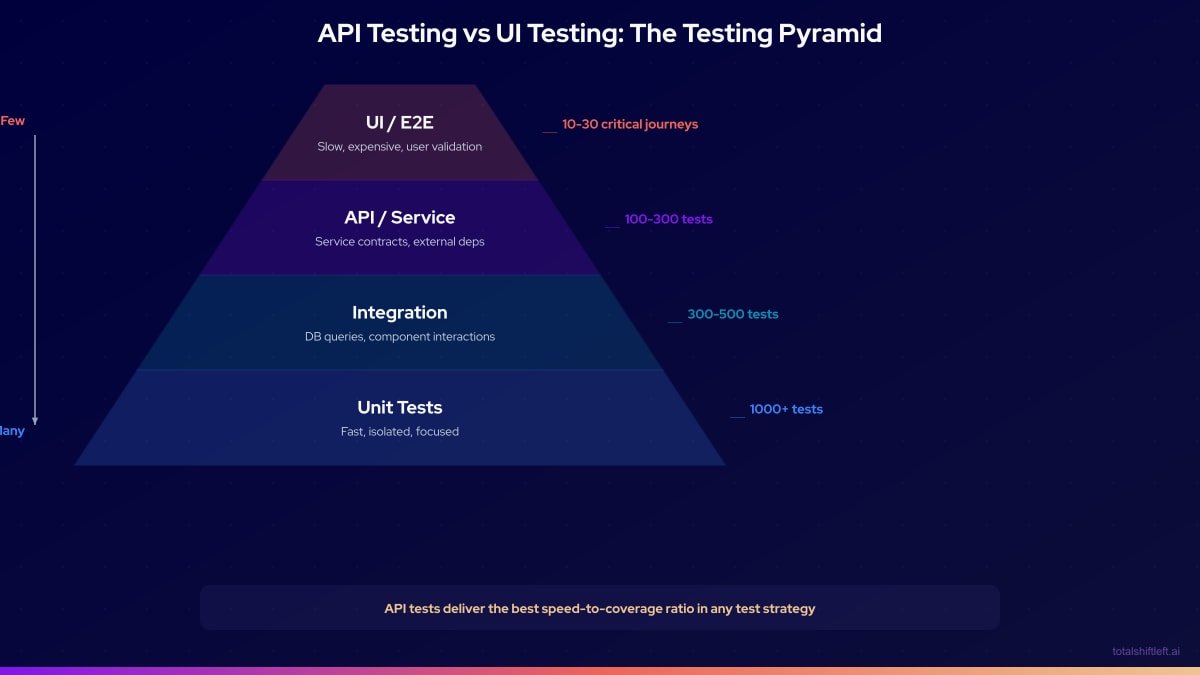
The pyramid shape is intentional. The wide base (unit tests) represents abundant, fast, cheap tests. The narrow top (UI tests) represents a small number of expensive but high-value user journey tests.
API tests occupy the critical middle layer. They provide:
- Higher confidence than unit tests (test the full endpoint, not just a function)
- Lower cost and higher stability than UI tests
- Direct validation of the contracts that consumers depend on
In practice, the optimal ratio for a modern web application is approximately:
- 60-70% unit tests
- 25-35% API/service tests
- 5-10% UI/E2E tests
Teams with inverted pyramids — many UI tests, few API tests — experience the "ice cream cone" anti-pattern: slow, flaky CI pipelines, high maintenance costs, and poor bug detection.
Comprehensive Comparison Table
| Dimension | API Testing | UI Testing |
|---|---|---|
| What is tested | Backend logic, contracts, data validation, security | User workflows, visual rendering, browser compatibility |
| Speed (per test) | 10-200ms | 5-60 seconds |
| Stability | High — breaks only when API logic changes | Low — breaks on HTML/CSS/timing changes |
| Maintenance cost | Low (auto-generated from OpenAPI spec) | High (selector updates, timing fixes) |
| Bug detection depth | Deep — catches logic, data, security bugs | Surface — catches rendering and workflow bugs |
| Setup complexity | Low — no browser, no frontend required | High — full stack deployment required |
| Parallelization | Easy — stateless HTTP calls | Difficult — browser instances are expensive |
| CI execution time | 2-10 minutes for full suite | 20-120 minutes for full suite |
| Catches regressions in | Business logic, schema drift, auth, performance | User-facing workflows, visual bugs |
| Authentication testing | Excellent — test every auth scenario directly | Limited — must navigate login flow every time |
| Data validation testing | Excellent — test all input combinations | Poor — slow to test many data variations |
| Security testing | Strong — inject payloads directly, test IDOR | Weak — limited to visible form inputs |
| Performance testing | Built-in — response time assertions | Limited — page load time only |
| Cost of a 1000-test suite | Low | Very high |
| Flakiness | Rare (unless testing non-deterministic behavior) | Common (timing, rendering, network) |
| Skills required | HTTP protocol knowledge | Browser automation tool knowledge |
| No-code option | Yes (Total Shift Left) | Partial (recording tools) |
| Coverage for microservices | Excellent — test each service independently | Poor — requires all services running |
Generate API test cases from your spec (free)
Free, runs in your browser, no sign-up needed.
Where Unit Tests Fit
Unit tests sit below both layers in this comparison rather than competing with either. A unit test calls one function directly, in the same process, with its dependencies mocked. An API test sends a real HTTP request to a running endpoint and exercises routing, serialization, middleware, auth and the database together. A function can pass every unit test and still produce a broken endpoint — a correct calculation whose result never reaches the response because of a serialization bug three layers up — which is exactly the gap API testing closes.
A healthy pyramid has far more unit tests than API tests, and neither replaces the other. The full unit vs API vs integration comparison, with a side-by-side table, is in unit testing vs integration testing vs system testing.
API Testing vs Web Service Testing
"Web service testing" is largely an older or SOAP-era name for the same discipline API testing describes today — validating a service's request/response contract over a network protocol. In practice, teams that say "web service testing" are usually referring to SOAP/WSDL services (XML envelopes, WS-Security) rather than modern REST or GraphQL APIs, but the underlying activity — send a request, assert on the response — is the same. If your service is SOAP-based, the tooling differs (WSDL parsing, XML schema validation) but the testing strategy in this guide — test the service layer first, before the UI — still applies.
When API Testing Is the Right Choice
API testing is the right choice — and should be your primary investment — when:
Validating Business Logic
Any rule that lives in your backend — pricing calculations, inventory checks, permission enforcement, state machine transitions — should be tested at the API layer. UI tests are too slow and indirect to provide meaningful coverage of business logic.
Testing Security and Authorization
Direct API calls let you test every combination of credentials, roles, and resource ownership. Browser-based tests cannot efficiently test IDOR vulnerabilities or authorization edge cases.
This is where the API layer also becomes the natural home for security checks. Shift-Left API's API security testing is a paid add-on (included in the Trial) that generates OWASP-mapped checks beside the functional tests you already have and runs them in the same packs and CI jobs. For object-level authorization it uses a second test user and an access matrix — Deny, Own data only, or Allow per endpoint — to test whether one user can read another's records, which is exactly the IDOR case a browser test cannot reach. Each report starts with what it could not check, and it is not a substitute for a penetration test.
Building CI/CD Quality Gates
API tests run in 2-10 minutes and can enforce quality gates on every pull request. A UI test suite cannot provide the same feedback loop. Learn how to set up these gates in our guide to building a CI/CD testing pipeline.
Testing Microservices
Each microservice needs its own test suite. UI tests by definition test the assembled system — they cannot validate service-by-service behavior. See our API testing strategy for microservices for a complete approach.
Validating Data Contracts
When your API is consumed by mobile apps, partner integrations, or other services, schema validation tests ensure the contract is honored on every deployment.
Regression Testing at Scale
Hundreds of API tests can be generated automatically from an OpenAPI spec. Equivalent UI test coverage would require thousands of hours of manual test writing.
How Shift-Left API does this: The platform reads every endpoint, parameter, and constraint in your OpenAPI or Swagger spec — and, if you have them, your business and requirement documents — and generates a full test suite — happy-path, negative, and boundary-value tests — without you writing test code. Point AI test generation at a self-hosted LLM (Ollama, LM Studio, or vLLM) and the spec and prompts never leave your own infrastructure.
When UI Testing Is Necessary
UI testing is necessary and irreplaceable for:
End-to-End User Journey Validation
The critical path through your application — user onboarding, core purchase flow, account management — should be validated as a complete user journey at least once. API tests cannot catch issues that arise from the interaction of multiple APIs with the frontend rendering logic.
Visual Regression Testing
Pixel-level rendering, responsive layout, component styling, and accessibility are only testable through a real browser.
JavaScript-Heavy Client-Side Logic
If significant business logic lives in the frontend (client-side routing, state management, form validation rendering), API tests cannot reach it.
Browser Compatibility
Cross-browser testing (Chrome, Firefox, Safari, Edge) requires real browser instances.
Accessibility Testing
Screen reader compatibility, keyboard navigation, ARIA attributes, and color contrast are UI-layer concerns.
Third-Party Integration UX
Payment widget behavior, OAuth redirect flows, and embedded third-party components need to be validated through the browser.
Does AI Change the Answer?
The strongest objection to API-first testing in 2026 is that AI has fixed UI tests. It has fixed part of the problem, and it is worth being precise about which part.
What AI genuinely changes: maintenance. The classic cost of a UI suite was repair work — a renamed button or a moved field broke dozens of tests. Tools such as mabl, Momentic and testRigor now use agents to re-resolve a step when the interface changes, and in August 2026 Tricentis announced Aida, an agent that explores web and Windows desktop applications without an existing test suite. At the UI layer, much of the selector-maintenance tax is being automated away.
What AI does not change: speed, setup and reach. A self-healing browser test still takes seconds, still needs the full stack deployed, and still reaches an authorization rule or a pricing calculation only by driving the screens in front of it. A thousand API tests still finish while the UI suite is logging in.
Where self-healing becomes a risk: the API layer. Repairing a UI step after a redesign is usually what you want. At the contract layer it is the opposite: if an API test rewrites its expectations to match whatever the endpoint now returns, it can no longer detect the breaking change it existed to catch. The safe pattern, covered in the AI test maintenance section of our CI/CD test automation tools guide, is that tooling proposes a change and a person reviews the diff against the spec before accepting it.
| Before AI agents | With AI agents | |
|---|---|---|
| UI test maintenance | High | Lower — agents repair many selector breaks |
| UI test runtime and setup | Seconds per test, full stack deployed | Unchanged |
| Reaching backend logic from the UI | Indirect | Unchanged |
| API test maintenance | Regenerate from the spec | Regenerate from the spec, and review proposed changes rather than accepting them silently |
The net effect is that AI narrows the maintenance gap between the layers. It does not move defects out of the API layer, so it does not change the order. For how agentic tools differ from each other, see agentic QA tools in 2026.
Why Test APIs First: The Shift-Left Argument
The Cost of Finding Bugs Late
Research consistently shows that bugs found later in the development cycle cost exponentially more to fix:
Relative bug fix cost by detection stage:

  Development (unit/API test): 1x
  Code review:                 2x
  QA/staging:                  5x
  Beta/UAT:                   10x
  Production:                 15-50x
API testing shifts bug detection to the earliest possible stage — catching issues when the cost to fix is lowest.
Most Bugs Live in the API Layer
There is no authoritative industry-wide split of where production defects originate, and precise-sounding percentages that circulate should be treated with caution. The pattern practitioners report in API-driven and microservices systems is consistent, though: most serious defects originate in backend business logic, data validation, authorization and service integration; a smaller share in infrastructure and configuration; and a minority are purely frontend rendering issues.
An API-first testing strategy targets that largest concentration of defects with the fastest and most maintainable test tools. It is also easy to check on your own system: tag a quarter's production incidents by the layer where the root cause lived.
UI Tests Cannot Efficiently Reach API-Layer Bugs
When a UI test fails because the checkout button does not work, you still have to investigate whether the problem is in the HTML, the JavaScript, the API request being made, the API server response, or the database. An API test that directly calls POST /orders eliminates three of those four investigation steps.
The Maintenance Math
A team that invests primarily in UI tests will spend an increasing proportion of their time maintaining tests rather than building features. API tests generated from OpenAPI specs need far less upkeep — when the spec changes, you review the diff and regenerate rather than rewriting tests by hand.
Architecture: The Optimal Test Strategy
OPTIMAL TEST STRATEGY ARCHITECTURE

                            ┌─────────────────────────────┐
                            │     Production Monitoring    │
                            │  (5-10 API smoke tests,      │
                            │   scheduled every 15 min)    │
                            └──────────────┬──────────────┘
                                           │
                            ┌─────────────────────────────┐
                            │       UI / E2E Tests         │
                            │  (10-30 critical journeys,   │
                            │   Playwright / Cypress)      │
                            └──────────────┬──────────────┘
                                           │
               ┌───────────────────────────────────────────────┐
               │              API / Service Tests               │
               │  (300-1000+ tests, auto-generated from spec)   │
               │                                                 │
               │  ├── Functional tests (all endpoints)           │
               │  ├── Schema validation (all responses)          │
               │  ├── Auth/authz tests (all protected endpoints) │
               │  ├── Negative tests (all invalid inputs)        │
               │  └── Performance baselines (all endpoints)      │
               └───────────────────────────────────────────────┘
                                           │
                            ┌─────────────────────────────┐
                            │          Unit Tests          │
                            │  (1000+ tests, per-function) │
                            └─────────────────────────────┘

  CI/CD Pipeline:
  PR opened → Unit Tests (1 min) → API Tests (5 min) → Quality Gate
  Merge to main → Unit + API + Contract Tests (10 min) → Deploy Staging
  Deploy Staging → UI Smoke Tests (15 min) → Deploy Production
Free ZIP: 5 CSV packs + guide
API Test Case Library
159 ready-made API test cases in five CSV packs: login, pagination, search and filter, auth (API key, JWT, OAuth 2.0) and errors. Copy, adapt, run.
Download FreeThis architecture gives you:
- Fast PR feedback (6 minutes total)
- Comprehensive API coverage before any UI tests run — see top API testing tools in 2026 for platform comparisons
- UI tests only on staging (not on every PR)
- Production monitoring with lightweight API tests
API testing and UI testing tools compared
API Testing Tools
| Tool | Auto Test Gen | OpenAPI Import | CI/CD Native | No-Code | Schema Validation |
|---|---|---|---|---|---|
| Total Shift Left | Yes (AI) | Yes | Yes | Yes | Yes |
| Postman / Newman | No | Yes | Yes | Partial | Manual |
| REST Assured | No | No | Yes | No | Manual |
| Karate DSL | No | Partial | Yes | No | Manual |
| Dredd | Partial | Yes | Yes | No | Yes |
UI Testing Tools
| Tool | Speed | Stability | Parallelization | API Testing | No-Code |
|---|---|---|---|---|---|
| Playwright | Fast | High | Yes | Partial | No |
| Cypress | Medium | Medium | Yes | Partial | No |
| Selenium | Slow | Low | Yes | No | No |
| Katalon | Medium | Medium | Yes | Yes | Partial |
| TestCafe | Medium | Medium | Yes | No | No |
Recommended combination: Total Shift Left for the API layer + Playwright for critical-path UI tests. This combination provides comprehensive coverage with the lowest maintenance overhead.
Real-World Implementation with Total Shift Left
Here is an illustrative restructuring from a UI-heavy to an API-first strategy. The figures are representative of this kind of migration rather than one named customer's results:
Before:
- 450 Cypress UI tests
- CI runtime: 2.5 hours
- Test flakiness rate: 23%
- Time spent on test maintenance per sprint: 2 developer days
After (with Total Shift Left for API layer):
- 850 API tests (auto-generated from OpenAPI spec) + 45 Playwright critical-path UI tests
- CI runtime: 18 minutes
- Test flakiness rate: 2%
- Time spent on test maintenance per sprint: 0.25 developer days
What changed:
- The team imported their OpenAPI spec into Total Shift Left, which generated 850 API tests covering all endpoints
- They identified the 45 most critical user journeys and kept those as Playwright tests
- The remaining 405 Cypress tests were retired — the API tests covered the underlying behavior more thoroughly
- Quality gates in CI blocked merges on API test failure, preventing regressions from reaching staging
The API tests caught 12 bugs in the first month that the Cypress tests had never detected: 3 authorization bypasses, 4 schema drift issues, and 5 edge cases in validation logic.
Common Mistakes in API vs UI Test Strategy
Mistake 1: Investing Primarily in UI Tests
The most common mistake. UI tests feel like "real" testing because they simulate user behavior, but they test the wrong layer for most bug types and are expensive to maintain.
Mistake 2: Using UI Tests for API Validation
Testing that an API saves data correctly by submitting a form and checking if it appears on a page is like driving through a traffic jam to check if your engine works. Test the API directly.
Mistake 3: No API Tests, Only Unit Tests
Unit tests and UI tests leave a gap: service integration, authentication, schema compliance, and cross-service behavior are not covered by either. API tests fill this gap.
Mistake 4: Identical Test Cases at Multiple Layers
If you test the same business rule in a unit test, an API test, and a UI test, you are tripling your maintenance burden for zero additional coverage. Test each behavior at the lowest appropriate level.
Mistake 5: Neglecting API Performance in Favor of UI Load Testing
API performance testing gives you faster, more actionable feedback than browser-level load testing. Establish API response time baselines before worrying about page load time.
The API tests you already have are usually the best starting point for that load. Shift-Left API's performance and load testing, a paid add-on also included in the Trial, builds load tests from existing functional tests — same auth, headers and bodies, with values chained between steps — and reports a plain-language verdict with percentiles and a per-step timing breakdown (DNS, connect, TLS, time to first byte), so a slow endpoint is located without a browser in the loop.
API testing and UI testing best practices
- Test APIs first — always: validate business logic, contracts, and security at the API layer before writing any UI tests
- Follow the test pyramid: aim for 60-70% unit, 25-35% API, 5-10% UI in your test portfolio
- Generate API tests from OpenAPI specs: manual API test writing cannot keep pace with API evolution; automation is the only sustainable approach
- Limit UI tests to critical user journeys: identify the 10-30 flows that, if broken, would cause immediate user impact — test only those as UI tests
- Run API tests in CI, UI tests on merge: API tests provide fast PR feedback; UI tests run on staging after merge to main
- Use API tests to verify UI test assumptions: when a UI test fails, have an API test ready that validates the same underlying behavior
- Parallelize API tests aggressively: API tests are stateless HTTP calls that can run in parallel with no coordination overhead
- Never use UI tests as your primary regression safety net: the maintenance burden makes this unsustainable at scale
- Monitor production with API tests, not UI tests: scheduled API tests running every 15 minutes catch production issues faster than scheduled UI tests
Testing Strategy Checklist
Portfolio Balance
- ✔ Test portfolio follows pyramid shape (many unit, medium API, few UI)
- ✔ API tests cover at least 80% of all endpoints
- ✔ UI tests are limited to 10-30 critical user journeys
- ✔ No duplicate test logic across API and UI layers
API Test Coverage
- ✔ All endpoints have happy-path tests
- ✔ All endpoints have negative and auth tests
- ✔ Schema validation is applied to all API responses
- ✔ Performance baselines are enforced via quality gates
UI Test Coverage
- ✔ Critical onboarding/registration flow tested
- ✔ Core product/service workflow tested
- ✔ Checkout/conversion flow tested (if applicable)
- ✔ Account management flow tested
CI/CD Integration
- ✔ API tests run on every pull request
- ✔ UI tests run on staging (not on every PR)
- ✔ Quality gates block merge when API tests fail
- ✔ API tests complete within 10 minutes
Maintenance
- ✔ API tests are auto-generated from OpenAPI specs
- ✔ UI tests use stable selectors (data-testid, aria-label)
- ✔ Flaky tests are tracked and fixed as priority bugs
- ✔ Test suite is reviewed for redundancy quarterly
See also: contract testing in our learn hub for the underlying concept.
Frequently asked questions about API testing and UI testing
What is the difference between API testing and UI testing?
API testing validates the behavior of the application's backend interface — request/response contracts, business logic, data validation, and authentication — without a user interface. UI testing validates what users see and interact with in the browser or app. API tests run faster, are more stable, and catch deeper logic bugs; UI tests validate the complete user experience but are slower and more brittle.
Should you do API testing or UI testing first?
You should test the API layer first (shift-left principle). API tests run in milliseconds, do not break due to design changes, and catch the underlying business logic bugs that cause UI failures. By the time a bug manifests in a UI test, it has already passed through multiple layers — API testing catches it at the source.
Can API testing replace UI testing?
API testing cannot fully replace UI testing. While API tests cover business logic, data flows, security, and integration thoroughly, UI tests are still needed to validate user workflows, accessibility, visual rendering, and browser compatibility. The optimal strategy is a large suite of fast API tests with a small set of critical-path UI tests.
How does the test pyramid relate to API vs UI testing?
The test pyramid recommends having many unit tests, a medium number of API/service tests, and few UI/E2E tests. This distribution reflects the relative speed, cost, and stability of each layer. API tests sit in the middle of the pyramid — they provide more coverage than unit tests while being far faster and cheaper than UI tests.
Does AI-powered UI testing make API testing less important?
No. Agents that repair UI steps after a design change cut the maintenance cost of UI tests, but a browser test still takes seconds, still needs the whole stack deployed, and still reaches backend logic only indirectly. AI narrows the maintenance gap between the layers; it does not change which layer finds most defects fastest.
Sources and further reading
- Martin Fowler — The Practical Test Pyramid — the reference argument for test-layer proportions.
- Playwright API testing — Playwright's request-context API for testing endpoints.
- Google Testing Blog — Google's engineering write-ups on test sizing and flakiness.
Key takeaways
- The API testing vs UI testing debate has a clear, evidence-backed answer: test the API layer first, with the most investment, and keep your UI test suite small and focused on critical journeys.
- This is not a radical position — it is the natural conclusion of analyzing where bugs actually live (predominantly in backend logic), where tests are cheapest to run and maintain (API layer), and how fast CI feedback needs to be to support modern delivery velocity (minutes, not hours).
- The shift-left principle is not just a slogan. It is a practical strategy supported by cost data, flakiness data, and bug detection rates.
- Teams that have restructured their testing investment from UI-heavy to API-first consistently report faster CI, less maintenance burden, and better bug detection.
- Total Shift Left makes the API-first strategy accessible to any team. By auto-generating comprehensive API tests from OpenAPI specs, it eliminates the biggest barrier to API test adoption — the time investment in writing and maintaining test code.
- Import your spec, generate your tests, set your quality gates, and let the API layer become your primary quality shield.
Then add the 30 most important UI tests. Nothing more.
Related: What Is Shift Left Testing: Complete Guide | Shift Left Testing Strategy | REST API Testing Best Practices | End-to-End Testing vs API Testing | API Testing Strategy for Microservices | How to Build a CI/CD Testing Pipeline | Best Shift Left Testing Tools | No-code API testing platform | Total Shift Left home | Start Free Trial
Continue learning
Go deeper in the Learning Center
Hands-on lessons with runnable code against our live sandbox.
An API is how two pieces of software talk to each other. Here's what that actually means — with runnable examples.
Happy paths prove your API works. Negative paths prove it fails safely. Here are the seven categories, a worked example, and where AI generation helps.
Ready to shift left with your API testing?
Import your OpenAPI spec and get a runnable test suite, in our cloud or on your own infrastructure.