
Unit vs Integration vs System Testing: Differences
Quick answer
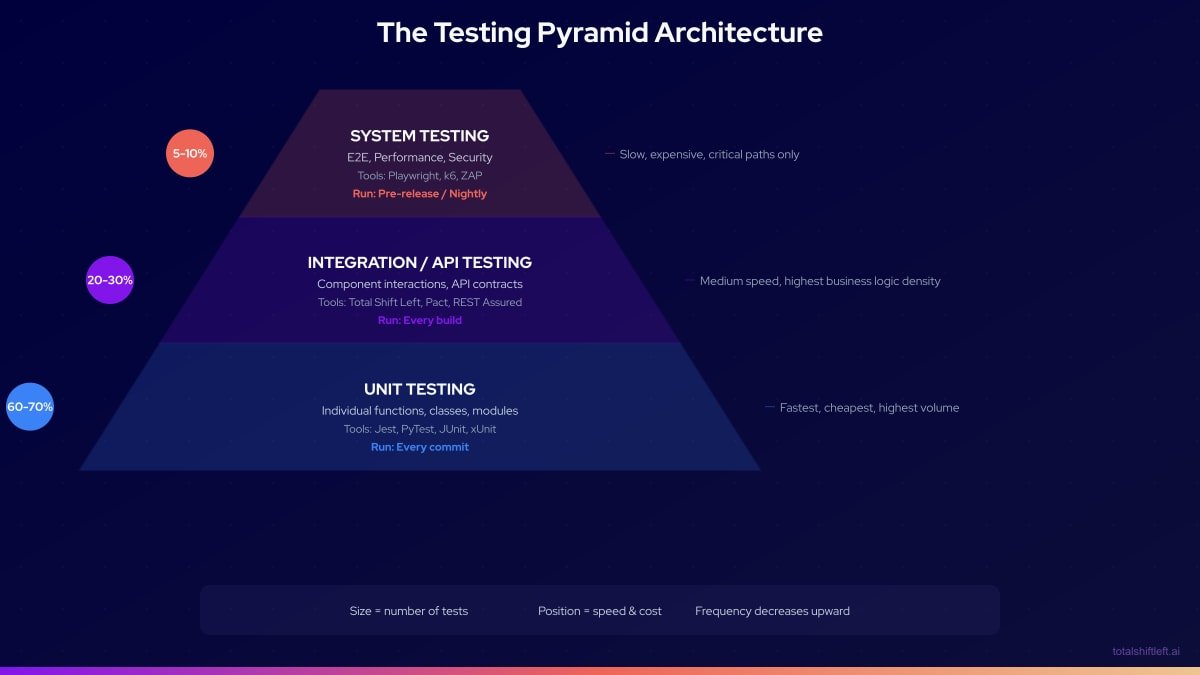
Unit tests validate one function or class in isolation with everything else mocked, in milliseconds on every commit. Integration tests validate that real components, such as a service and its database, work together, in seconds on every build. System tests validate the complete deployed application before release. Use roughly 60-70% unit, 20-30% integration and 5-10% system tests.
Reviewed by Parveen Kumari
Part of the Shift-Left, DevOps & QA Strategy hub. Start with the pillar guide: What is shift-left testing?.
Unit testing, integration testing, and system testing represent the three canonical layers of the software testing pyramid. Each layer has a distinct scope, a distinct defect class it is designed to catch, and a distinct cost-per-test profile. Understanding how they differ—and how they complement each other—is foundational to designing a testing strategy that provides comprehensive coverage without wasting resources on redundant or poorly targeted tests. This guide provides a definitive three-way comparison, a visual testing pyramid, and specific guidance on where Total Shift Left makes the integration layer accessible to any team without writing test code.
The testing pyramid is one of the most enduring concepts in software engineering, originally described by Mike Cohn in "Succeeding with Agile" (2009). Its core insight—that more tests should exist at the faster, cheaper layers and fewer at the slower, more expensive layers—remains as valid in 2026 as it was when first articulated. What has changed is the tooling available at each layer, and particularly the middle layer (integration and API testing), which has historically been the most under-invested due to its combination of technical complexity and lack of accessible no-code tooling.
This guide explains all three layers clearly, with precise definitions, a detailed three-way comparison table, and practical implementation guidance. It also addresses two common points of confusion: integration testing vs system testing (they are not the same thing, and one cannot substitute for the other) and unit testing vs integration testing (the line most teams accidentally cross).
By the end, you will understand exactly what each layer validates, what defects each layer catches, how to allocate your testing investment, and where Total Shift Left fills the integration layer gap for API-driven applications.
In this guide
- Unit vs integration vs system vs end-to-end testing: comparison table
- Integration Testing vs System Testing
- Unit Testing vs Integration Testing
- Unit vs integration vs end-to-end testing
- Unit testing vs API testing
- What Is Unit Testing?
- What Is Integration Testing?
- What Is System Testing?
- Why the Three-Layer Model Matters
- Key Characteristics of Each Layer
- The Testing Pyramid Architecture
- Unit, integration and system testing in practice: a worked example
- Unit, integration and system testing challenges and how to solve them
- Best Practices for the Three Testing Layers
- Testing Pyramid Checklist
- Frequently asked questions about unit, integration and system testing
Unit vs integration vs system vs end-to-end testing: comparison table
| Dimension | Unit Testing | Integration Testing | System Testing | End-to-End / Acceptance |
|---|---|---|---|---|
| Scope | Single function or class | Multiple components | Complete system | A full user journey across systems |
| Dependencies | All mocked | Real components (some mocked) | Full stack deployed | Full stack plus third parties |
| Speed | Milliseconds | Seconds | 10-30 seconds | Minutes |
| Cost per test | Very low | Medium | High | Highest |
| Maintenance | Low | Medium | High | Highest |
| Defects caught | Logic, validation, algorithms | Contracts, serialization, auth | Workflows, UX, performance | Business outcomes, real third-party integration |
| Ownership | Developers | QA + Developers | QA + Product | QA + Product + business stakeholders |
| CI trigger | Every commit | Every build | Pre-release/nightly | Pre-release only |
| Coverage target | 60-70% of suite | 20-30% of suite | 5-10% of suite | A handful of critical journeys |
| Primary tools | Jest, PyTest, JUnit | Total Shift Left, Testcontainers, Pact | Playwright, Cypress, k6 | Playwright, Cypress, manual acceptance |
The wider framing — testing from outside the implementation versus inside it — is in black box vs white box testing.
Where the boundary sits between a full journey test and an API test is worked through in end-to-end testing vs API testing.
Integration Testing vs System Testing
These two are the pair teams confuse most often, because both involve "more than one component." The difference is scope and perspective, not just size.
Integration testing stays inside the system boundary. It validates that component A correctly calls component B — a service correctly writes to its database, or service A's request matches what service B expects — using real or near-real dependencies. It never involves a browser or an end-user perspective; it runs against APIs and internal interfaces directly.
System testing treats the entire deployed application as a black box and validates it from outside the system boundary — the way a real user or an external caller would experience it. It doesn't care how components talk to each other internally; it cares whether the checkout flow works, whether the page loads under load, whether the response the outside world sees is correct.
| Integration Testing | System Testing | |
|---|---|---|
| Perspective | Inside the system, component-to-component | Outside the system, user/external-caller |
| Interface tested | APIs, internal contracts, database calls | UI, public API surface, complete workflows |
| Needs a browser? | No | Often (for web apps) |
| Failure tells you | Which two components broke their contract | That something in the end-to-end flow is broken (often needs further triage to localize) |
| Example | "Does POST /orders correctly write to Postgres and publish to Kafka?" | "Can a user browse, add to cart, and check out successfully?" |
A team that only has system tests can tell that something broke but not where — a checkout system test failing doesn't say whether the bug is in the order service, the payment integration, or the UI. Integration tests localize the failure to a specific boundary, which is why they're cheaper to debug even though system tests are what actually proves the product works for users. You need both; neither substitutes for the other.
Unit Testing vs Integration Testing
In one line: a unit test exercises one function with every dependency mocked, and an integration test exercises two or more real components together — a service and its database, or two services over HTTP. Every other difference follows from that one.
| Unit test | Integration test | |
|---|---|---|
| Scope | One function, method or class | Two or more components together |
| Dependencies | All mocked | At least one real: database, queue, HTTP service |
| Typical runtime | Under 100 ms | 100 ms to a few seconds |
| Runs on | Every commit | Every build |
| Catches | Logic errors inside the unit | Wiring, serialization, schema, transaction and auth errors |
| Misses | Whether the pieces fit together | Logic edge cases inside a single unit |
| A failure means | The function is wrong | The contract between two components is wrong |
| Setup cost | None | Containers, or a seeded test database |
| Share of a healthy suite | 60–70% | 20–30% |
The practical decision rule: write a unit test when the risk is in the logic, and an integration test when the risk is in the seam. A pricing calculation with six branches is a unit test. The same calculation reaching the database through an ORM that silently truncates a decimal is an integration test.
This is also the boundary teams cross by accident most often — a "unit test" that quietly became an integration test without anyone deciding that on purpose.
The test is a unit test only if every external dependency is mocked: no real database, no real network call, no real file system, no real message queue. The moment any of those becomes real, it's an integration test, regardless of what the test file is named or which directory it lives in.
# UNIT test — total isolation, in-memory only
def test_calculate_order_total():
    items = [OrderItem(price=Decimal("10.00"), quantity=2)]
    assert calculate_order_total(items, tax_rate=Decimal("0.1")) == Decimal("22.00")

# INTEGRATION test — same feature, but hits a real database
def test_create_order_persists_to_database(db_session):
    order = create_order(db_session, items=[{"sku": "ABC", "qty": 2}])
    saved = db_session.query(Order).get(order.id)
    assert saved.total == Decimal("22.00")  # actually round-tripped through Postgres
Why the distinction matters in practice: a unit test suite with hidden integration tests inside it is slow and flaky in a way that's hard to diagnose, because the test names and file locations don't tell you which tests are safe to run offline or in parallel without a database. Audit your "unit" directory periodically — any test that opens a real connection belongs in the integration layer, both for CI trigger timing (integration tests run on every build, not every commit) and for accurate coverage reporting.
Unit vs integration vs end-to-end testing
The three-layer model above stops at system testing, but the phrase most people search for is unit vs integration vs e2e. The distinction between the last two is worth stating plainly, because teams routinely conflate them.
System testing exercises your deployed system as a whole, with its own dependencies real and third parties usually stubbed. It answers: does the thing we built work end to end?
End-to-end (or acceptance) testing exercises a business journey across everything, including the third parties you do not control. It answers: can a customer actually complete this?
The practical consequence is cost. A system test can run on every pre-release build; an end-to-end test that touches a payment provider sandbox cannot, and should not. That is why the pyramid narrows to a handful of journeys at the top rather than a whole layer of them.
Unit testing vs API testing
Unit vs integration is a question about scope. Unit vs API testing is a different question — it asks which side of the interface you are standing on — and the two get conflated constantly, so it is worth separating them properly.
A unit test calls a function directly, inside the same process, with its collaborators mocked. It knows the implementation: it can reach a private method, assert on an internal state transition, and it breaks when you rename things. It is white-box by construction.
An API test sends a real HTTP request to a running service and asserts on the response — status code, body shape, headers, timing. It knows nothing about the implementation, only the contract. You could rewrite the service in another language and a well-written API test would still pass.
| Dimension | Unit testing | API testing |
|---|---|---|
| Scope | One function, method, or class | One endpoint or a sequence of endpoints |
| Approach | White box — knows internal structure | Black box — knows only the contract |
| Process boundary | Same process, direct call | Over the network, to a deployed service |
| Dependencies | Mocked or stubbed | Real service, usually a real database |
| Typically written by | Developers, alongside the code | Developers and QA engineers |
| Speed | Milliseconds | Tens to hundreds of milliseconds |
| What it catches | Logic errors, edge cases, branch bugs | Contract breaks, auth failures, serialization bugs, status-code errors |
| What it cannot catch | Anything at the wiring or serialization layer | Which line of code caused the failure |
| Breaks when | You refactor internals | You change the contract |
| Runs at | Every commit, pre-commit hook | Post-deploy to a test environment, CI pipeline stage |
Ready to shift left with your API testing?
Try our no-code API test automation platform free. Generate tests from OpenAPI, run in CI/CD, and scale quality.
Where API testing sits relative to the three layers
API testing is not a fourth layer of the pyramid — it is a technique that spans the middle. Most API tests are integration tests by scope: they exercise a real service against a real database and validate that the pieces are wired together. Some are system tests, when they chain several endpoints into a full workflow against a fully deployed environment.
The reason it deserves its own name is that the API is the layer where the contract lives, and contracts break differently from logic. A unit test passing while an API test fails almost always means the logic is right and the wiring, serialization, or contract is wrong — a field renamed in a DTO, a date serialized in the wrong format, middleware rejecting a valid token.
Do you need both?
Yes, and the reason is not thoroughness — it is that they fail in genuinely different ways.
Consider a discount calculation. The unit test asserts that calculateDiscount(100, 0.2) returns 80. It will keep passing after someone changes the API response field from discountedTotal to discounted_total, because the function never changed. Every consumer breaks; the unit suite stays green.
Now the inverse. An API test asserts that POST /orders returns 200 with a total of 80. It passes. Six months later a refactor introduces a rounding bug that only appears at a specific decimal boundary. The API test, exercising one happy path, never sees it. A unit test with a table of boundary cases would have caught it on the first run.
Neither layer subsumes the other:
- Unit tests give you branch coverage cheaply. Enumerating twenty edge cases costs milliseconds and no infrastructure.
- API tests give you the guarantee that the assembled system honours its published contract — the thing your consumers actually depend on.
The failure mode worth naming is a team with 85% unit coverage and no API tests, shipping a green build that breaks every client. High unit coverage measures how much code was executed, not whether the system does what it promised.
Why the API layer is usually the thin one
In practice this middle layer is the most under-invested, and the reason is economic rather than technical. Unit tests are cheap to write and developers own them. UI tests are visible and get budget. API tests sit in between: they need environments, test data, and auth handling, and they have historically required writing a lot of code by hand for coverage nobody sees in a demo.
This is the gap that spec-driven generation closes. Because an OpenAPI specification already describes every endpoint, its parameters, and its response schemas, the tests for that contract can be generated from the spec rather than hand-written — which turns full endpoint coverage from a quarter-long project into a build step. Total Shift Left generates that layer from the specification, so the middle of the pyramid gets covered without the hand-authoring cost that usually leaves it thin.
For the related distinction between API tests and full user-journey tests, see end-to-end testing vs API testing. For where contract testing fits as a stricter form of API testing, see what is API contract testing.
What Is Unit Testing?
Unit testing validates the smallest testable units of software—individual functions, methods, or classes—in complete isolation from external dependencies. Every external dependency (databases, APIs, message queues, file systems) is replaced with mocks, stubs, or fakes.
The defining characteristic of a unit test is isolation. If a unit test makes a network call or reads from a real database, it is not a unit test—it is a slow, unreliable integration test masquerading as a unit test.
What Unit Tests Validate
- Return values for given inputs
- Correct handling of edge cases and boundary conditions
- Correct error throwing/handling for invalid inputs
- Algorithm correctness
- State changes within a single object or module
- Business logic that is contained within one function or class
What Unit Tests Do Not Validate
- Whether component A correctly calls component B
- Whether the application correctly reads or writes to a database
- Whether HTTP requests are correctly serialized and deserialized
- Whether the whole application behaves correctly for a user
Unit Testing in Practice
# Example: Pure unit test (no external dependencies)
def test_calculate_order_total():
    items = [
        OrderItem(price=Decimal("10.00"), quantity=2),
        OrderItem(price=Decimal("5.00"), quantity=1),
    ]
    total = calculate_order_total(items, tax_rate=Decimal("0.1"))
    assert total == Decimal("27.50")  # (20 + 5) * 1.1

# This test validates the calculation logic in isolation.
# No database, no HTTP calls, no message queues.
Unit tests should compose 60–70% of the total test suite. They run in milliseconds, require no infrastructure, and provide the fastest feedback on code correctness.
What Is Integration Testing?
Integration testing validates that separately developed components, services, or modules work correctly when combined. Unlike unit tests, integration tests use real component instances (or carefully controlled doubles for specific boundaries) and validate the interactions across component boundaries. Chaining these cross-boundary checks as multi-step integration test workflows — where one request's response feeds the next — is what makes it practical to cover service-to-service flows without hand-writing glue code.
The defining characteristic of an integration test is the presence of real dependencies. A test that validates that the order service correctly saves to PostgreSQL, or that the payment service correctly calls the Stripe API, is an integration test.
What Integration Tests Validate
- Service-to-database communication (correct queries, correct data handling)
- Service-to-service HTTP/gRPC communication (correct contracts, correct serialization)
- Service-to-message-queue communication (correct publishing and consuming)
- Authentication and authorization across service boundaries
- Error propagation between components (what happens when one component fails)
- Data transformation correctness across component boundaries
What Integration Tests Do Not Validate
- Whether the complete user-facing system meets all functional requirements
- Whether the system handles production-scale concurrent traffic
- Whether the UI correctly reflects backend changes
- End-to-end user workflows across the full application stack
Integration Testing in Practice
# Total Shift Left auto-generates integration tests from OpenAPI spec.
# Example of what gets validated automatically:

GET /api/orders/{orderId}
  ✓ Returns 200 with correct response schema for valid orderId
  ✓ Returns 404 for non-existent orderId
  ✓ Returns 401 without authentication token
  ✓ Returns 403 for unauthorized user (wrong tenant)
  ✓ Response latency within SLA threshold

POST /api/orders
  ✓ Creates order with valid payload (validates database write)
  ✓ Returns 400 with validation errors for invalid payload
  ✓ Returns 409 for duplicate order ID
  ✓ Correctly handles optional fields
How Total Shift Left does this: Total Shift Left imports an OpenAPI or Swagger spec and generates the integration-layer test suite directly from it — positive, negative, and boundary cases per endpoint — without hand-written test code. The same platform covers REST, SOAP, and GraphQL, so multi-protocol integration layers are tested from one place.
Integration tests should compose 20–30% of the total test suite. They take seconds to run and require real component instances or controlled environments.
What Is System Testing?
System testing validates the complete, integrated application as a whole from the perspective of an end user or external system. System tests do not concern themselves with the internal implementation or component boundaries—they treat the application as a black box and validate that it meets its functional and non-functional requirements in its entirety.
System testing often subsumes:
- End-to-end (E2E) testing: Browser automation testing complete user workflows
- Performance testing: Validating response times, throughput, and stability under load
- Security testing: Validating that the complete system is resistant to attack
- Usability testing: Validating user experience quality
- Accessibility testing: Validating compliance with accessibility standards
Two of these — performance and security — can be driven from the API layer you already automated rather than from a separate toolchain. In Shift-Left API, load testing turns existing functional tests into load, stress, spike or soak runs, and security testing generates OWASP-mapped checks (including one user reading another's data) beside those same tests. Both are paid add-ons, included in the Trial. They complement, rather than replace, system-level load and penetration testing against the fully deployed stack.
What System Tests Validate
- Complete user workflows from start to finish (e.g., browse → add to cart → checkout → confirmation)
- System performance under realistic load conditions
- Cross-browser compatibility and responsive design
- Accessibility compliance (WCAG standards)
- Security controls at the system level
- Business process correctness across the full application
What System Tests Do Not Validate
- The internal correctness of individual components (that is unit testing's job)
- The correctness of individual service-to-service interactions (that is integration testing)
- Every possible edge case (system tests are expensive; they focus on critical paths)
System Testing in Practice
// Example: Playwright system/E2E test
test('User can complete checkout flow end to end', async ({ page }) => {
  // Setup
  await page.goto('/');

  // Step 1: Browse and add to cart
  await page.click('[data-testid="product-listing"]');
  await page.click('[data-testid="add-to-cart"]');

  // Step 2: Proceed to checkout
  await page.click('[data-testid="cart-icon"]');
  await page.click('[data-testid="checkout-button"]');

  // Step 3: Complete payment
  await page.fill('[data-testid="card-number"]', '4242424242424242');
  await page.click('[data-testid="place-order"]');

  // Assert: Order confirmation visible
  await expect(page.locator('[data-testid="order-confirmation"]')).toBeVisible();
});
System tests should compose 5–10% of the total test suite. They take seconds to minutes each to run and require the full application stack to be deployed.
A note on acceptance testing: acceptance testing overlaps heavily with system testing but answers a narrower question — "does this build meet the specific criteria a stakeholder defined for release?" — often expressed as user stories or Gherkin scenarios. In practice, most teams run acceptance criteria as a subset of their system test suite rather than maintaining it as a fourth, separate layer.
Why the Three-Layer Model Matters
Cost of Defects at Each Layer
NIST research established that defect cost increases dramatically the later it is found. Mapping this to the three-layer model:
Free PDF (10 pages)
Shift Left Testing Playbook
Move testing earlier in your SDLC with a proven adoption roadmap. Includes CI/CD architecture, tool stack recommendations, and metrics to track success.
Download Free- Defect caught by unit test: ~$1 (minutes of developer time)
- Defect caught by integration test: ~$10 (hours of investigation, environment setup)
- Defect caught by system test: ~$100 (multi-team debugging, full environment)
- Defect caught in production: ~$1,000+ (incident response, customer impact, reputation)
A team that invests primarily in system testing is paying 10–100x more per defect than a team that catches the same defects at the unit and integration layers.
Speed Determines Feedback Loop Quality
The testing pyramid is fundamentally about feedback loop speed:
- Unit tests: Milliseconds per test → 2-3 minute suite → Feedback within minutes of writing code
- Integration tests: Seconds per test → 5-10 minute suite → Feedback within a build cycle
- System tests: 10-30 seconds per test → 15-30 minute suite → Feedback at release time
A team that relies on system tests for primary defect detection gets feedback hours or days after a defect is introduced. A team that uses all three layers gets feedback within minutes. This is the core principle behind shift left testing—moving defect detection as early as possible in the development lifecycle. The DORA research consistently shows that tight feedback loops are the strongest predictor of software delivery performance.
Key Characteristics of Each Layer
Unit Testing
- Isolation: Complete. All dependencies mocked.
- Speed: Milliseconds per test
- Maintenance: Low. Tests change only when logic changes.
- Ownership: Developers
- CI trigger: Every commit
- Infrastructure required: None (runs in the developer's process)
- Coverage target: 70% of test suite, 80%+ code coverage
Integration Testing
- Isolation: Partial. Tests real component interactions, may mock some external boundaries.
- Speed: Seconds per test
- Maintenance: Medium. Tests change when APIs or contracts change.
- Ownership: QA engineers, shared with developers
- CI trigger: Every build (post-merge)
- Infrastructure required: Real component instances (Docker Compose, TestContainers)
- Coverage target: 20-30% of test suite, 100% of API endpoints
System Testing
- Isolation: None. Tests the complete system as deployed.
- Speed: 10-30 seconds per test
- Maintenance: High. Tests change when UI, workflows, or requirements change.
- Ownership: QA engineers, product teams
- CI trigger: Pre-release or nightly
- Infrastructure required: Full deployed application stack
- Coverage target: 5-10% of test suite, critical user journeys only
The Testing Pyramid Architecture
Unit, integration and system testing in practice: a worked example
Problem
A fintech startup building an investment platform had the classic inverted pyramid problem: they had 800 E2E tests (written by a dedicated QA team over 18 months), 150 integration tests (mostly written ad hoc), and only 200 unit tests. The E2E suite took 4 hours to run and was 35% flaky. The CI pipeline was effectively useless—developers had learned to deploy despite red builds because the failures were usually infrastructure issues, not real defects. Meanwhile, a genuine business logic defect had slipped through and caused incorrect tax calculations in production for 3 weeks before being detected.
The problem: the inverted pyramid provides maximum defect visibility at the most expensive layer. Real defects hide in the noise of infrastructure failures.
Separating that noise from real defects is now something tooling can help with. Shift-Left API's failed-run analysis groups a failed run into a handful of causes and gives each a verdict — environment problem, data issue, test defect or suspected product bug — so a red build caused by an unreachable dependency reads differently from one caused by a wrong tax calculation.
Solution
Phase 1: Flip the pyramid (months 1–2)
Unit tests:
- Developers wrote unit tests for all new code immediately
- QA engineers identified the 50 highest-risk business logic functions
- Unit tests written for all 50 functions; coverage increased from 18% to 67%
Integration tests via Total Shift Left:
- Imported OpenAPI specifications for 4 core services
- Auto-generated 340 integration tests covering all endpoints
- Integrated into CI pipeline running on every build (4 minutes)
- Replaced 200 E2E tests that were actually testing API behavior, not UI
System tests:
- E2E suite audited: 800 tests reduced to 120 critical user journey tests
- Migrated from Selenium to Playwright (4 hours → 22 minutes)
- Scheduled nightly + triggered pre-release
Phase 2: CI pipeline correction (month 3)
- Unit tests gate every PR (2.5 minutes)
- Integration tests gate every build (4 minutes)
- E2E tests gate every release (22 minutes, nightly for regular monitoring)
Results After 90 Days
| Metric | Before | After |
|---|---|---|
| Unit test count | 200 | 1,847 |
| Integration test count | 150 | 340 (all via TSL) |
| System test count | 800 | 120 |
| E2E suite runtime | 4 hours | 22 minutes |
| E2E flakiness rate | 35% | 3% |
| CI pipeline time (PR gate) | 4 hours | 6 minutes |
| Production defect rate | 2.3/month | 0.2/month |
| Tax calculation defect class | Recurred 3x | Never recurred (caught in unit tests) |
Unit, integration and system testing challenges and how to solve them
Challenge: Team cannot distinguish between integration and system tests Solution: Define the boundary explicitly: integration tests do not use a browser, do not test user-visible UI, and validate component interactions. System tests use a browser or full deployment and test user-visible behavior. Document this definition and enforce it in code review.
Challenge: Integration tests require complex environment setup Solution: Containerize using Docker Compose or TestContainers. Define the integration test environment in code (infrastructure-as-code), commit it to the repository, and run it identically on every machine.
Challenge: Unit tests are slow because they are not really unit tests Solution: Audit your "unit" test suite. Any test that makes network calls, reads files, or queries databases is an integration test and should be moved to the integration layer. True unit tests run in under 100ms each.
Challenge: API integration tests break whenever the API changes Solution: Use Shift-Left API and re-import your OpenAPI spec when the API changes. Regeneration reports which tests were created, updated or skipped and why, and fixes for tests that broke arrive as proposals a person accepts — replacing the manual update cycle that makes code-based integration tests expensive to maintain, without letting a real regression be "fixed" by editing the test.
Challenge: No clear ownership for integration test failures Solution: Integration tests validate the contract between two components. The team that owns the API being tested owns the integration test for that API. For cross-team service interactions, implement contract testing with Pact.
Best Practices for the Three Testing Layers
- Follow the pyramid proportions. 60–70% unit, 20–30% integration, 5–10% system. Deviating creates cost and reliability problems.
- Treat each layer as distinct. Do not let integration tests creep into the unit layer (by using real dependencies) or system test logic creep into the integration layer.
- Own unit tests in the development team. Developers who write features write unit tests as part of the definition of done.
- Automate API integration coverage completely. Use Total Shift Left to generate tests from your OpenAPI spec—100% endpoint coverage without writing code. For microservices architectures, see our dedicated API testing strategy for microservices guide.
- Limit system tests to critical user journeys. More than 15–20% of your test suite in E2E/system tests is a warning sign.
- Match CI triggers to layer speed. Unit tests on every commit. Integration tests on every build. System tests nightly or pre-release. Our guide on how to build a CI/CD testing pipeline covers the pipeline configuration in detail.
- Measure and report coverage by layer. Know your unit coverage percentage, your API endpoint coverage percentage, and your critical user journey coverage percentage.
- Delete system tests that duplicate integration coverage. If a system test validates something already covered by an integration test, the system test is redundant and expensive.
- Define testing layer ownership in your test automation strategy. Clear ownership prevents gaps and duplicated effort across layers.
- Understand how these layers relate to functional testing vs integration testing. The terminology overlaps — your team needs a shared vocabulary.
Testing Pyramid Checklist
- ✔ Unit tests compose 60–70% of the total test suite
- ✔ Integration tests compose 20–30% of the total test suite
- ✔ System tests compose 5–10% of the total test suite
- ✔ Unit tests run on every commit via pre-commit hooks and PR gates
- ✔ Integration tests run on every build (all API endpoints covered via TSL)
- ✔ System tests run nightly and pre-release (critical user journeys only)
- ✔ No unit tests make network calls or access real databases
- ✔ Coverage metrics are tracked and reported for all three layers
Frequently asked questions about unit, integration and system testing
What is the difference between unit testing and integration testing?
A unit test exercises one function with every dependency mocked — no database, no network, no file system — and runs in under 100 milliseconds. An integration test exercises two or more real components together, such as a service and its database, and takes from 100 milliseconds to a few seconds. Write a unit test when the risk is in the logic, and an integration test when the risk is in the seam between components. A healthy suite is roughly 60-70% unit tests and 20-30% integration tests.
What is the difference between unit testing, integration testing, and system testing?
Unit testing validates individual functions or classes in isolation. Integration testing validates that multiple components work correctly together. System testing validates the entire application as a complete system from the user or external system perspective.
In what order should unit, integration, and system tests run?
Unit tests run first (on every commit), then integration tests (on every build), then system tests (pre-release or nightly). This order reflects cost and speed—cheaper, faster tests run more frequently and catch defects earlier.
What is the recommended ratio of unit to integration to system tests?
The standard testing pyramid recommends approximately 60-70% unit tests, 20-30% integration tests, and 5-10% system tests. More unit tests means faster feedback and lower maintenance cost at the highest coverage layer.
What is the difference between unit testing and API testing?
A unit test calls a function directly inside the same process with its collaborators mocked, so it is white box — it knows the implementation and breaks when you refactor internals. An API test sends a real HTTP request to a running service and asserts on the response, so it is black box — it knows only the contract and breaks when the contract changes. Unit tests catch logic and edge-case errors; API tests catch contract breaks, auth failures, and serialization bugs that unit tests structurally cannot see.
Can API tests replace unit tests?
No. They fail in different ways. A unit test asserting calculateDiscount(100, 0.2) == 80 keeps passing after someone renames the API response field from discountedTotal to discounted_total — every consumer breaks while the unit suite stays green. Conversely, an API test exercising one happy path will not catch a rounding bug that only appears at a specific decimal boundary, which a unit test with a table of boundary cases catches immediately. High unit coverage measures how much code was executed, not whether the assembled system honours its published contract.
What tools automate integration and API testing in the test pyramid?
Total Shift Left operates at the integration and API layers of the testing pyramid, auto-generating integration tests from OpenAPI/Swagger specifications. This provides automated coverage for the middle layer of the pyramid—the most valuable and most commonly under-invested layer.
Sources and further reading
- Martin Fowler — The Practical Test Pyramid — the reference argument for test-layer proportions.
- ISTQB Glossary — the standard vocabulary for test terms.
- Google Testing Blog — Google's engineering write-ups on test sizing and flakiness.
Key takeaways
Unit testing, integration testing, and system testing are the three layers of a complete quality strategy. Each validates a distinct scope, catches a distinct defect class, and operates at a distinct cost point. The pyramid model prescribes more investment at the cheaper, faster layers and focused investment at the expensive system layer—a distribution that minimizes total quality cost while maximizing defect detection coverage. For the integration and API layer, Total Shift Left eliminates the technical barrier to comprehensive coverage by auto-generating tests from your OpenAPI specification. Start your free trial and build your integration layer coverage today.
Related: Functional Testing vs Integration Testing | What Is Shift Left Testing | Shift Left Testing Strategy | API Testing Strategy for Microservices | How to Build a CI/CD Testing Pipeline | DevOps Testing Strategy | No-code API testing platform | Start Free Trial
Ready to shift left with your API testing?
Import your OpenAPI spec and get a runnable test suite, in our cloud or on your own infrastructure.