
Failed API Test to Bug Ticket: What to Send and How
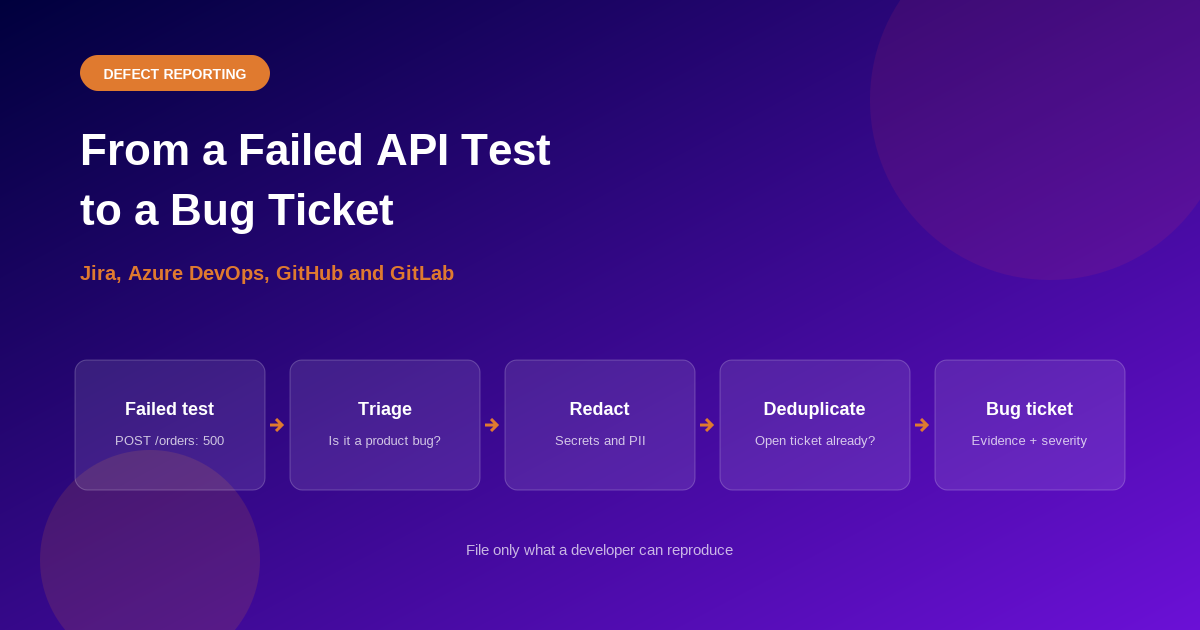
To turn a failed API test into a bug ticket, first confirm the failure is a product bug and not a test, data or environment problem. Then send the test name, environment, request, expected and actual response, the failed check, a run link and a severity. Remove secrets and personal data first, and search for an open ticket so the same failure is not filed twice.
Part of the API Testing in CI/CD hub. Start with the pillar guides: API testing in CI/CD: step-by-step · API regression testing: the complete guide.
To create a bug ticket from a failed API test, you need more than the error message. A developer needs to see what was sent, what came back, what should have come back and where it happened. This guide shows what to put in the ticket, when not to file one, and how to file from a pipeline without flooding your tracker.
In this guide
- Check that it is a bug before you file
- What an API bug ticket should include
- A worked example
- Keep secrets and personal data out
- Set severity from impact
- Stop duplicate tickets
- File from a pipeline with a script
- Azure DevOps, GitHub and GitLab
- Manual, automatic or one click
- Filing from Shift-Left API
- Checklist
- Frequently asked questions
Check that it is a bug before you file
A red test tells you that an expectation was not met. It does not tell you who is wrong. Sort the failure into one of four causes first.
| Cause | Typical signs | What to do |
|---|---|---|
| Product bug | The request is valid, the environment is healthy and the response breaks the spec or a requirement | File a bug against the API |
| Test defect | The assertion is out of date, or the spec changed on purpose | Fix the test |
| Data problem | A record the test expects is missing, used up or shared with another test | Fix the setup or seed data |
| Environment problem | A gateway or sign-in page, DNS errors, timeouts across many endpoints | Raise it with whoever runs the environment |
The status code is a useful first clue, so check what it means in our lesson on HTTP status codes. Two quick questions help with most cases. Did many unrelated tests fail at the same moment? If so, look for one shared cause, and file one ticket for it at most. Does the same request fail again with fresh data? If not, record it as intermittent and find out why before you blame the API.
For a step-by-step method, see how to debug failed API tests in CI/CD.
What an API bug ticket should include
The test is simple: can a developer who has never seen your suite reproduce the problem from the ticket alone?
| Field | What to write | Why it matters |
|---|---|---|
| Title | Symptom plus operation: POST /orders returns 500 instead of 201 | It can be found and told apart in a list |
| Environment and build | Environment name, base URL, build or commit | The bug may exist in only one of them |
| Request | Method, path, query, relevant headers and body | The developer can send it again |
| Expected | Status and body, with the spec or requirement that says so | It shows why this is a bug and not an opinion |
| Actual | Status, body and relevant response headers | It is the evidence |
| Failed check | The assertion, its expected value and its actual value | It points at the exact difference |
| Correlation ID | A trace or request ID, if the API returns one | The developer can find the server logs |
| Run link | The CI job or test report | It gives the full context |
| Frequency | Always, or for example 3 of the last 10 runs | It separates a hard failure from an intermittent one |
| Severity | Based on impact, using the team's written scale | It helps set the order of work |
Keep long logs short. Put the lines around the failure in the ticket and link to the rest. A ticket that opens with 2,000 lines of log gets skimmed.
A worked example
Here is a ticket that gives a developer nothing to work with:
Create order is broken. The test failed in the pipeline. Please check.
And here is the same failure written so that someone can act on it:
[Test failed] POST /orders returns 500 instead of 201 on staging

Environment: staging, build 482
Frequency:   failed in the last 3 of 3 runs; passed on build 479
Severity:    High (customers cannot place an order with two or more items)

Request
POST /orders
Content-Type: application/json
Authorization: [hidden]

{"customerId": "test-17",
 "items": [{"sku": "A1", "qty": 1}, {"sku": "B2", "qty": 1}]}

Expected:     201 with an order id (OpenAPI operation createOrder)
Actual:       500 {"error": "internal_error", "requestId": "req-8f2c"}
Failed check: status equals 201 (actual 500)
Note:         the same request with one item returns 201
Run:          <link to the CI job>
The note line is very useful. One extra request narrowed the search from "orders are broken" to "orders with several items are broken". When you can, change one thing, run the request again and write down the result.
If you often argue about what "expected" means, tie each check to the spec or a requirement. Our guides to writing API test cases and catching schema drift cover both.
Keep secrets and personal data out of the ticket
An issue tracker often has a wider audience than your pipeline logs, and ticket text gets copied into emails and chat. Treat every request and response as sensitive until you have checked it. The OWASP Logging Cheat Sheet lists data that should usually not be recorded in logs, and the same list is a good guide for tickets.
Check these places:
Authorization,Cookie,Set-Cookieand API key headers.- The URL, because keys and tokens passed in the query string are easy to miss.
- Request bodies, including form-encoded ones such as an OAuth token request.
- Response bodies, which may hold names, emails, addresses or account numbers.
- Assertion and error messages, which often repeat the value they compared.
Do not assume that a pattern-based mask finds everything. A secret in a field with an ordinary name can pass through. Use synthetic test data, limit who can read the project, and rotate any credential that reaches a ticket. Our guide to test data management explains how to keep real personal data out of test runs in the first place.
Ready to shift left with your API testing?
Try our no-code API test automation platform free. Generate tests from OpenAPI, run in CI/CD, and scale quality.
Set severity from impact
Agree on a short scale before the next failure, so that nobody has to negotiate it during a release.
| Severity | Meaning for an API | Example |
|---|---|---|
| Critical | Data loss, a security hole or a core operation that fails for everyone | One customer can read another customer's orders |
| High | A core operation fails for a common case, with no good workaround | Orders with two items return 500 |
| Medium | Wrong behaviour with a workaround, or in a less common path | A filter parameter is ignored |
| Low | Cosmetic or documentation differences | An error message does not match the docs |
Severity is not priority. Severity describes the damage. Priority describes when the team will fix it. Some trackers store them separately, so check which field your team sorts by.
Stop duplicate tickets
A nightly suite that files a new ticket for the same failure every night will soon be ignored. Four rules help prevent that:
- Give each failing test a fingerprint. A hash of the suite and test name is a good start. Do not include timestamps or random IDs, or every run looks new.
- Search before you create. Store the fingerprint as a label. If an open ticket has it, add a comment with the new run.
- Limit new tickets for each run. If 40 tests fail at once, you are more likely to have a few shared causes than 40 separate bugs.
- Do not close tickets on one green run. An intermittent failure often passes. Let a person close the ticket, or require several clean runs.
A fingerprint based on the test name has limits. Renaming a test creates a new fingerprint, and two different bugs in the same test share one ticket. Read the new comment before you assume it is the same problem.
File Jira bugs from a pipeline
Many test runners can write a JUnit XML report, so a script that reads it works with many frameworks. This one uses the Jira Cloud REST API to search for an open issue, then comments or creates. Version 3 of the API expects descriptions and comments in the Atlassian Document Format.
# file_failures.py: one Jira bug per failing test, a comment if one is already open
import hashlib, os, re, sys
import xml.etree.ElementTree as ET
import requests

BASE = os.environ["JIRA_URL"].rstrip("/")
PROJECT = os.environ["JIRA_PROJECT"]
RUN_URL = os.environ.get("RUN_URL", "(no run link)")
AUTH = (os.environ["JIRA_EMAIL"], os.environ["JIRA_API_TOKEN"])
MAX_NEW = 5   # more new failures than this usually means one shared cause

SECRETS = re.compile(
    r"(?i)(bearer\s+|(?:token|api[_-]?key|password|secret)[\"']?\s*[=:]\s*[\"']?)[^\s\"'&,}]+")

def redact(text):
    return SECRETS.sub(r"\1[hidden]", text)

def adf(text):   # Jira Cloud v3 takes Atlassian Document Format, not plain text
    return {"type": "doc", "version": 1, "content": [
        {"type": "codeBlock", "content": [{"type": "text", "text": text}]}]}

def jira(method, path, **kw):
    r = requests.request(method, BASE + path, auth=AUTH, timeout=30, **kw)
    r.raise_for_status()
    return r.json()

def failures(report):
    for case in ET.parse(report).getroot().iter("testcase"):
        node = case.find("failure")
        if node is None:
            node = case.find("error")
        if node is not None:
            detail = f"{node.get('message', '')}\n{node.text or ''}".strip()
            yield case.get("classname", ""), case.get("name", ""), detail

def main(report):
    created = 0
    for suite, name, detail in failures(report):
        label = "apitest-" + hashlib.sha1(f"{suite}::{name}".encode()).hexdigest()[:12]
        body = redact(f"Test: {suite}::{name}\nRun: {RUN_URL}\n\n{detail}")[:8000]
        found = jira("GET", "/rest/api/3/search/jql", params={
            "jql": f'project = "{PROJECT}" AND labels = "{label}" AND statusCategory != Done',
            "fields": "key", "maxResults": 1})["issues"]
        if found:
            key = found[0]["key"]
            jira("POST", f"/rest/api/3/issue/{key}/comment", json={"body": adf(body)})
            print("commented on", key)
        elif created < MAX_NEW:
            key = jira("POST", "/rest/api/3/issue", json={"fields": {
                "project": {"key": PROJECT},
                "issuetype": {"name": "Bug"},
                "summary": redact(f"[Test failed] {name}")[:250],
                "labels": ["test-failure", label],
                "description": adf(body)}})["key"]
            created += 1
            print("created", key)
        else:
            print("skipped (limit reached):", name)

if __name__ == "__main__":
    main(sys.argv[1])
Run it only when a step has failed, after the tests have written the report:
# .github/workflows/api-tests.yml (steps)
- run: pytest tests/api --junitxml=results.xml
- if: failure() && github.ref == 'refs/heads/main'
  run: pip install requests && python file_failures.py results.xml
  env:
    JIRA_URL: ${{ vars.JIRA_URL }}
    JIRA_PROJECT: ${{ vars.JIRA_PROJECT }}
    JIRA_EMAIL: ${{ secrets.JIRA_EMAIL }}
    JIRA_API_TOKEN: ${{ secrets.JIRA_API_TOKEN }}
    RUN_URL: ${{ github.server_url }}/${{ github.repository }}/actions/runs/${{ github.run_id }}
Before you rely on it, know its limits:
- We tested the script against a local stand-in for Jira, not a real Jira site. The test covered creating, commenting, the limit and the masking. We did not run the workflow file. Try both on a sandbox project first. Your project may require extra fields, or name the Bug issue type differently.
- A JUnit report may not hold the request and response. The ticket gets only the failure message and trace. Add the exchange to your assertion messages, or link to a saved artifact.
- The masking is a safety net, not a guarantee. It covers a few common patterns. It does not reliably find cookies, Basic credentials, personal data or secrets under other names.
- The limit applies to each run. If the other failures are still there next time, the script files up to five more. When you hit the limit, stop and find the shared cause.
- It does not set a severity. Your report does not tell the script how bad the impact is.
CI/CD Testing Pipeline Templates
Production-ready CI/CD pipeline templates for GitHub Actions and GitLab CI. Includes API testing, contract testing, and performance testing stages.
The if line also keeps feature branches out of the tracker. A failure on a pull request usually belongs to its author, and the pipeline check already tells them. See API quality gates for deciding what blocks a merge.
The same pattern in Azure DevOps, GitHub and GitLab
The four rules stay the same. The API calls and field names change.
| Tracker | Create with | Body format | Where severity can go |
|---|---|---|---|
| Jira Cloud | POST /rest/api/3/issue (docs) | Atlassian Document Format | The priority field, or a custom field |
| Azure DevOps | The Work Items Create call with type Bug, sent as a JSON Patch document | HTML in the repro steps field | The Severity and Priority fields, depending on your process |
| GitHub Issues | POST /repos/{owner}/{repo}/issues (docs) | Markdown | A label such as severity:high |
| GitLab Issues | POST /projects/:id/issues (docs) | Markdown | A label such as severity:high |
Whichever you use, give the token the narrowest access that can do the job, and keep it in your CI secret store.
Manual, automatic or one click
| Approach | Best for | Strength | Weakness |
|---|---|---|---|
| Copy by hand | Rare failures, new suites | A person checks the cause and the data | Slow, and ticket quality varies |
| Pipeline script | Stable suites on the main branch | Needs no manual step | Needs duplicate checks, limits and upkeep, and can file failures that are not bugs |
| A button on the failed result | Teams that triage before filing | A person decides, and the evidence is filled in | Someone has to press it |
A sensible path is to start by hand, move to a button or a template once you know what a good ticket looks like, and automate only the suites that rarely fail for reasons other than the product.
How to file a failed test as a bug in Shift-Left API
This section covers what filing a failed test as a bug does in Shift-Left API, and its limits. It is available on every plan, including the free one.
- An administrator connects a tracker under Settings → Integrations → Issue Trackers: Jira (Cloud, Server or Data Center), Azure DevOps, GitHub Issues or GitLab Issues.
- Open a result with the status failed or errored. Under its header is the box File this failure as a bug.
- Choose a tracker under File in, then select File as a bug. Filing needs permission to edit tests.
What the ticket carries. The test, environment and run details, up to 100 checks with expected and actual values, the request and response with headers and bodies, the error, diagnostics, extracted variables and the end of the run log. Long parts are cut and marked. It links back to the run when the server knows its public address. The test's severity becomes the priority in Jira and Azure DevOps, or a severity label in GitHub and GitLab. If Jira or Azure DevOps refuses that field, the ticket is sent again without it.
What is hidden. Headers, JSON body fields, XML elements and variables whose names look like credentials are hidden. The full request URL, the text of checks, error messages, form-encoded bodies and secrets under ordinary field names are not masked. A failed result's ticket always includes the response body, so read the report before you file it.
Grouped failures. Failed-run analysis groups the failures of a run into causes, and you can file one ticket for a cause. That ticket is a summary, not the full report. It has no severity, and it includes response lines only if you tick the box for them.
What it does not do. A person files one result or one cause at a time. There is no automatic or bulk filing and no filing from a pipeline. The status of these tickets is not read back. A result is filed only once, but a later run of the same test is a new result, so check your tracker for duplicates. Workflow and load test results do not have the box.
The steps and troubleshooting are in File a failed test as a bug. To try it on your own API, start a trial or compare the plans.
Bug ticket checklist
- The failure is a product bug, or the ticket clearly says what is still unknown.
- The title names the operation and the symptom.
- Environment, base URL and build or commit are listed.
- The request can be sent again from the ticket.
- Expected and actual results are both shown, with the source of "expected".
- A correlation ID and a run link are included where they exist.
- Secrets and personal data are removed, including from the URL and error text.
- Severity follows the team's written scale.
- No open ticket already covers the same failure.
Frequently asked questions about API bug tickets
What should an API bug report include?
The test name, endpoint and method, environment and build, the request, the expected and actual response, the check that failed, a link to the run, a severity and how often it fails. Remove secrets and personal data before you send it.
Should every failed test create a bug ticket automatically?
Usually not. Many failures come from the test, its data or the environment. File automatically only for stable suites, with a duplicate check and a limit on new tickets for each run.
How do I avoid duplicate bug tickets from CI?
Give each failing test a stable fingerprint, store it on the ticket as a label, and search for an open ticket with that label before creating one. If one exists, add a comment instead.
Is it safe to attach the request and response to a ticket?
Only after redaction. Authorization headers, cookies, keys in query strings and personal data can all appear. Pattern-based masking misses some secrets, so limit who can read the project and use test data.
Can Shift-Left API file bugs from failed tests?
Yes. A person can file a failed test result or a group of failures in Jira, Azure DevOps, GitHub or GitLab, on every plan. Nothing is filed automatically, and credentials are hidden by field name only.
Key takeaways
- Triage first. A failed test is not always a bug.
- Write for someone who has never seen your suite: request, expected, actual, environment and run link.
- Redact before sending, and assume masking will miss something.
- Fingerprint, search and limit before any pipeline creates tickets.
- To connect tickets back to requirements, see Jira and Azure DevOps ticket traceability. For the wider reporting picture, see scalable API test reporting.
Ready to shift left with your API testing?
Import your OpenAPI spec and get a runnable test suite, in our cloud or on your own infrastructure.