
8 Best WebSocket Testing Tools in 2026
Quick answer
WebSocket testing needs different tools than REST because there's no single request/response to assert on — you connect once, then send and receive a stream of messages over a persistent connection. wscat and websocat are the fastest CLI clients for a quick manual connection; Postman has native WebSocket request support alongside its REST and GraphQL tooling; Playwright can monitor WebSocket frames during a browser-driven test; and k6's k6/ws module or Artillery cover WebSocket load testing with many concurrent connections.
Reviewed by Parveen Kumari
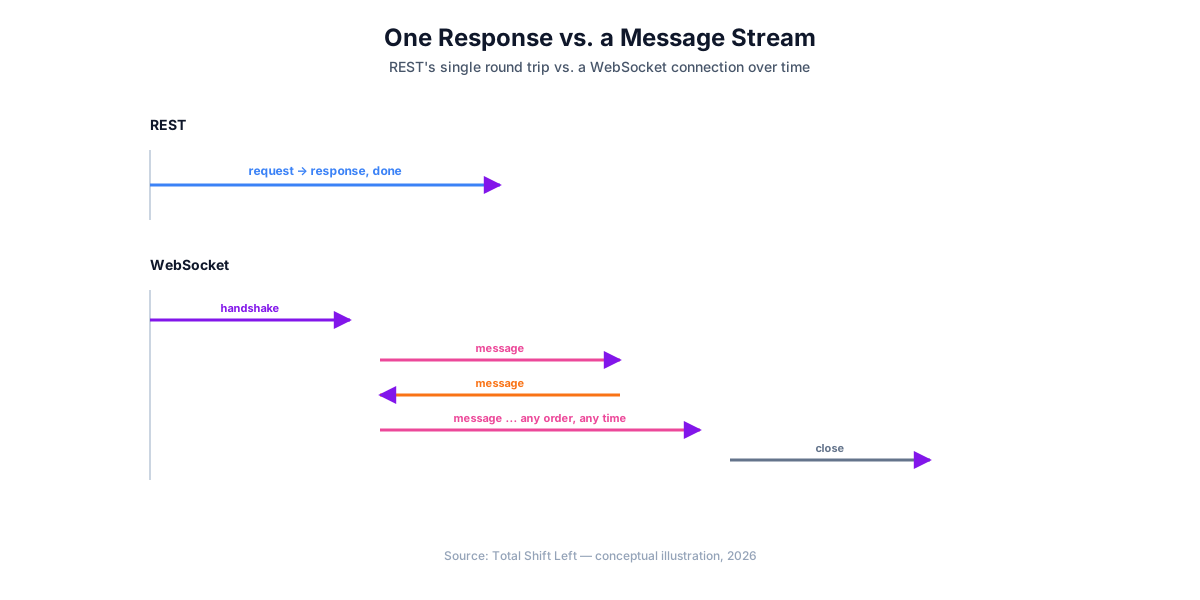
WebSocket testing tools exist as their own category because a WebSocket connection isn't a single request and response — it's a persistent, full-duplex connection you open once and then exchange a stream of messages over, which means tests need to assert on message order, timing, and connection lifecycle events rather than one response body.
In this guide
- What's Different About WebSocket Testing
- CLI Clients
- GUI and Browser-Integrated Tools
- Load Testing Tools
- A Note on Socket.IO
- Testing a WebSocket endpoint
- WebSocket testing tools compared
- Authentication is the awkward part
- Reconnection is behaviour, not plumbing
- Common mistakes
- Frequently asked questions about WebSocket testing
- The five assertions a WebSocket suite needs
- Load testing a persistent connection
What's Different About WebSocket Testing
A WebSocket connection starts with an HTTP handshake (an Upgrade request) and then stays open — both sides can send messages at any time, in any order, with no fixed request-then-response pairing. Testing it means covering four distinct things: the handshake succeeding, the message stream (content, order, and timing of what's sent and received), lifecycle events (clean close, abrupt disconnect, error, reconnection), and behavior under many concurrent open connections.
The assertions change when the protocol does — REST vs GraphQL vs gRPC testing covers what transfers and what does not.
CLI Clients
- wscat — a Node.js command-line tool for connecting to a WebSocket URL and sending/receiving messages interactively, the fastest way to manually poke at an endpoint without any GUI.
- websocat — a more feature-rich Rust-based CLI equivalent, supporting piping WebSocket traffic to and from other command-line tools and scripts.
GUI and Browser-Integrated Tools
- Postman — has native WebSocket request support alongside its REST, GraphQL, and gRPC tooling, so teams already using Postman for other API types can test WebSocket endpoints from the same app rather than switching tools. See our Postman beginner guide for the equivalent REST workflow.
- Playwright — via
page.on('websocket')and its frame-level events, Playwright can monitor WebSocket traffic that occurs as part of a browser-driven end-to-end test, useful for verifying a real application's actual WebSocket usage rather than testing the WebSocket endpoint in isolation the way a dedicated client does. See our Playwright API testing guide for the equivalent HTTP-only workflow. - Browser DevTools — every major browser's Network tab has a dedicated WebSocket frames view for manual inspection during development, the zero-setup option for a quick look at what's actually being sent.
Load Testing Tools
- k6 (k6/ws) — k6's WebSocket module scripts connection lifecycle and message exchange for load testing, using the same
check()/thresholdspattern covered in our k6 load testing tutorial, adapted for a persistent connection instead of one request per iteration. - Artillery — supports WebSocket (and Socket.IO) load testing scenarios directly in its YAML configuration, useful for teams wanting one load-testing tool across both HTTP and WebSocket traffic. The best API load testing tools covers how it compares to the rest of that field.
A Note on Socket.IO
Applications built on Socket.IO run on top of WebSocket but add their own protocol layer and fallback transports (for environments where a raw WebSocket connection isn't available). A raw WebSocket client like wscat or websocat won't correctly speak Socket.IO's additional framing — testing a Socket.IO application typically means using the socket.io-client library directly in test code, which handles that protocol layer for you, rather than reaching for a generic WebSocket tool.
Testing a WebSocket endpoint
For an interactive check, websocat is the curl of WebSockets — connect, send a frame, see what comes back:
# connect and send one message
websocat wss://api.example.com/v1/stream \
  -H "Authorization: Bearer $TOKEN" <<< '{"action":"subscribe","channel":"orders"}'

# check the handshake itself (RFC 6455): 101, upgrade headers, accepted subprotocol
curl -isS "https://api.example.com/v1/stream" \
  -H "Connection: Upgrade" -H "Upgrade: websocket" \
  -H "Sec-WebSocket-Version: 13" \
  -H "Sec-WebSocket-Key: dGhlIHNhbXBsZSBub25jZQ==" \
  -H "Sec-WebSocket-Protocol: orders.v1" | head -8
For an automated suite, the assertions that matter are ordering, reconnection and backpressure — the things a request/response test never has to think about:
// ws.test.js
import WebSocket from 'ws';

test('messages arrive in order and survive a reconnect', async () => {
  const received = [];
  let ws = new WebSocket(process.env.WS_URL, { headers: { Authorization: `Bearer ${T}` } });

  await new Promise((r) => ws.on('open', r));
  ws.send(JSON.stringify({ action: 'subscribe', channel: 'orders', from: 0 }));
  ws.on('message', (m) => received.push(JSON.parse(m)));

  await triggerOrders(10);
  await waitFor(() => received.length >= 10, 5000);

  // 1. sequence numbers are monotonic — no reordering, no gaps
  const seq = received.map((m) => m.seq);
  expect(seq).toEqual([...seq].sort((a, b) => a - b));
  expect(new Set(seq).size).toBe(seq.length);

  // 2. after an abrupt close, resuming from the last seq replays nothing twice
  ws.terminate();
  ws = new WebSocket(process.env.WS_URL, { headers: { Authorization: `Bearer ${T}` } });
  await new Promise((r) => ws.on('open', r));
  ws.send(JSON.stringify({ action: 'subscribe', channel: 'orders', from: Math.max(...seq) }));
  const after = [];
  ws.on('message', (m) => after.push(JSON.parse(m)));
  await triggerOrders(1);
  await waitFor(() => after.length >= 1, 5000);
  expect(after.every((m) => m.seq > Math.max(...seq))).toBe(true);
});

test('an unauthenticated connection is refused at the handshake', async () => {
  const ws = new WebSocket(process.env.WS_URL);
  const err = await new Promise((r) => ws.on('unexpected-response', (_, res) => r(res)));
  expect(err.statusCode).toBe(401);
});
Ready to shift left with your API testing?
Try our no-code API test automation platform free. Generate tests from OpenAPI, run in CI/CD, and scale quality.
WebSocket testing tools compared
Interactive probing, automated assertions and load are three different jobs:
| Tool | Type | Scriptable | Load testing | Assertions | Best for |
|---|---|---|---|---|---|
| websocat | CLI | Shell | No | Manual | The curl of WebSockets; quick probing |
| wscat | CLI | Shell | No | Manual | The same role, in the Node ecosystem |
| ws (Node library) | Library | JavaScript | No | Full, via Jest or Vitest | Automated suites with ordering and reconnect checks |
| k6 | Load tool | JavaScript | Yes | Thresholds | Concurrency, message rate, connection churn |
| Artillery | Load tool | YAML/JS | Yes | Expectations | Scenario-based load mixing HTTP and WebSocket |
| Postman | GUI | Limited | No | Basic | Exploring a socket by hand |
| Autobahn TestSuite | Conformance | Config | No | Protocol-level | Verifying RFC 6455 conformance of a server you wrote |
The gap most teams have is the third row and the last: reconnect and ordering behaviour, and protocol conformance. Neither appears in a request/response test plan — 9 types of API testing covers the layers a plan usually does include — and both are where real WebSocket defects live.
Authentication is the awkward part
WebSocket authentication is where most teams improvise, because the browser API makes the obvious approach impossible: new WebSocket(url) accepts no custom headers, so there is nowhere to put an Authorization header from browser code.
Three patterns are in common use, and they are not equivalent.
Token in the query string. Simplest, and the one to avoid where you can. URLs land in server access logs, proxy logs and browser history — the same reason you would not put a token in a REST URL applies here.
Token in the subprotocol header. The Sec-WebSocket-Protocol header is one of the few the browser API lets you set, so it gets used to carry a credential. It works, but it overloads a field meant for protocol negotiation, and the server must echo a valid subprotocol back or the handshake fails.
Authenticate after connect. The connection opens unauthenticated, the client sends a credential as its first message, and the server refuses everything else until it validates. This keeps the token out of URLs entirely, at the cost of a server that must handle half-open connections and time them out.
Whichever you choose, three assertions belong in the suite — the long-lived-session variants of the cases in JWT authentication testing: an unauthenticated connection is closed rather than left open, an expired token is rejected at the handshake, and — the one usually missed — a token that expires during a long-lived connection eventually terminates it. A connection authenticated once and held open for six hours is a session with no expiry.
Origin checking is not optional, and it is the same authorization gap catalogued in the OWASP API Security Top 10. WebSocket connections are not protected by the same-origin policy the way XHR is; the browser will happily open one to another origin and send cookies with it. If your server authenticates by cookie, validate the Origin header at the handshake or you have built a cross-site hijack.
Reconnection is behaviour, not plumbing
Persistent connections drop — networks change, load balancers recycle, deploys happen. What the client does next is application behaviour and deserves tests, in the same way fault injection testing treats a dropped dependency as a case rather than an accident.
Does it reconnect at all, and does it back off? A client that reconnects immediately in a tight loop turns a brief blip into a self-inflicted denial of service, and it is a common bug because it only appears when the server is already struggling.
Does it resume, or restart? After reconnecting, does the client request what it missed, or silently continue and drop the gap? For anything ordered — a feed, a chat, a ticker — a silent gap is a correctness bug that no functional test on a stable connection will find.
Does it re-authenticate? A reconnect establishes a new connection, which needs the same credential checks as the first. Servers that authenticate only the initial handshake and trust reconnections are a real pattern.
Testing these means deliberately killing the connection mid-suite and asserting on what follows — which is why a scriptable client matters more than a GUI for this class of test.
Common mistakes
Testing only that the connection opens. The handshake succeeding proves very little. Ordering, termination, reconnection and authentication expiry are where the defects are.
Assuming message order is guaranteed. A single connection preserves order; a client that opens several, or a server that fans out through a broker, may not. Assert on it if your application depends on it.
No test for the server closing. Close codes carry meaning, and clients frequently treat every close identically. Assert the code your server sends for a policy violation, a normal shutdown and an auth failure.
Load testing with request-per-second thinking. The load characteristic of a WebSocket service is concurrent held connections and memory per connection, not requests per second. A tool that only models request rate measures the wrong thing.
Forgetting Socket.IO is not WebSocket. A raw WebSocket client cannot talk to a Socket.IO server — it has its own handshake and framing on top. Use a matching client, or the connection fails in a way that looks like a server fault.
Free Guided worksheet
Build Your Testing Strategy in 30 Minutes
A structured worksheet that walks you through defining your testing strategy in 30 minutes. Cover architecture, tools, layers, and team responsibilities.
Download FreeFrequently asked questions about WebSocket testing
How is testing a WebSocket API different from testing a REST API? REST testing sends one request and asserts on one response. WebSocket testing connects once and then sends and receives a stream of messages over a persistent connection, so tests need to assert on message order, timing, and connection lifecycle events (open, close, error) rather than a single request/response pair.
What is the fastest way to manually test a WebSocket endpoint? wscat or websocat from the command line — both connect and let you send/receive messages interactively, similar to curl for a single HTTP request.
Can Postman test WebSocket APIs? Yes — Postman has native WebSocket request support alongside its REST, GraphQL, and gRPC tooling, letting you connect, send messages, and view incoming messages from the same app used for other API types.
Can Playwright test WebSocket connections? Playwright can monitor WebSocket traffic during a browser-driven test via the page.on('websocket') event and its frame-level events, useful for verifying that a real application's WebSocket usage behaves correctly as part of an end-to-end test, rather than as a standalone WebSocket client the way wscat is.
How do I load test a WebSocket API? k6's k6/ws module and Artillery both support scripting many concurrent WebSocket connections and measuring behavior under that load, similar in spirit to how they test HTTP load — the key difference is scripting connection lifecycle and message exchange instead of a single request per virtual user.
Should I test Socket.IO the same way as raw WebSocket? Not quite — Socket.IO adds its own protocol layer and fallback transports on top of WebSocket, so testing it typically means using the socket.io-client library directly in test code rather than a raw WebSocket tool, which won't correctly speak Socket.IO's additional framing.
The five assertions a WebSocket suite needs
Request/response testing has one obvious assertion — the status code. A persistent connection has five, and most suites cover one of them.
1. The handshake. Before any message, the upgrade has to succeed with the right subprotocol and the right auth outcome.
2. Ordering. Messages on a single connection must arrive in the order the server sent them, with no gaps in the sequence.
3. Reconnection and replay. After a drop, resuming from the last sequence number must deliver what was missed and nothing twice.
4. Backpressure. A slow consumer must not cause the server to buffer without limit or drop silently.
5. Close semantics. The close code and reason should be meaningful, and the server should close cleanly on auth expiry rather than hanging.
// the two that are almost never tested: backpressure and close semantics
import WebSocket from 'ws';

test('a slow consumer gets closed, not silently dropped', async () => {
  const ws = new WebSocket(process.env.WS_URL, { headers: { Authorization: `Bearer ${T}` } });
  await new Promise((r) => ws.on('open', r));
  ws.pause();                       // stop reading, simulate a slow client
  await triggerOrders(5000);        // far more than any sane buffer

  const close = await new Promise((r) => ws.on('close', (code, reason) => r({ code, reason: String(reason) })));
  expect(close.code).toBe(1008);    // policy violation, not 1006 abnormal
  expect(close.reason).toMatch(/backpressure|slow consumer/i);
});

test('the server closes cleanly when the token expires', async () => {
  const ws = new WebSocket(process.env.WS_URL, { headers: { Authorization: `Bearer ${SHORT_LIVED_TOKEN}` } });
  await new Promise((r) => ws.on('open', r));
  const close = await new Promise((r) => ws.on('close', (code) => r(code)));
  expect(close).toBe(1008);         // and not left open indefinitely
});
Load testing a persistent connection
WebSocket load is a different shape from HTTP load: the interesting number is concurrent connections held open, not requests per second, and the failure mode is memory rather than CPU.
// ws-load.js — k6 run ws-load.js
import ws from 'k6/ws';
import { check } from 'k6';
import { Counter, Trend } from 'k6/metrics';

const messagesReceived = new Counter('ws_messages_received');
const messageLatency = new Trend('ws_message_latency', true);

export const options = {
  scenarios: {
    hold: {
      executor: 'ramping-vus',
      stages: [
        { duration: '1m', target: 500 },   // ramp connections
        { duration: '5m', target: 500 },   // hold them open — this is the test
        { duration: '1m', target: 0 },
      ],
    },
  },
  thresholds: {
    ws_connecting: ['p(95)<1000'],
    ws_message_latency: ['p(99)<250'],
    ws_session_errors: ['count<10'],
  },
};

export default function () {
  const url = `${__ENV.WS_URL}?token=${__ENV.TOKEN}`;
  ws.connect(url, {}, (socket) => {
    socket.on('open', () => socket.send(JSON.stringify({ action: 'subscribe', channel: 'orders' })));
    socket.on('message', (data) => {
      const msg = JSON.parse(data);
      messagesReceived.add(1);
      if (msg.sentAt) messageLatency.add(Date.now() - msg.sentAt);
    });
    socket.setTimeout(() => socket.close(), 300000);   // hold for the scenario
  });
}
Watch server memory during the hold phase, not just latency. The characteristic WebSocket failure is a slow leak per connection that looks fine at 500 and takes the process down at 5,000 — which a two-minute HTTP-style load test will never reveal.
Sources and further reading
- RFC 6455 — The WebSocket Protocol — the handshake and framing rules WebSocket tests assert against.
- Grafana k6 documentation — scripted load testing with thresholds you can gate on.
- AsyncAPI Specification — the event-driven equivalent of OpenAPI.
Key takeaways
- WebSocket testing asserts on a message stream and lifecycle, not a single request/response — different mental model than REST.
- wscat and websocat are the fastest manual clients for a quick connection with no GUI.
- Postman and Playwright both cover WebSocket testing, but for different purposes — Postman for standalone API testing, Playwright for monitoring WebSocket traffic inside a real browser-driven test.
- k6 and Artillery both support WebSocket load testing using the same scripting model they use for HTTP.
- Socket.IO needs its own client library, not a raw WebSocket tool, because of its additional protocol layer.
Ready to shift left with your API testing?
Try our no-code API test automation platform free.