
API Performance Testing: How to Load Test an API
Quick answer
API performance testing measures how an API behaves under load: latency percentiles (p95, p99), throughput and error rate as traffic rises. To load test an API, set SLOs first, model realistic traffic, run load, stress, spike and soak tests against a production-like environment with a tool such as k6 or JMeter, and fail CI when a threshold is breached.
Reviewed by Smeet Gohel
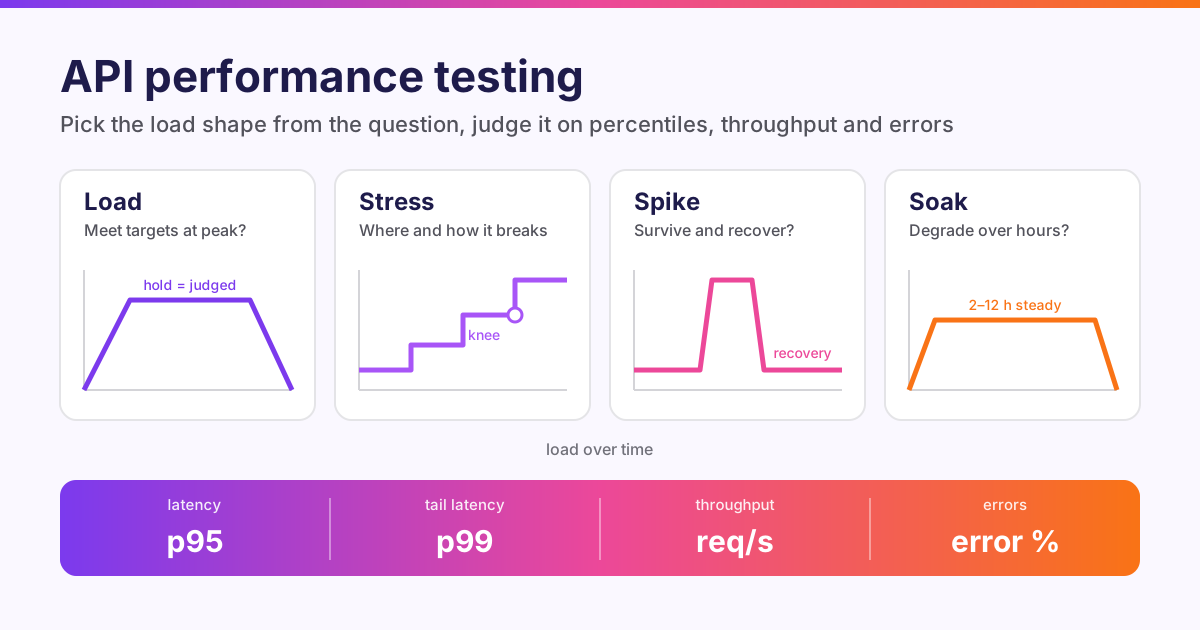
API performance testing measures how an API behaves when many clients call it at once: how fast it answers (latency percentiles such as p95 and p99), how much traffic it sustains (throughput), and how often it fails (error rate) as load rises. The most common form is the API load test, which applies realistic peak traffic and checks the results against agreed targets. Stress, spike and soak tests push in other directions.
This is the pillar guide for our Performance, Reliability & Observability hub. It covers the test types, the metrics that matter and how to load test an API step by step. Then come a worked example in k6 and JMeter, SLOs and CI gating, and the mistakes that quietly make results meaningless. Where a topic deserves more depth, we link to the dedicated guide.
In this guide: what it is · test types · metrics · how to load test an API · k6 and JMeter example · SLOs and CI · tools and mistakes · FAQ.
What is API performance testing?
Functional API tests ask does this endpoint return the right answer? Performance tests ask does it still return the right answer, fast enough, when a thousand clients ask at once? The two need each other. A fast wrong answer is useless, and so is a correct answer that takes eight seconds.
Performance testing an API differs from testing a web page in three ways:
- No browser. You measure the server's response, not rendering, so a single machine can generate far more load than browser-based tests could.
- The payload matters. Request and response size, serialization cost and compression all shape latency. A test that only posts tiny JSON bodies won't predict how an endpoint behaves with real 200 KB payloads.
- Dependencies dominate. Most API latency is spent waiting on something else: a database, a cache, another service, a third-party API. A performance test is often really a test of those dependencies and of the connection pools, timeouts and retries in between.
That last point is why performance testing belongs next to observability. A load test tells you that p99 latency jumped at 400 requests per second. Traces and metrics tell you why. See distributed tracing for microservices and observability vs monitoring.
Types of API performance tests
Each test type answers one question. Pick the type from the question, not the other way round.
Smoke test
Does the script work, and does the API respond normally at trivial load? Run 1 to 5 virtual users for a minute. It validates the script, the data and the environment before you spend an hour on a real run. Every other test should start with one.
Load test
Does the API meet its targets at expected peak traffic? Ramp up to the expected peak, hold it steady for long enough to be meaningful (usually 10 to 30 minutes), then ramp down. Judge the targets on the steady hold stage only. This is the test most people mean when they ask how to load test an API.
Stress test
Where does it break, and how? Increase load in steps past the expected peak: 1×, 1.5×, 2×, 3×. Watch for the knee, the point where latency starts rising faster than throughput. Also watch how the API fails. A healthy API sheds load with fast 429 or 503 responses. An unhealthy one queues requests until every client times out.
Spike test
What happens when traffic jumps suddenly? Go from baseline to many times baseline in seconds: a marketing email, a retry storm after an outage, a cron job on thousands of clients. Hold briefly, drop back, and measure recovery time: how long until latency and errors return to baseline. Autoscaling that takes three minutes to react won't help with a 60-second spike.
Soak (endurance) test
Does it degrade over hours? Hold moderate load (often 60 to 80% of peak) for several hours. Soak tests find memory leaks, connection-pool exhaustion, growing queues, log volumes that fill disks, and caches that grow without bound. These defects are invisible in a 10-minute run.
Breakpoint and capacity tests
What is the maximum sustainable throughput? Ramp continuously until a target is breached, and record the rate at which it happened. That number feeds capacity planning. A related check is the rate-limit probe: does the API start returning 429 at its documented limit?
| Test type | Load shape | Typical duration | Question it answers |
|---|---|---|---|
| Smoke | 1–5 users, flat | 1 min | Does the script and environment work? |
| Load | Ramp to expected peak, hold | 10–30 min hold | Do we meet targets at peak? |
| Stress | Steps past peak | 10–30 min | Where is the knee, and how do we fail? |
| Spike | Sudden jump, short hold, drop | 5–10 min | Do we survive and recover from bursts? |
| Soak | Moderate, flat | 2–12 h | Do we degrade over time? |
| Breakpoint | Continuous ramp until failure | Until a target breaks | What is our maximum capacity? |
Performance under failure is a neighbouring discipline. Combine load with injected faults (a slow database, a dead dependency) to test timeouts, retries and circuit breakers. See fault injection testing and the microservices reliability testing guide.
API performance testing metrics
Latency percentiles, not averages
An average hides the users who suffer. If 95 requests take 100 ms and 5 take 4 seconds, the average is 295 ms, which describes nobody's experience. Use percentiles:
- p50 (median): the typical request.
- p95: 1 in 20 requests is slower than this. The most common SLO target.
- p99: 1 in 100 is slower. Fan-out makes it matter more than it sounds: if one page calls ten APIs, roughly 1 page load in 10 hits at least one p99-slow call.
- max: useful for spotting timeouts, but too noisy to set targets on.
Two rules keep percentiles honest. First, never average percentiles across machines or time windows; merge the raw distributions (histograms) and compute the percentile from the merged data. Second, report latency for successful responses separately whenever errors occur. A fast 500 makes average latency look better while the service is failing.
Throughput
Requests per second (rps) the API actually served, not what the tool tried to send. If the generator meant to send 500 rps and the API served 380, the gap is the result.
Error rate
The percentage of requests that failed: timeouts, connection errors, 5xx, and any status your test didn't expect. Decide up front whether 429 counts as an error. In a load test it usually does; in a rate-limit probe it is the expected result.
Saturation
The server-side signals that explain the client-side numbers: CPU, memory, garbage-collection pauses, database connection-pool usage, thread-pool queue depth, and downstream latency. Google's SRE book calls latency, traffic, errors and saturation the "four golden signals". A load test that records only the first three can tell you something broke, but not what.
Concurrency and Little's law
Concurrency, throughput and latency are linked by Little's law: concurrency = throughput × time in the system. If each virtual user's iteration takes 250 ms of response time plus 750 ms of think time, a user completes one iteration per second. So 200 iterations per second needs about 200 concurrent users. Use the formula to size tests instead of guessing at a user count.
How to load test an API, step by step
1. Write down the targets first
A load test without targets produces numbers but no verdict. Agree targets with whoever owns the service, for example:
- p95 below 300 ms and p99 below 800 ms for
POST /ordersat 200 rps - error rate at or below 1%
- no degradation over a 4-hour soak at 120 rps
Targets usually come from SLOs, contractual SLAs or non-functional requirements (NFRs). If none exist, measure a baseline today and set targets relative to it.
2. Model real traffic
Look at production logs or API gateway analytics and answer three questions.
- What is the mix? For example, 70%
GET /products, 20%GET /products/{id}, 10%POST /orders. - What is the peak rate, and how does it arrive? Steady, daily curve, or bursts.
- What do the payloads look like? Real sizes and real variety.
Ready to shift left with your API testing?
Try our no-code API test automation platform free. Generate tests from OpenAPI, run in CI/CD, and scale quality.
A test that hammers one cached GET endpoint measures your cache, not your API.
3. Choose the workload model: closed or open
- Closed model (virtual users). A fixed number of users loop through the script. When the API slows down, each user waits longer, so the tool sends fewer requests. This is realistic for a fixed pool of clients, such as batch workers.
- Open model (arrival rate). New requests arrive at a set rate whatever the API does, like real internet traffic. When the API slows down, requests pile up exactly as they would in production.
The closed model's hidden problem is coordinated omission: the load generator backs off just when the API struggles, so the worst latencies are never measured. For throughput targets ("200 rps"), and for stress and spike tests, use an open model.
4. Prepare data and environment
- Test data: use enough distinct records that caches and database indexes behave realistically. Thousands of users each fetching their own orders is a different test from thousands of users fetching order 1.
- Authentication: generate tokens per virtual user and make sure they won't expire mid-run.
- Environment: production-like in size and configuration, or the results won't transfer. Note every difference.
- Generator capacity: check that the load generator itself isn't the bottleneck. Watch its CPU usage. A saturated generator reports latency it caused itself.
5. Run smoke, baseline, then the real test
Run a smoke test first. Then run the load test, and save the result as the baseline for future comparisons. Only then move on to stress, spike and soak runs.
6. Analyse and compare
Judge the targets on the steady stage. Correlate any breach with server-side metrics and traces. Compare against the baseline. Small run-to-run differences of a few percent are usually noise. Look for consistent shifts across repeated runs before calling something a regression.
Want to skip writing a second test suite? The 15-day free trial of Shift-Left API includes the Performance & Load Testing add-on at Scale-package limits. You can turn the functional tests you already have into a load, stress, spike or soak run and read a verdict against your targets.
Worked example: load testing an API with k6 and JMeter
The examples target QuickPizza, a demo service Grafana publishes for practising k6. Keep the load small against any public service you don't own. For real numbers, point BASE_URL at your own staging environment.
A k6 load test
k6 scripts are JavaScript; thresholds turn measurements into a pass or fail and set the exit code. Save as load-test.js:
import http from 'k6/http';
import { check, sleep } from 'k6';

const BASE_URL = __ENV.BASE_URL || 'https://quickpizza.grafana.com';

export const options = {
  scenarios: {
    average_load: {
      executor: 'ramping-vus',
      startVUs: 0,
      stages: [
        { duration: __ENV.RAMP || '1m', target: Number(__ENV.VUS || 20) },  // ramp up
        { duration: __ENV.HOLD || '5m', target: Number(__ENV.VUS || 20) },  // steady state
        { duration: '30s', target: 0 },                                       // ramp down
      ],
    },
  },
  thresholds: {
    http_req_failed: ['rate<0.01'],                    // < 1% errors
    http_req_duration: ['p(95)<500', 'p(99)<1000'],    // latency targets in ms
    'http_req_duration{name:create-pizza}': ['p(95)<800'],
    checks: ['rate>0.99'],
  },
};

const params = {
  headers: {
    'Content-Type': 'application/json',
    Authorization: `token ${__ENV.API_TOKEN || 'abcdef0123456789'}`,
  },
  tags: { name: 'create-pizza' },
};

export default function () {
  const payload = JSON.stringify({
    maxCaloriesPerSlice: 1000,
    mustBeVegetarian: false,
    excludedIngredients: [],
    excludedTools: [],
    maxNumberOfToppings: 5,
    minNumberOfToppings: 2,
  });

  const res = http.post(`${BASE_URL}/api/pizza`, payload, params);

  check(res, {
    'status is 200': (r) => r.status === 200,
    'has a pizza id': (r) => r.json('pizza.id') !== undefined,
  });

  sleep(Math.random() * 1 + 0.5);   // 0.5-1.5 s think time
}
Run a smoke-sized version first, then the real profile against your own environment:
# smoke: 2 users, short stages
k6 run -e VUS=2 -e RAMP=5s -e HOLD=30s load-test.js

# load test against staging
k6 run -e BASE_URL=https://staging.example.com -e VUS=50 load-test.js
The end-of-test summary prints each threshold with a ✓ or ✗ and the measured value, for example p(95)=234.18ms. If any threshold fails, k6 exits with a non-zero code (99), and CI uses that code to fail the build. Note that the {name:create-pizza} tag puts a per-endpoint target beside the global one. Use tags like this to give each endpoint in a mixed workload its own target.
For a spike or stress test, switch to an arrival-rate (open model) executor so that the request rate stays fixed even when the API slows down:
import http from 'k6/http';

export const options = {
  scenarios: {
    spike: {
      executor: 'ramping-arrival-rate',   // open model: requests/s, not users
      startRate: 10,
      timeUnit: '1s',
      preAllocatedVUs: 50,
      maxVUs: 500,
      stages: [
        { duration: '2m', target: 10 },    // baseline
        { duration: '10s', target: 200 },  // spike to 20x
        { duration: '1m', target: 200 },   // hold the spike
        { duration: '10s', target: 10 },   // drop back
        { duration: '3m', target: 10 },    // does it recover?
      ],
    },
  },
  thresholds: {
    http_req_failed: ['rate<0.05'],
    dropped_iterations: ['count<1'],      // no free VU was available to send a request
  },
};

export default function () {
  http.get(`${__ENV.BASE_URL}/api/health`);
}
dropped_iterations counts requests k6 should have started but couldn't, because every VU was busy. If it is non-zero, the API slowed down so much that maxVUs ran out, or the generator is under-provisioned. Either way, the planned load was never delivered, and the run shouldn't pass. Our k6 load testing tutorial goes further into scenarios, checks and tags.
The same test in JMeter
Apache JMeter models the same load with a Thread Group, HTTP Request samplers and assertions. Build the plan in the GUI, but run it from the command line. The GUI is for editing, and it skews results under load. Parameterize the Thread Group with properties so CI can change the load without editing the plan. This excerpt from the .jmx file shows the idea:
<ThreadGroup guiclass="ThreadGroupGui" testclass="ThreadGroup" testname="API users">
  <stringProp name="ThreadGroup.num_threads">${__P(threads,20)}</stringProp>
  <stringProp name="ThreadGroup.ramp_time">${__P(rampup,60)}</stringProp>
  <boolProp name="ThreadGroup.scheduler">true</boolProp>
  <stringProp name="ThreadGroup.duration">${__P(duration,300)}</stringProp>
  <stringProp name="ThreadGroup.on_sample_error">continue</stringProp>
</ThreadGroup>
Then run it in non-GUI mode and generate the HTML dashboard:
jmeter -n -t api-load.jmx \
  -Jthreads=50 -Jrampup=60 -Jduration=300 \
  -l results.jtl \
  -e -o report/
-n runs without the GUI, -l writes raw samples, and -e -o report/ builds the HTML dashboard: APDEX, percentiles per sampler, throughput over time and errors by type. Plain JMeter doesn't fail a build on a percentile. Add assertions (Duration Assertion, Response Assertion) to turn slow or wrong responses into errors, and have CI check the error rate, or use a plugin that evaluates thresholds. The JMeter API testing tutorial builds the full plan step by step. For choosing between the two, see k6 vs JMeter vs Gatling.
Free PDF guide (12 pages)
Top 50 API Testing Mistakes
50 real-world API testing mistakes organized by category — from authentication to performance — each with a concrete fix strategy.
Download FreeSLOs, CI gating and reading the performance report
Turn targets into SLOs and thresholds
A service level objective (SLO) is a target for a measurable indicator over a window: "99% of GET /orders requests complete in under 300 ms over 28 days". A load-test threshold is the same idea applied to one run: "p95 under 300 ms during the hold stage". Write thresholds that match your SLOs. Then a passing load test is evidence that the service will meet its SLO at that traffic level, and a failing one is an early warning.
Run performance tests in CI, at the right size
Not every performance test belongs on every pull request.
| Trigger | Test | Purpose |
|---|---|---|
| Every PR | Smoke (1–5 users, 1 min) with thresholds | Catch gross regressions and broken scripts fast |
| Merge to main / nightly | Load test at expected peak | Compare against baseline; catch gradual regressions |
| Weekly or before release | Stress, spike and soak | Capacity, resilience and leaks |
A minimal GitHub Actions job using the official k6 container:
name: api-performance
on:
  push:
    branches: [main]
  schedule:
    - cron: "0 2 * * *"   # nightly

jobs:
  load-test:
    runs-on: ubuntu-latest
    steps:
      - uses: actions/checkout@v4
      - name: Run k6 load test
        run: >
          docker run --rm -i
          -e BASE_URL=${{ vars.STAGING_BASE_URL }}
          -e VUS=50
          grafana/k6 run - < load-test.js
Because k6 exits non-zero when a threshold fails, the job fails without any extra scripting. Run the generator close to the environment under test, in the same region, and never on a CI runner shared with the build, if you can avoid it.
What a useful performance test report contains
People search for an "API performance testing report sample" because most reports are a wall of charts with no conclusion. A useful report reads top-down:
- Verdict first: pass, fail or inconclusive, in one sentence, against named targets.
- Conditions: environment, build, test type, load profile, duration and data set.
- Targets vs measured: a table, for example:
| Target | Threshold | Measured (hold stage) | Result |
|---|---|---|---|
POST /orders p95 | < 300 ms | 284 ms | Pass |
POST /orders p99 | < 800 ms | 912 ms | Fail |
| Error rate | ≤ 1% | 0.4% | Pass |
| Throughput | ≥ 200 rps | 203 rps | Pass |
(Illustrative numbers, to show the format.)
- What failed and when: the load level at which the breach began, the error types, and what the server said.
- Comparison with baseline: better, worse or within normal variation.
- Next step: for example, "p99 breach correlates with connection-pool exhaustion at 180 rps; raise the pool size or add a read replica, then rerun".
API performance testing tools and common mistakes
Tools, briefly
- k6: JavaScript scripts, a CLI-first workflow, thresholds that set the exit code. Strong for CI.
- Apache JMeter: GUI plan builder, huge plugin ecosystem, wide protocol support. Strong for teams with existing JMeter skills.
- Gatling: code-first scenarios (Scala, Java, Kotlin or JavaScript), detailed HTML reports.
- Locust: Python scripts. A natural fit if you want to load test an API in Python.
- Postman: the Collection Runner can simulate virtual users for a quick check of a collection; dedicated tools take over for large, long or CI-gated runs.
Our API load testing tools roundup compares them in depth. For tool-by-tool trade-offs against a functional-test-first approach, see Shift-Left API vs JMeter and Shift-Left API vs k6.
Most of these tools need a separate load script next to the functional suite, with its own auth handling, data and request definitions, and the two drift apart. Shift-Left API's Performance & Load Testing add-on (a paid add-on) takes the other route. Performance tests are built from your existing REST, SOAP, GraphQL and JSON-RPC tests, and every request goes through the same request pipeline as a functional run. It offers nine test kinds: load, soak and concurrency tests hold virtual users, while stress, spike, breakpoint and rate-limit tests hold an arrival rate. Percentiles come from merged histograms and are never averaged, and only the steady stages are judged. If the load generator itself saturates, the verdict is Inconclusive rather than blaming your API.
Mistakes that make results meaningless
- Reporting averages. Use p95 and p99, and judge them on the steady stage, not across ramp-up and ramp-down.
- Averaging percentiles. The mean of two p95s isn't a p95. Merge raw data or histograms instead.
- Closed-model tests for throughput targets. Users that wait for slow responses send fewer requests, which hides the latency you care about. That is coordinated omission. Use arrival-rate models for rps targets.
- No think time. Real clients pause between calls. Zero think time with 50 users is a very different load from 50 real users.
- One endpoint, one record. Hitting
GET /users/1repeatedly measures a cache. Use realistic mixes and enough distinct data. - A saturated load generator. If the generator's CPU is pegged, its timings are wrong. Monitor it, and distribute load across machines when needed.
- Testing a toy environment. A single small instance with an empty database doesn't predict production. Document every difference.
- Ignoring errors in latency. Fast failures drag latency down. Report successful-request latency separately whenever errors occur.
- No baseline. A single run can't show a regression. Keep a baseline and compare like with like: same environment, profile and data.
- Load testing without permission. Never point load at production, or at third-party APIs you call, without explicit authorization and a rollback plan. Many providers' terms forbid it.
Once the API is live, keep watching the same indicators in production. Monitoring API performance in production closes the loop between test-time targets and real-world behaviour.
More from the API Performance, Reliability & Observability hub
Every guide in this hub, grouped by format. The API Performance, Reliability & Observability hub page has the full list.
Tools and comparisons
Guides and concepts
- OpenTelemetry for Microservices: Tracing & Testing (2026)
- Root Cause Analysis for Distributed Systems
API performance testing FAQ
What is API load testing?
API load testing sends a realistic, sustained volume of requests to an API and measures latency, throughput and error rate at that volume. Its goal is to confirm the API meets its performance targets at expected peak traffic. It is one type of API performance testing, alongside stress, spike and soak testing.
How do you load test an API?
Define targets first (for example p95 under 300 ms and errors under 1% at 200 requests per second). Model the real traffic mix and test data, and script it in a tool such as k6, JMeter, Gatling or Locust. Run it against a production-like environment: ramp up, hold steady load, then compare the measured percentiles and error rate against the targets.
What metrics matter most in API performance testing?
Latency percentiles (p50, p95 and p99) rather than averages, throughput in requests per second, error rate, and saturation signals on the server such as CPU, memory, connection pools and queue depth. Judge them on the steady-state part of the test, not during ramp-up.
Can we do API performance testing using Postman?
Postman's Collection Runner can simulate virtual users for a quick performance check of a collection. For large or long runs, precise workload models, percentile thresholds that fail a CI build, or distributed load, teams usually move to a dedicated load tool such as k6, JMeter, Gatling or Locust.
What is the difference between load testing and stress testing?
Load testing checks behaviour at expected traffic and asks whether the API meets its targets. Stress testing pushes past expected traffic to find the breaking point and see how the API fails and recovers. Does it shed load with 429 or 503 responses, or does latency explode and take dependent services down with it?
How many virtual users do I need for an API load test?
Work it out from your target throughput rather than guessing. By Little's law, concurrency equals throughput multiplied by time in the system. 200 requests per second at 250 ms per iteration needs about 50 users busy at once, plus headroom for think time and slow responses. For throughput targets, an arrival-rate (open) model is usually more accurate than a fixed number of users.
Sources and further reading
- k6 documentation, Grafana Labs
- k6 thresholds
- k6 scenarios and executors
- Open and closed workload models in k6
- Load test types, k6 testing guides
- Apache JMeter user manual: getting started
- Apache JMeter: generating the HTML dashboard report
- Service Level Objectives, Google SRE book
- Monitoring distributed systems: the four golden signals, Google SRE book
- Little's law
- Locust documentation
Ready to shift left with your API testing?
Import your OpenAPI spec and get a runnable test suite, in our cloud or on your own infrastructure.